Our Blog

Reducing GPU Costs for Video Detection Workloads with AWS Batch and G6 Instances

Reducing GPU Costs for Video Detection Workloads with AWS Batch and G6 Instances

Introduction

Video detection and inference workloads often require GPU-backed infrastructure, especially when using models such as YOLO-v9 for object detection, tracking, classification, and scene analysis. For organizations processing surveillance footage, uploaded evidence videos, traffic recordings, or incident-based media, GPU acceleration can be essential for performance.

However, not every video analytics workload needs real-time processing.

For many Law Enforcement Agency video workflows, the current process is still largely manual. Officers, investigators, or analysts may review CCTV recordings, uploaded case evidence, traffic footage, or bodycam and incident videos after an event has already occurred. In these cases, the business requirement is usually:

Process the video reliably and return useful results within an acceptable time window.

That is very different from:

Run inference in real time with sub-second latency.

This distinction matters because it changes the cloud architecture—and more importantly, the cost model. When video processing can be asynchronous, organizations do not always need GPU instances running 24/7. Instead, they can use a job-based architecture where GPU capacity starts only when there is actual work to process.

AWS Batch, combined with Amazon EC2 G6 instances, Amazon S3, Amazon SQS, and containerized detection workloads, provides a practical way to reduce idle GPU spend without replacing the underlying ML model or rewriting the entire application architecture.
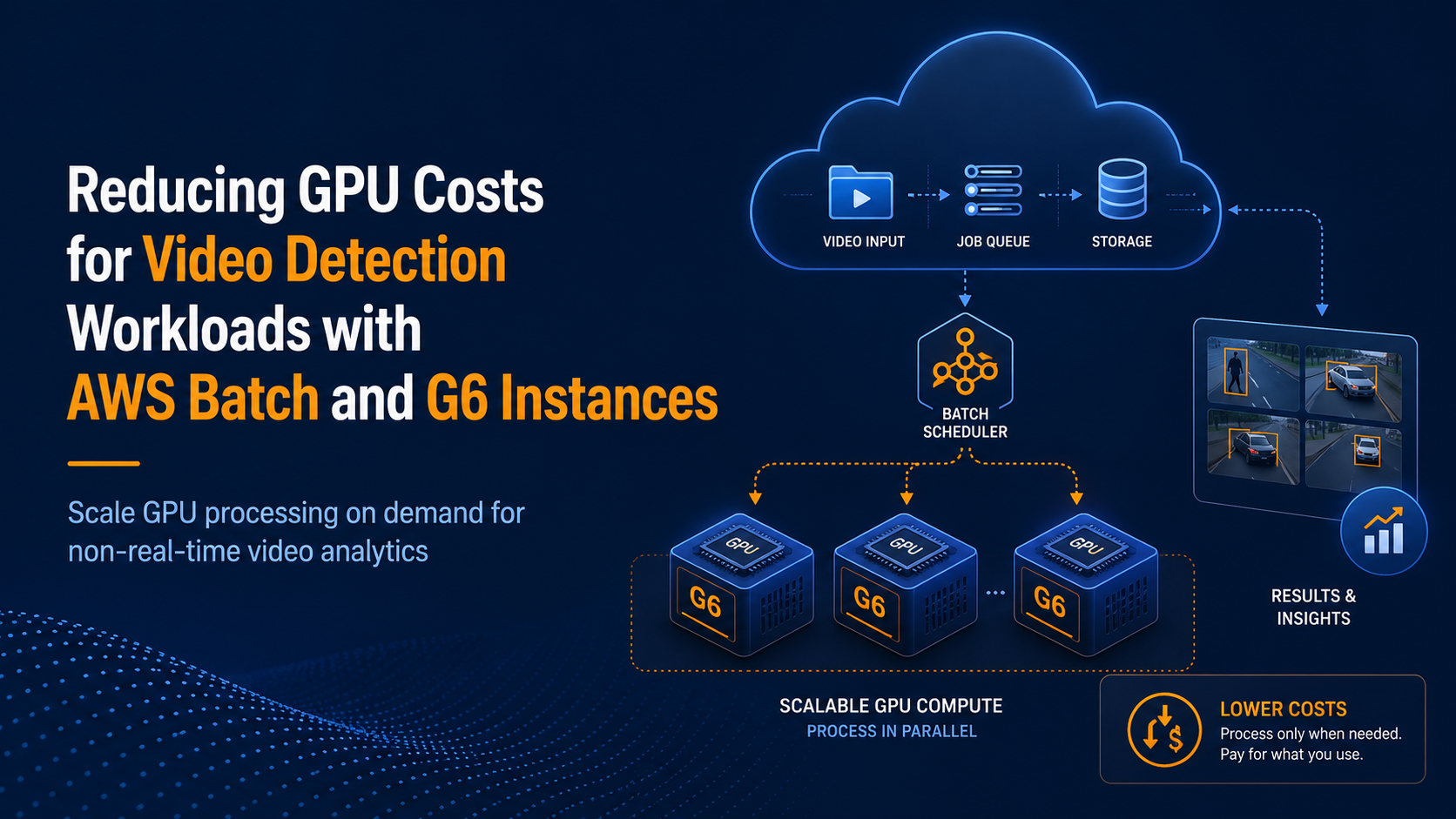
Running GPU-heavy video analytics?

FAMRO helps teams reduce idle GPU spend by moving non-real-time detection and inference workloads from always-on G6 instances to AWS Batch, S3, SQS, and scale-to-zero processing.

Book a Free AWS Cost & Capacity Review

This guide is for you if:

  • Your hosting costs are rising but performance is not improving.
  • Your application faces traffic spikes, slow response times, or 5xx errors.
  • Your backups, disaster recovery, or failover processes are manual or untested.
  • Your engineers spend too much time maintaining infrastructure instead of shipping features.
  • You are preparing for larger customers, security reviews, or compliance expectations.

The Problem with Always-On GPU Inference

GPU infrastructure is expensive for a simple reason: it is specialized compute. For video analytics, that cost may be justified when GPUs are actively processing frames, running detection models, or performing inference.

The problem is not the use of GPU.

The problem is paying for GPU capacity when it is doing nothing.

Amazon EC2 G6 instances are powered by NVIDIA L4 Tensor Core GPUs and are designed for graphics-intensive and machine learning workloads, including inference use cases. That makes them a strong technical fit for video detection and inference pipelines.

But if G6 instances are deployed as always-on workers, the cost continues even when:

→ No video has been uploaded.

→ No SQS messages are waiting.

→ No analyst is requesting results.

→ No inference job is running.

→ The GPU is idle.

For workloads that arrive in bursts, this can make the effective cost per processed video much higher than expected.

Current Architecture

A common existing architecture for this type of workload already uses event-driven design:

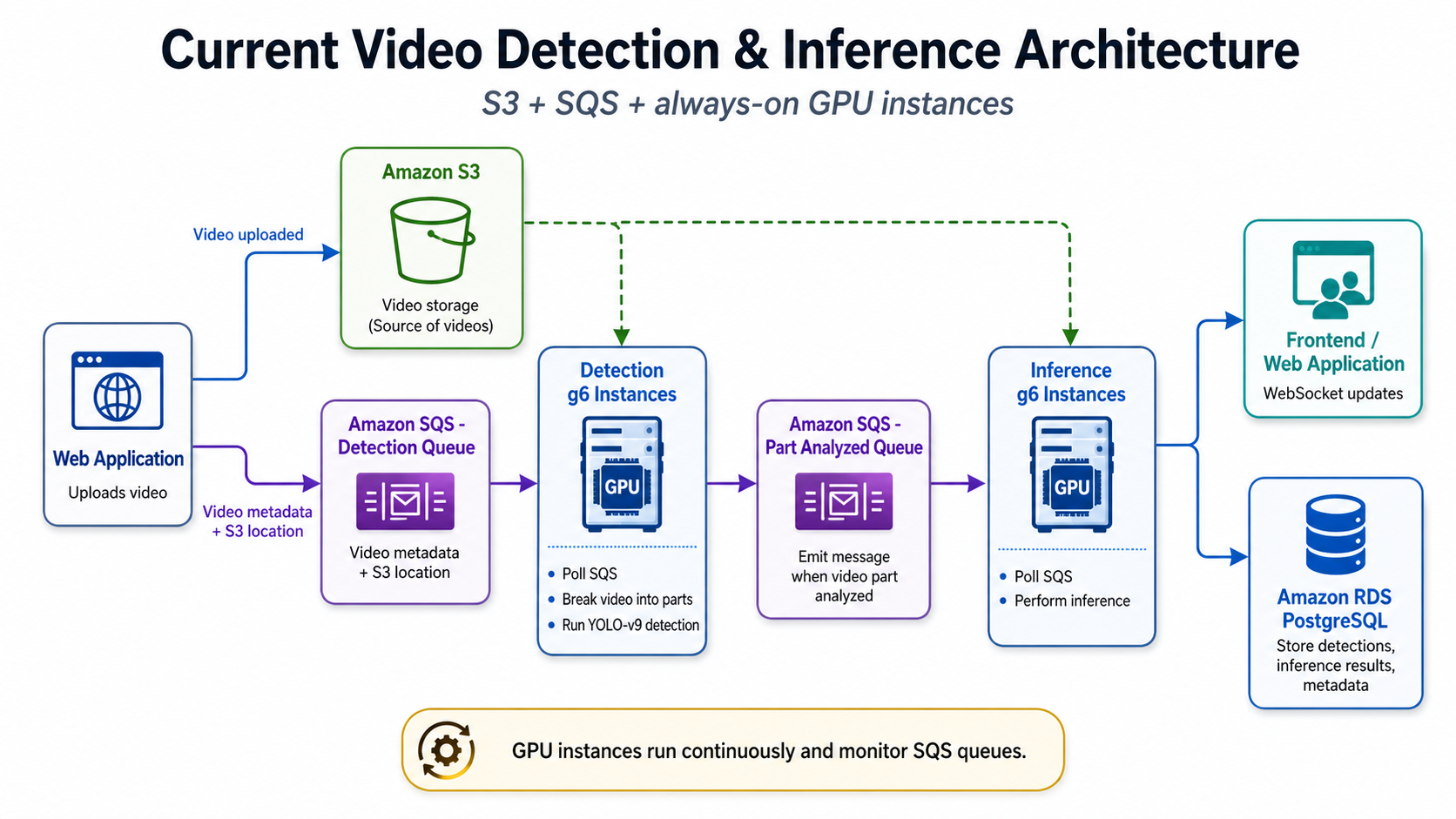
Current AWS Architecture using g6 instances

This architecture has several good design choices already.

Amazon S3 provides durable storage for uploaded source videos and can also store extracted frames, thumbnails, processed clips, temporary artifacts, and model outputs.

Amazon SQS decouples video upload from GPU processing. The web application does not need to wait for the detection or inference process to complete before responding to the user.

The detection workers continuously poll SQS, split videos into smaller parts, and run YOLO-v9 or similar GPU-accelerated detection models.

The inference workers consume downstream messages and perform additional classification, enrichment, aggregation, or result interpretation.

WebSockets provide user-facing progress updates as video parts are processed.

Amazon RDS PostgreSQL stores case metadata, timestamps, detection results, inference outputs, processing status, and audit-related records.

Technically, this architecture works.

Financially, it may cost more than necessary.

Why This Works Technically but Costs More Than Necessary

The key issue is that the GPU layer is permanently active.

If detection and inference each run on dedicated G6 instances, the organization may be paying for multiple GPU-backed compute layers even when only one stage has work—or when neither stage has work.

This creates four common cost problems.

First, GPU cost continues during idle periods. If the instances run 24 hours a day, the bill reflects 24 hours of GPU capacity, regardless of whether video was processed for 20 hours, 4 hours, or 30 minutes.

Second, utilization may be uneven. Law Enforcement video workloads often arrive in bursts: several videos after an incident, long quiet periods overnight, heavy processing during active investigations, and little or no processing during routine periods.

Third, separate detection and inference fleets multiply idle cost. If both stages require their own always-on workers, the architecture pays for two GPU layers even when one queue is empty.

Fourth, capacity planning becomes harder. Over-provisioning keeps queues short but increases waste. Under-provisioning saves money but creates backlogs. Neither outcome is ideal.

The Key Question: Do We Really Need Real-Time Inference?

Real-time inference changes the architecture discussion.

If the use case involves live CCTV monitoring, immediate vehicle detection, real-time suspect tracking, live drone feeds, or instant alerting, then always-warm GPU capacity may be justified. In that scenario, latency is the product requirement.

But many Law Enforcement video review workflows are different.

The system may need to process videos faster than manual review, but not necessarily in real time. A video uploaded as evidence may need results within minutes or hours, depending on case priority. A backlog of archived footage may be processed overnight. A standard investigation may tolerate queued processing as long as the workflow is reliable, traceable, and operationally predictable.

That opens the door to a batch-processing model.

Instead of keeping GPU instances online continuously, the system can submit GPU jobs only when video work exists.

Updated Architecture Using AWS Batch

AWS Batch is a strong fit for asynchronous video processing because it is designed to run containerized jobs and manage compute capacity based on job demand. AWS Batch supports GPU-based jobs on NVIDIA GPU instance types, and GPU requirements can be defined as part of the job definition.

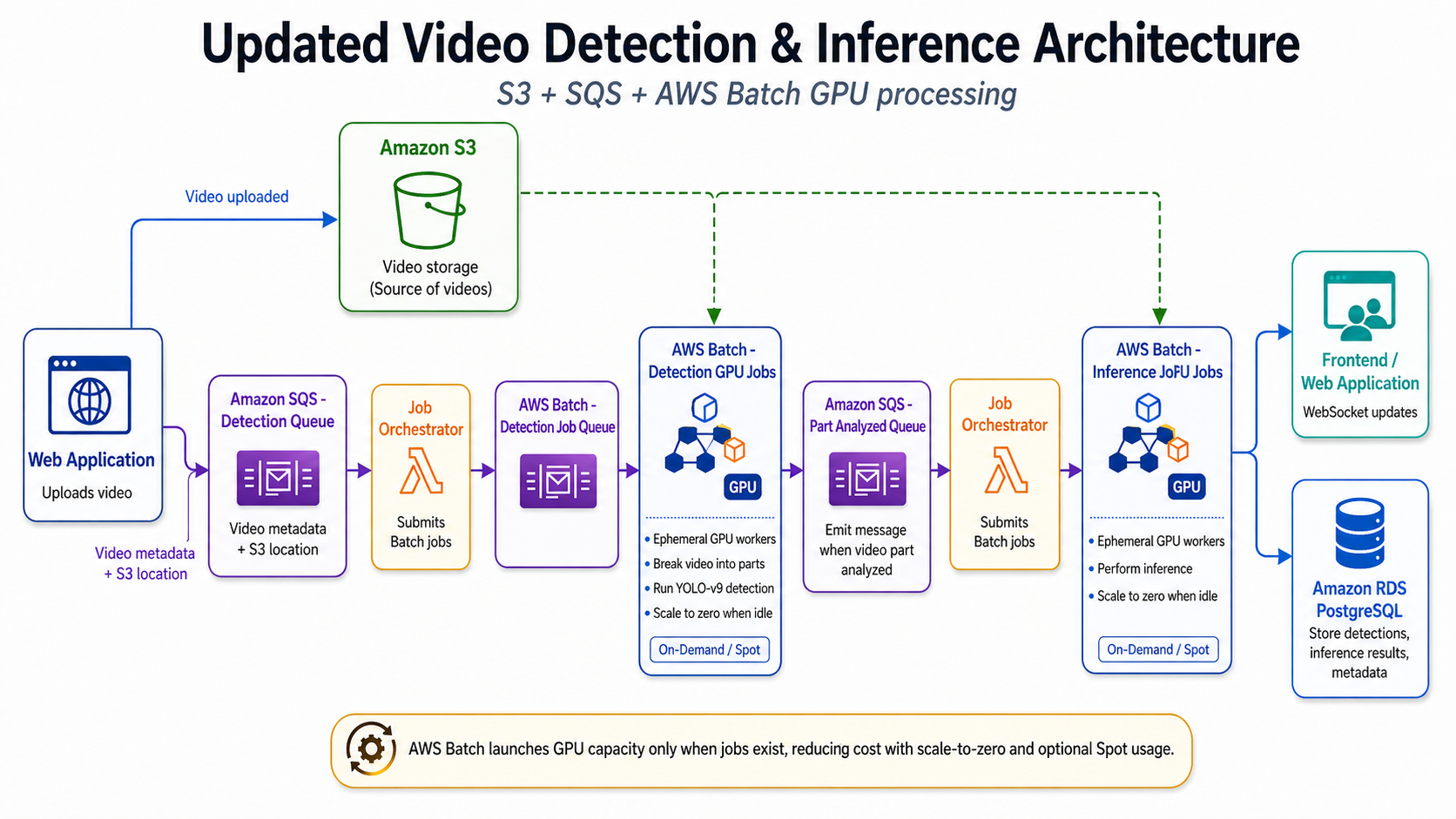
Updated AWS Architecture using AWS Batch

The important point is that the surrounding architecture does not need to be thrown away.

S3 remains the source of truth for uploaded video files and processing artifacts.

SQS remains the decoupling layer between upload, detection, inference, and status updates.

RDS remains the system of record for job status, results, case references, and metadata.

WebSockets can continue to provide frontend updates.

The main architectural change is the GPU execution model. Instead of long-running G6 workers polling queues continuously, a lightweight orchestrator submits AWS Batch jobs when there is work to process.

That orchestrator can be implemented using AWS Lambda, a small ECS service, an existing backend worker, or AWS Step Functions. Its responsibilities are straightforward: read the SQS message, validate the payload, submit the appropriate AWS Batch job, track the job ID, and update processing status.

How AWS Batch Reduces Cost

AWS Batch itself does not add an additional service charge. AWS states that there is no additional charge for AWS Batch; customers pay for the AWS resources used to run jobs, such as EC2 instances.

That means the cost-saving opportunity comes from changing how GPU resources are consumed.

In the current model:

GPU cost = G6 instances running 24/7

In the AWS Batch model:

GPU cost = GPU instance runtime while jobs are being processed

This is the central cost optimization.

Scale to Zero

When there are no video jobs, the AWS Batch compute environment can scale down instead of keeping GPU workers alive.

For non-real-time video review, this is often where the largest savings come from. The architecture stops treating GPU capacity as a fixed always-on layer and starts treating it as job-based processing capacity.

Better Alignment with Workload Demand

GPU instances run when there is detection or inference work. If 30 videos arrive after an incident, AWS Batch can scale up capacity to process the backlog. When processing completes, the compute capacity can scale down.

This is better aligned with investigation-based and evidence-processing workloads, where demand is often uneven.

Spot Instances for Flexible Workloads

Because non-real-time workloads can often tolerate retries, EC2 Spot Instances may be suitable for standard-priority or bulk processing queues. AWS Spot Instances can provide discounts of up to 90% compared with On-Demand pricing, although they can be interrupted.

A practical operating model could be:

→ Urgent cases → On-Demand AWS Batch queue

→ Standard cases → Spot AWS Batch queue

→ Bulk backlogs → Spot AWS Batch queue

→ Sensitive deadlines → On-Demand AWS Batch queue

→ Testing workloads → Spot or low-priority queue

This gives infrastructure teams more control. Not every video requires the same cost profile, urgency, or interruption tolerance.

Priority-Based Job Queues

AWS Batch job queues can be designed around operational priorities.

A critical case queue can use On-Demand G6 capacity and higher scheduling priority. A standard investigation queue can use a mix of On-Demand and Spot. A bulk archive processing queue can favor Spot capacity and run when compute is available.

This is more flexible than a fixed fleet of always-on GPU instances.

Smaller Video Chunks for Better Retry Behavior

Instead of processing a full video as one large GPU job, the system can split videos into smaller chunks such as 5-minute, 10-minute, or 15-minute segments.

This improves resilience. If one chunk fails or is interrupted, only that chunk needs to be retried—not the entire video.

It also improves throughput and parallelism. Multiple chunks can be processed concurrently, and results can be streamed back progressively to the frontend.

Example Cost Comparison Concept

Exact savings depend on AWS Region, instance size, processing duration, Spot availability, video volume, model performance, and concurrency requirements. A responsible cost estimate should always use actual usage data.

However, the concept is simple.

In an always-on model, two GPU instances may run continuously:

Detection G6 instance: running 24/7

Inference G6 instance: running 24/7

Cost continues even when both queues are empty.

In a Batch model:

No video jobs → no GPU workers

Processing spike → AWS Batch launches GPU workers

Backlog cleared → GPU workers terminate

If GPU workers are actively processing video for only 4 hours per day but currently run for 24 hours per day, a large portion of the spend is idle capacity.

AWS Batch does not make GPU processing free. It helps align GPU spend with actual processing demand.

What Changes in the System?

The system does not need to change everything. The biggest changes happen in the worker layer.

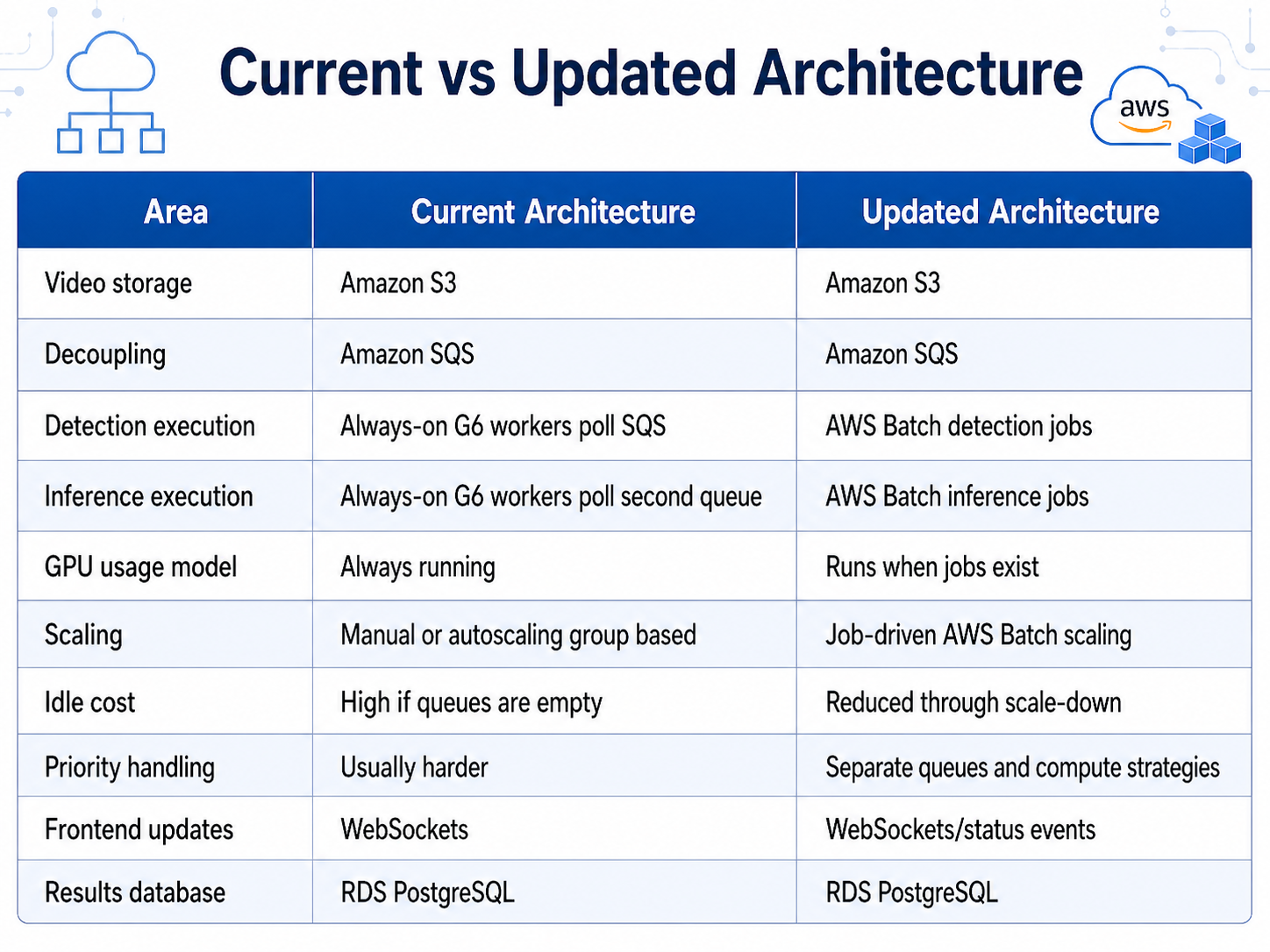
Current vs New architecture (G6 instances vs AWS Batch)

The application workflow remains familiar to users. Uploads still go to S3. Processing status is still tracked. Results still end up in PostgreSQL. The frontend can still receive progress updates.

The infrastructure becomes more cost-aware.

Security Considerations for LEA Video Workloads

For Law Enforcement video processing, cost optimization cannot come at the expense of security, evidence integrity, or auditability.

A production-ready AWS Batch architecture should include:

→ Private subnets for Batch GPU workers.

→ No public IP addresses on processing instances.

→ S3 encryption with AWS KMS.

→ RDS encryption at rest.

→ IAM least privilege for job roles and instance roles.

→ VPC endpoints for S3, SQS, ECR, CloudWatch, and related AWS services where appropriate.

→ CloudWatch Logs for job-level traceability.

→ Per-case audit trails for access, processing, and result changes.

→ Strict object retention and lifecycle policies.

→ Controlled access to generated clips, thumbnails, and artifacts.

→ Separate buckets or prefixes for raw evidence, temporary files, and processed outputs.

→ Signed URLs or authenticated access patterns for sensitive outputs.

→ Clear failure and retry records for chain-of-custody visibility.

This is especially important when video evidence may be connected to investigations, prosecutions, internal reviews, or public safety operations.

Migration Roadmap

A practical migration to AWS Batch does not require a big-bang rewrite. It can be delivered in phases.

Phase 1: Containerize the Current GPU Workers

Package the existing detection and inference workers into Docker containers.

Each container should support:

→ S3 input and output.

→ Environment-based configuration.

→ Model and dependency loading.

→ Job-specific parameters.

→ Structured logging.

→ Status reporting.

→ Clean failure handling.

This step makes the existing workload portable and prepares it for AWS Batch execution.

Phase 2: Create AWS Batch GPU Compute Environments

Create managed EC2 compute environments suitable for GPU jobs.

Configuration should include:

→ G6-compatible instance types.

→ Minimum vCPU set to zero.

→ Desired vCPU set to zero.

→ Maximum vCPU based on expected concurrency.

→ On-Demand and/or Spot capacity.

→ Appropriate subnets and security groups.

→ Launch templates where custom AMI, driver, or networking configuration is required.

Phase 3: Create AWS Batch Job Definitions

AWS Batch job definitions can define resources such as GPU, vCPU, and memory. The AWS Batch API supports GPU, VCPU, and MEMORY as resource requirement types.

A simplified job definition concept may include:

{ "resourceRequirements": [ { "type": "GPU", "value": "1" }, { "type": "VCPU", "value": "4" }, { "type": "MEMORY", "value": "16000" } ] }

Separate job definitions can be created for detection, inference, testing, and bulk processing.

Phase 4: Add the Job Orchestrator

The orchestrator reads SQS messages and submits AWS Batch jobs.

Its responsibilities include:

→ Validating video metadata.

→ Checking case and user permissions if required.

→ Submitting detection jobs.

→ Submitting inference jobs after detection output is ready.

→ Updating RDS with job IDs and statuses.

→ Handling retries and failure states.

→ Publishing status updates for the frontend.

Phase 5: Update the Job Status Flow

The status model should clearly represent each stage of processing.

Example statuses:

↠ UPLOADED

↠ QUEUED_FOR_DETECTION

↠ DETECTION_RUNNING

↠ DETECTION_COMPLETED

↠ QUEUED_FOR_INFERENCE

↠ INFERENCE_RUNNING

↠ COMPLETED

↠ FAILED

↠ RETRYING

This helps analysts understand where each video is in the pipeline and gives operations teams better visibility into failures or delays.

Phase 6: Add Monitoring and Cost Tracking

Once the workload is running through AWS Batch, track both operational and financial metrics.

Useful metrics include:

→ GPU job duration.

→ Average processing time per video.

→ Queue wait time.

→ Cost per processed video.

→ Failure rate.

→ Retry count.

→ Spot interruption rate.

→ GPU utilization.

→ Average chunk processing time.

→ Detection-to-inference delay.

→ Processing cost by case type or priority.

This turns GPU cost from a fixed monthly infrastructure expense into a measurable unit economics model.

Conclusion

For video analytics workloads, the biggest cloud cost issue is often not the ML model itself. It is the way GPU infrastructure is kept running around the clock.

If a system truly needs real-time detection, always-warm GPU capacity may be justified. But for many Law Enforcement video review workflows, processing can happen asynchronously. The operational goal is to reduce manual review time, improve consistency, and return reliable results within an acceptable window—not necessarily to process every frame in real time.

In that scenario, AWS Batch becomes a strong architectural fit.

By moving detection and inference from always-on G6 instances to AWS Batch GPU jobs, organizations can keep the existing S3 and SQS workflow while changing the GPU cost model. GPU workers can launch when video jobs exist, process detection and inference workloads, store results in RDS, update the frontend, and scale down when idle.

The result is a more cost-efficient, scalable, and operationally cleaner architecture for non-real-time video detection workloads.

FAMRO helps engineering and infrastructure teams modernize GPU-heavy video processing pipelines on AWS. We design and implement cost-aware architectures using Amazon S3, Amazon SQS, AWS Batch, GPU containers, Amazon RDS, secure networking, IAM, monitoring, and production-ready deployment patterns for sensitive video analytics environments.

To help your organization get started, we offer a free initial consultation focused on reducing GPU costs for video detection and inference workloads—no obligation, no generic pitch.

If your team is investing in GPU-based video analytics and wants a more efficient AWS architecture, now is the right time to review the cost model.

🌐 Learn more: Visit Our Homepage

💬 WhatsApp: +971-505-208-240

Our solutions for your business growth

Our services enable clients to grow their business by providing customized technical solutions that improve infrastructure, streamline software development, and enhance project management.

Our technical consultancy and project management services ensure successful project outcomes by reviewing project requirements, gathering business requirements, designing solutions, and managing project plans with resource augmentation for business analyst and project management roles.

Read More
2
Infrastructure / DevOps
3
Project Management
4
Technical Consulting