3. Introduction to REST API Development Using Rust
Rust is a strong fit for API services because it combines performance, memory safety, and predictable concurrency. For backend teams, that means fewer runtime surprises and efficient services that can scale without excessive resource usage.
A typical Rust REST API contains:
+ routing to map URLs to handlers,
+ request handling to validate inputs,
+ serialization to convert Rust structs to and from JSON,
+ HTTP client logic to call external APIs,
+ configuration management using environment variables
+ error handling for upstream failures and malformed requests.
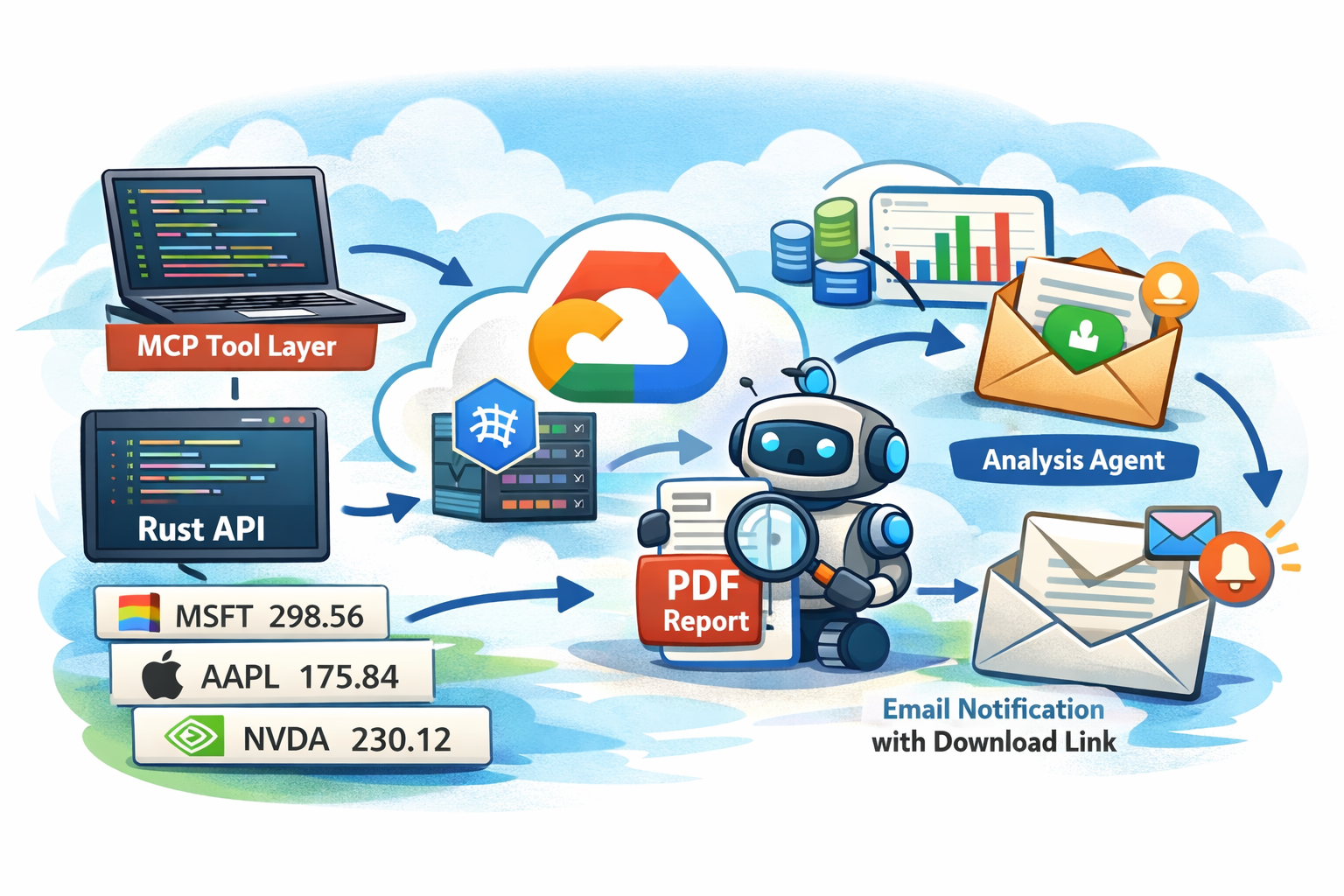
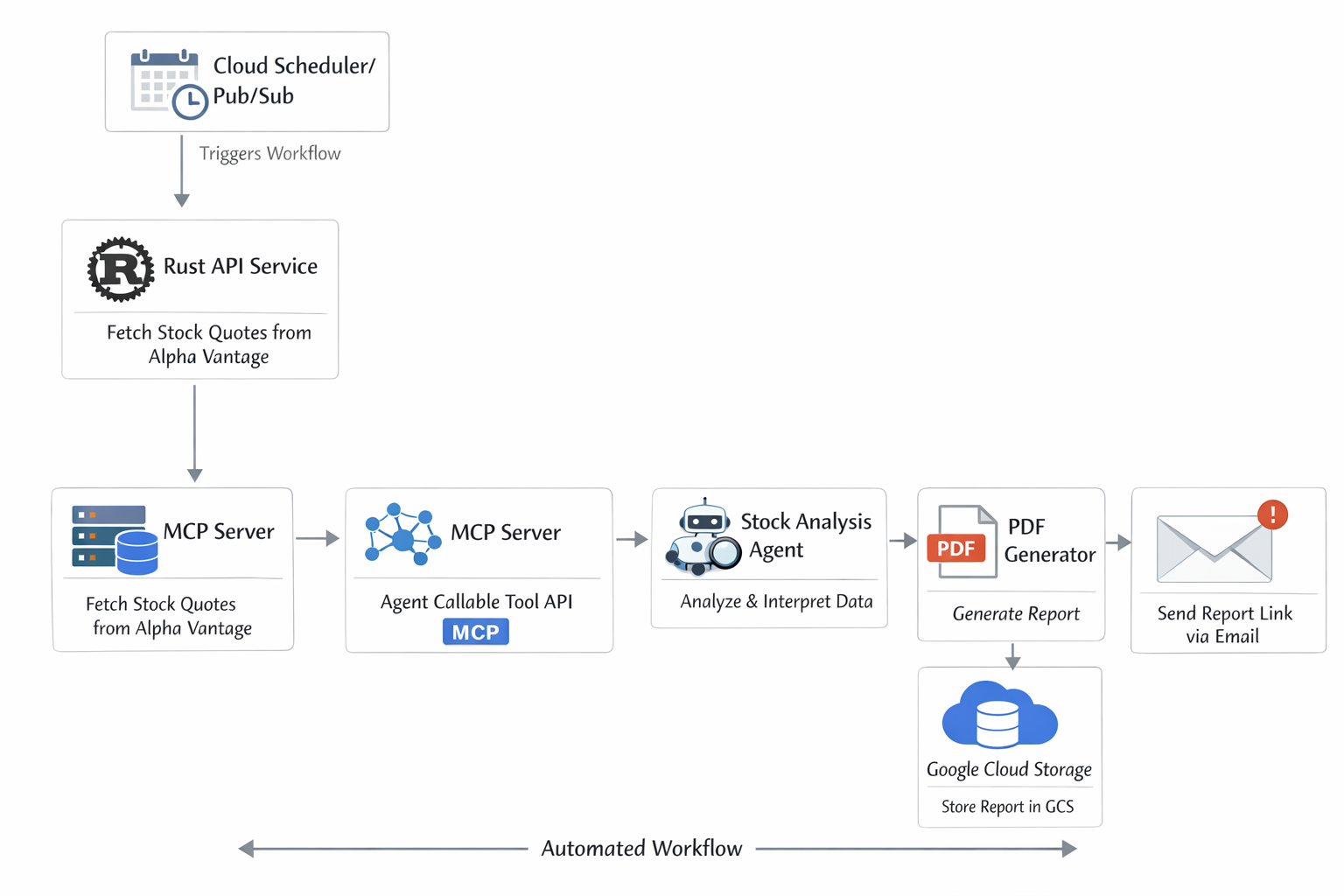
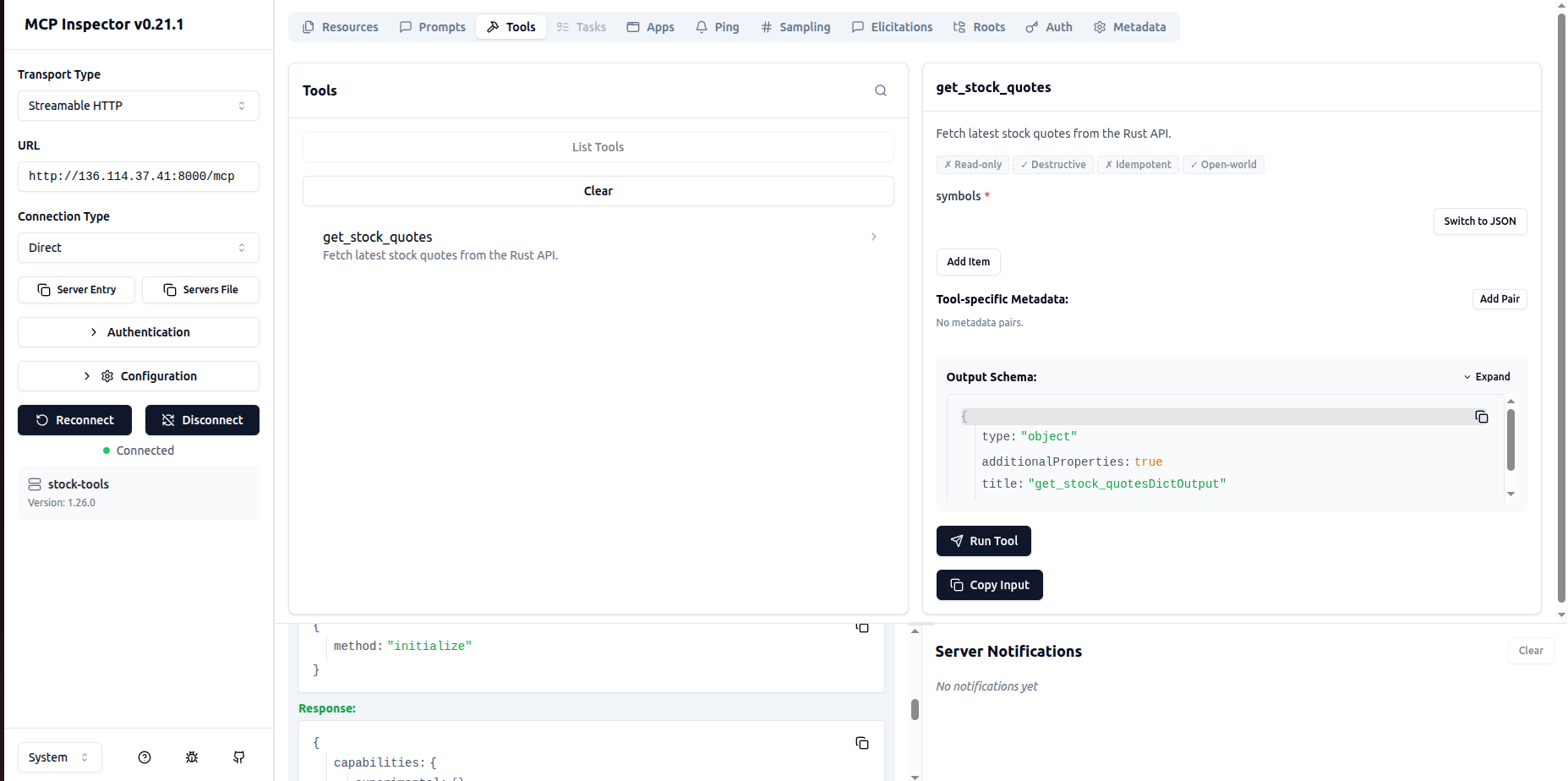
In our example, the Rust API will do one thing well: fetch current stock quotes from Alpha Vantage and expose them through JSON endpoints that an MCP agent can consume cleanly.
Project Structure:
Review the following screenshot to understand the RUST based REST API's project structure
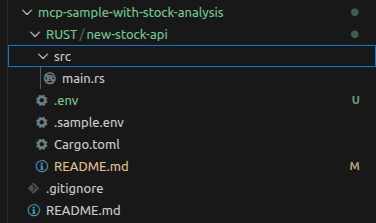
Key files include:
1. Cargo.toml
Cargo.toml defines a Rust project’s metadata and dependencies, telling Cargo how to build, manage, and run the application. Key components include:
+ package: Project metadata section containing package identity and compiler settings.
[package]
name = "stock-api"
version = "0.1.0"
edition = "2021"
+ name="stock-api": Sets the project and crate name used by Cargo during build and package management.
+ version = "0.1.0": Defines the current package version, useful for releases and dependency tracking.
+ edition = "2021": Specifies the Rust language edition, enabling syntax and compiler behavior for 2021 features.
dependencies: same promotion mechanism every time, regardless of team
[dependencies]
axum = "0.8"
tokio = { version = "1", features = ["full"] }
reqwest = { version = "0.12", features = ["json", "rustls-tls"] }
serde = { version = "1", features = ["derive"] }
serde_json = "1"
dotenvy = "0.15"
tower-http = { version = "0.6", features = ["cors", "trace"] }
tracing = "0.1"
tracing-subscriber = { version = "0.3", features = ["env-filter"] }
+ axum = "0.8"
Web framework for building HTTP APIs, routing requests, and returning structured responses.
+ tokio = { version = "1", features = ["full"] }
Async runtime powering concurrent tasks, networking, timers, and background operations.
+ reqwest = { version = "0.12", features = ["json", "rustls-tls"] }
LHTTP client for calling external APIs with JSON support and TLS encryption.
+ serde = { version = "1", features = ["derive"] }
Serialization library for converting Rust structs to and from JSON and other formats.
+ serde_json = "1"
Adds JSON-specific support on top of Serde for encoding and decoding JSON data.
+ dotenvy = "0.15"
Loads environment variables from a .env file for local development configuration.
+ tower-http = { version = "0.6", features = ["cors", "trace"] }
HTTP middleware utilities for CORS handling and request tracing in web applications.
+ tracing = "0.1"
Structured logging framework for recording application events, diagnostics, and runtime behavior.
+ tracing-subscriber = { version = "0.3", features = ["env-filter"] }
Configures how tracing logs are collected, filtered, and displayed based on environment settings.
2. .env
Environment variables file for storing your credentials:
ALPHAVANTAGE_API_KEY=your_real_key_here
BIND_ADDRESS=0.0.0.0:8080
3. README.md
This file contains the instructions for how to setup your environment for running code RUST based REST API. Once you have cloned the repository (https://github.com/ronin1770/mcp-sample-with-stock-analysis), you can review it. It is located under repo_root/RUST/new-stock-api/README.md>
ALPHAVANTAGE_API_KEY=your_real_key_here
BIND_ADDRESS=0.0.0.0:8080
4. Main Code file (main.rs): This is the main code file for creating REST API. It is located at repo_root/RUST/new-stock-api/src/main.rs
use axum::{
    extract::{Query, State},
    http::StatusCode,
    response::{IntoResponse, Response},
    routing::get,
    Json, Router,
};
use reqwest::Client;
use serde::{Deserialize, Serialize};
use std::{collections::HashMap, env, io, net::SocketAddr, sync::Arc};
use tokio::net::TcpListener;
use tower_http::{cors::CorsLayer, trace::TraceLayer};
use tracing::info;
use tracing_subscriber::EnvFilter;

#[derive(Clone)]
struct AppState {
    http_client: Client,
    alpha_key: String,
}

#[derive(Debug, Deserialize)]
struct QuotesQuery {
    symbols: String,
}

#[derive(Debug, Serialize)]
struct QuotesResponse {
    requested_symbols: Vec,
    quotes: Vec,
}

#[derive(Debug, Serialize)]
struct QuoteDto {
    symbol: String,
    price: f64,
    previous_close: f64,
    change: f64,
    change_percent: String,
    latest_trading_day: String,
}

#[derive(Debug, Deserialize)]
struct AlphaQuoteResponse {
    #[serde(rename = "Global Quote")]
    global_quote: Option,
    #[serde(rename = "Note")]
    note: Option,
    #[serde(rename = "Error Message")]
    error_message: Option,
}

#[derive(Debug, Deserialize)]
struct AlphaGlobalQuote {
    #[serde(rename = "01. symbol")]
    symbol: Option,
    #[serde(rename = "05. price")]
    price: Option,
    #[serde(rename = "08. previous close")]
    previous_close: Option,
    #[serde(rename = "09. change")]
    change: Option,
    #[serde(rename = "10. change percent")]
    change_percent: Option,
    #[serde(rename = "07. latest trading day")]
    latest_trading_day: Option,
}

#[derive(Debug)]
struct ApiError {
    status: StatusCode,
    message: String,
}

#[derive(Serialize)]
struct ErrorBody {
    error: String,
}

impl IntoResponse for ApiError {
    fn into_response(self) -> Response {
        (self.status, Json(ErrorBody { error: self.message })).into_response()
    }
}

#[derive(Serialize)]
struct HealthResponse {
    status: &'static str,
}

#[tokio::main]
async fn main() -> Result<(), Box> {
    dotenvy::dotenv().ok();

    let env_filter =
        EnvFilter::try_from_default_env().unwrap_or_else(|_| EnvFilter::new("info,tower_http=info"));
    tracing_subscriber::fmt().with_env_filter(env_filter).init();

    let alpha_key = env::var("ALPHAVANTAGE_API_KEY").map_err(|_| {
        io::Error::new(
            io::ErrorKind::InvalidInput,
            "Missing ALPHAVANTAGE_API_KEY in environment",
        )
    })?;

    let bind_address = env::var("BIND_ADDRESS").unwrap_or_else(|_| "0.0.0.0:8080".to_string());
    let addr: SocketAddr = bind_address.parse().map_err(|e| {
        io::Error::new(
            io::ErrorKind::InvalidInput,
            format!("Invalid BIND_ADDRESS '{}': {}", bind_address, e),
        )
    })?;

    let state = Arc::new(AppState {
        http_client: Client::new(),
        alpha_key,
    });

    let app = Router::new()
        .route("/health", get(health))
        .route("/quotes", get(get_quotes))
        .with_state(state)
        .layer(CorsLayer::permissive())
        .layer(TraceLayer::new_for_http());

    let listener = TcpListener::bind(addr).await?;
    info!("stock-api listening on {}", addr);
    axum::serve(listener, app).await?;
    Ok(())
}

async fn health() -> Json {
    Json(HealthResponse { status: "ok" })
}

async fn get_quotes(
    State(state): State>,
    Query(params): Query,
) -> Result, ApiError> {
    let symbols: Vec = params
        .symbols
        .split(',')
        .map(|s| s.trim().to_uppercase())
        .filter(|s| !s.is_empty())
        .collect();

    if symbols.is_empty() {
        return Err(ApiError {
            status: StatusCode::BAD_REQUEST,
            message: "Provide at least one symbol, e.g. ?symbols=MSFT,AAPL,NVDA".to_string(),
        });
    }

    let mut quotes = Vec::with_capacity(symbols.len());
    for symbol in &symbols {
        let quote = fetch_quote(&state.http_client, &state.alpha_key, symbol).await?;
        quotes.push(quote);
    }

    Ok(Json(QuotesResponse {
        requested_symbols: symbols,
        quotes,
    }))
}

async fn fetch_quote(client: &Client, api_key: &str, symbol: &str) -> Result {
    let mut query = HashMap::new();
    query.insert("function", "GLOBAL_QUOTE");
    query.insert("symbol", symbol);
    query.insert("apikey", api_key);

    let response = client
        .get("https://www.alphavantage.co/query")
        .query(&query)
        .send()
        .await
        .map_err(|e| ApiError {
            status: StatusCode::BAD_GATEWAY,
            message: format!("Failed to call Alpha Vantage: {}", e),
        })?;

    if !response.status().is_success() {
        return Err(ApiError {
            status: StatusCode::BAD_GATEWAY,
            message: format!("Alpha Vantage returned status {}", response.status()),
        });
    }

    let parsed: AlphaQuoteResponse = response.json().await.map_err(|e| ApiError {
        status: StatusCode::BAD_GATEWAY,
        message: format!("Invalid Alpha Vantage JSON response: {}", e),
    })?;

    if let Some(msg) = parsed.error_message.or(parsed.note) {
        return Err(ApiError {
            status: StatusCode::BAD_GATEWAY,
            message: format!("Alpha Vantage error for {}: {}", symbol, msg),
        });
    }

    let q = parsed.global_quote.ok_or_else(|| ApiError {
        status: StatusCode::BAD_GATEWAY,
        message: format!("No quote returned for {}", symbol),
    })?;

    let response_symbol = required_text(q.symbol, "01. symbol", symbol)?;
    let price = parse_f64(q.price, "05. price", symbol)?;
    let previous_close = parse_f64(q.previous_close, "08. previous close", symbol)?;
    let change = parse_f64(q.change, "09. change", symbol)?;
    let change_percent = required_text(q.change_percent, "10. change percent", symbol)?;
    let latest_trading_day = required_text(q.latest_trading_day, "07. latest trading day", symbol)?;

    Ok(QuoteDto {
        symbol: response_symbol,
        price,
        previous_close,
        change,
        change_percent,
        latest_trading_day,
    })
}

fn required_text(value: Option, field: &str, symbol: &str) -> Result {
    value
        .map(|s| s.trim().to_string())
        .filter(|s| !s.is_empty())
        .ok_or_else(|| ApiError {
            status: StatusCode::BAD_GATEWAY,
            message: format!("Missing {} for {}", field, symbol),
        })
}

fn parse_f64(value: Option, field: &str, symbol: &str) -> Result {
    let raw = required_text(value, field, symbol)?;
    raw.parse::().map_err(|_| ApiError {
        status: StatusCode::BAD_GATEWAY,
        message: format!("Could not parse {}='{}' for {}", field, raw, symbol),
    })
}
Key components of this file include:
Imports: Libaries / modules imported by main.rs.
use axum::{
    extract::{Query, State},
    http::StatusCode,
    response::{IntoResponse, Response},
    routing::get,
    Json, Router,
};
use reqwest::Client;
use serde::{Deserialize, Serialize};
use std::{collections::HashMap, env, io, net::SocketAddr, sync::Arc};
use tokio::net::TcpListener;
use tower_http::{cors::CorsLayer, trace::TraceLayer};
use tracing::info;
use tracing_subscriber::EnvFilter;
+ axum
Provides web server features like routing, request extraction, responses, JSON handling, and application state management.
+ reqwest::Client
HTTP client used to call the Alpha Vantage external API asynchronously.
+ axum
Provides web server features like routing, request extraction, responses, JSON handling, and application state management.
+ serde::{Deserialize, Serialize}
Enables conversion between Rust structs and JSON request or response data.
+ std::{collections::HashMap, env, io, net::SocketAddr, sync::Arc}
Provides maps, environment access, error handling, socket binding, and thread-safe shared state.
+ tokio::net::TcpListener
Creates the async TCP listener that binds the server to a network address.
+ axum
Provides web server features like routing, request extraction, responses, JSON handling, and application state management.
+ tower_http::{cors::CorsLayer, trace::TraceLayer}
Adds middleware for CORS support and HTTP request tracing.
+ tracing::info
Logs informational runtime messages, such as server startup details.
+ tracing_subscriber::EnvFilter
Configures log filtering based on environment variables or fallback settings.
Key Methods
+ main()
Initializes environment, logging, configuration, shared state, routes, and starts the Axum HTTP server.
+ health()
Returns a simple JSON health check response showing the service is running.
+ get_quotes()
Reads stock symbols from query parameters, validates them, fetches quotes, and returns structured JSON results.
+ fetch_quote()
Calls Alpha Vantage API, validates response, parses fields, and converts them into internal quote data.
+ required_text()
Ensures a required string field exists and is not empty.
+ required_text()
ializes environment, logging, configuration, shared state, routes, and starts the Axum HTTP server.
+ parse_f64()
Validates a text field and parses it into a floating-point number.
+ into_response()
Converts custom API errors into HTTP responses with status code and JSON error body.
Main execution block or method
ializes environment, logging, configuration, shared state, routes, and starts the Axum HTTP server.
+ #[tokio::main] async fn main()
Program entry point using Tokio runtime for async execution.
Build and Run the Code
You can build the code for RUST using the following command:
cargo run

Next, we can test it using the following code (on the same development server)
curl "http://127.0.0.1:8080/health"
Output is:
{"status":"ok"}
Let's try to get quote for MSFT:
curl "http://127.0.0.1:8080/quotes?symbols=MSFT"
Output is:
{"requested_symbols":["MSFT"],"quotes":[{"symbol":"MSFT","price":395.55,"previous_close":401.86,"change":-6.31,"change_percent":"-1.5702%","latest_trading_day":"2026-03-13"}]}