Key Takeaways

Infrastructure automation is no longer a luxury for cloud teams. For software engineers, team leaders, and architects working in SMEs, scaleups, and startups, the ability to create reliable environments quickly can directly affect release speed, security posture, operational cost, and developer productivity.

Key Takeaways

Infrastructure automation is no longer a luxury for cloud teams. For software engineers, team leaders, and architects working in SMEs, scaleups, and startups, the ability to create reliable environments quickly can directly affect release speed, security posture, operational cost, and developer productivity.

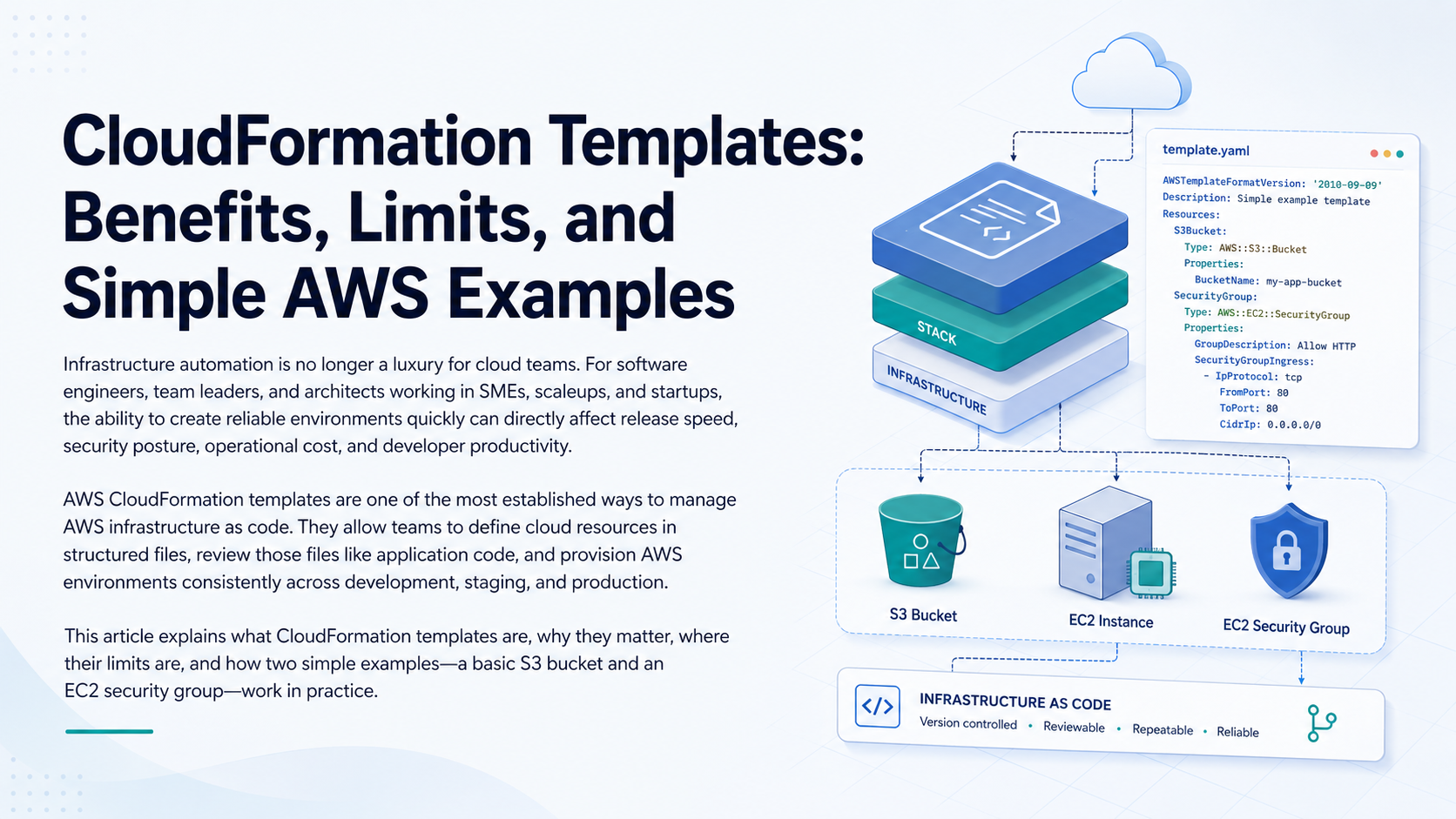
AWS CloudFormation templates are one of the most established ways to manage AWS infrastructure as code. They allow teams to define cloud resources in structured files, review those files like application code, and provision AWS environments consistently across development, staging, and production.

This article explains what CloudFormation templates are, why they matter, where their limits are, and how two simple examples—a basic S3 bucket and an EC2 security group—work in practice.

CloudFormation templates help AWS teams define infrastructure in version-controlled code instead of configuring resources manually. They are useful for repeatability, consistency, auditing, onboarding, and controlled infrastructure changes. However, CloudFormation does not replace cloud architecture, security engineering, monitoring, cost governance, or operational discipline.

Build More Reliable AWS Infrastructure with FAMRO

FAMRO helps SMEs, scaleups, and technical leaders design practical AWS Infrastructure as Code workflows, improve CloudFormation templates, and introduce secure deployment standards without unnecessary complexity.

This guide is for you if:

  • You want to replace manual AWS Console changes with reviewed, repeatable infrastructure code.
  • Your development, staging, and production environments are becoming inconsistent.
  • You need a practical starting point for AWS Infrastructure as Code.
  • You are evaluating CloudFormation for S3 buckets, security groups, IAM roles, or network resources.
  • You want stronger change control without slowing down engineering delivery.
  • You need to make AWS infrastructure easier for new engineers to understand and maintain.
  • You want to improve cloud security and operational discipline as your company grows.

1. What Is Infrastructure as Code?

Infrastructure as Code, commonly shortened to IaC, is the practice of defining and managing infrastructure using configuration files rather than manual setup through a console or ad hoc command-line steps.

Instead of clicking through the AWS Management Console to create a VPC, S3 bucket, security group, IAM role, or database, engineers describe those resources in a file. That file can then be committed to source control, reviewed by peers, tested, reused, and deployed through an automated pipeline.

For modern engineering teams, IaC solves a common problem: infrastructure knowledge often lives in people’s heads, old tickets, or undocumented manual steps. That works for a small prototype, but it quickly becomes risky when a company grows.

Infrastructure as Code makes cloud environments:

⇒ Repeatable, because the same template can be deployed again.

⇒ Reviewable, because changes can go through pull requests.

⇒ Auditable, because infrastructure history is stored in version control.

⇒ Automatable, because deployment can be integrated into CI/CD.

⇒ Recoverable, because environments can be recreated from known definitions.

For startups and scaleups, this matters because infrastructure changes often happen quickly. A new product feature may require a queue, a storage bucket, a new database, or a network rule. Without IaC, teams risk creating inconsistent environments, undocumented changes, and production drift.

IaC gives technical teams a foundation for moving quickly without losing control.

2. What Is an AWS CloudFormation Template?

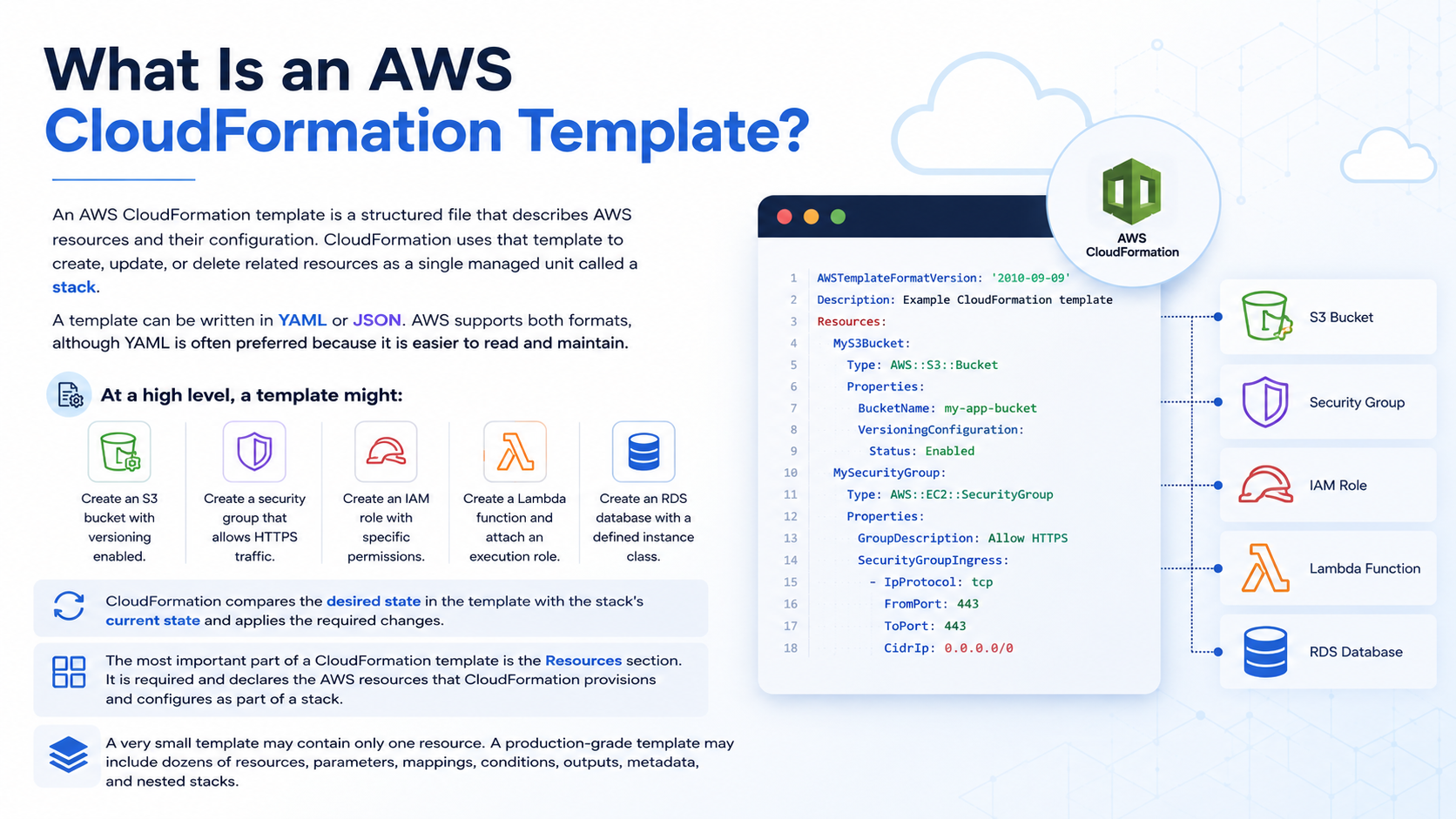
An AWS CloudFormation template is a structured file that describes AWS resources and their configuration. CloudFormation uses that template to create, update, or delete related resources as a single managed unit called a stack. AWS describes CloudFormation as a service that helps teams model and set up AWS resources so they can spend less time managing those resources manually and more time focusing on applications.

What is an AWS Cloudformation template?

Related FAMRO Resources

3. Why CloudFormation Templates Are Useful

CloudFormation templates are useful because they turn infrastructure setup into an engineering workflow.

For SMEs, startups, and scaleups, that is especially valuable. These organizations often need mature cloud practices but may not yet have large platform engineering or DevOps teams. CloudFormation provides a disciplined way to manage AWS infrastructure without introducing unnecessary process overhead.

Repeatable Environments

A common engineering problem is that development, staging, and production environments slowly become different from each other. One environment has a manually added security rule. Another has a different bucket setting. A third has an outdated IAM policy.

CloudFormation reduces this risk by defining infrastructure in reusable templates. The same core template can be deployed across environments, with environment-specific values passed through parameters.

This improves confidence during releases because staging looks more like production.

Consistency Across Teams

As teams grow, different engineers may provision resources in different ways. One developer may create an S3 bucket with encryption. Another may forget. One team may restrict a security group. Another may open a broad CIDR range during testing and never close it.

Templates create a standard pattern. Instead of relying on memory or tribal knowledge, teams use reviewed definitions.

Peer Review Through Source Control

CloudFormation templates can be stored in Git repositories. This means infrastructure changes can follow the same review process as application code.

For example, a pull request that changes an inbound security group rule can be reviewed by a team leader or security-aware engineer before it reaches production. This is far safer than making untracked changes directly in the AWS Console.

Reduced Manual Setup

Manual infrastructure setup is slow and error-prone. It also does not scale well when a team needs to create multiple environments, onboard new customers, recover from failed experiments, or replicate a platform in another AWS account.

CloudFormation templates allow teams to automate provisioning. AWS CloudFormation creates and manages resources together as a stack, which helps teams treat related infrastructure as a single unit.

Easier Onboarding for Growing Teams

When a new engineer joins, they can read the CloudFormation templates to understand how the infrastructure is assembled. This is much better than relying only on diagrams, outdated wiki pages, or senior engineers explaining every detail verbally.

Templates become living documentation. They show what actually exists, not what someone remembers.

Better Operational Discipline Without Heavy Process

Startups and scaleups often resist process because they need speed. That is understandable. But unmanaged infrastructure eventually slows teams down through outages, security incidents, inconsistent environments, and painful deployments.

CloudFormation gives teams a practical middle ground. It introduces structure without forcing a heavyweight enterprise operating model.

4. What CloudFormation Templates Cannot Do

CloudFormation is powerful, but it is not magic. It automates infrastructure provisioning, but it does not replace engineering judgment.

CloudFormation cannot replace application code. It can create a Lambda function, ECS service, S3 bucket, or database, but it does not write the business logic, validate the application design, or guarantee that the system behaves correctly.

CloudFormation also does not replace architecture. A template can deploy a poor architecture just as easily as a good one. If the design has a single point of failure, excessive permissions, weak network segmentation, or no disaster recovery plan, CloudFormation will not automatically fix that.

It also does not replace security design. A template can define IAM policies, encryption settings, security groups, and access controls, but engineers still need to decide what the correct security model should be. Misconfigured infrastructure as code is still misconfigured infrastructure.

As Amazon CTO Werner Vogels famously said, “Everything fails, all the time.” That mindset is important for CloudFormation users: infrastructure automation should support resilient design, not create a false sense of safety.

CloudFormation also does not replace:

⇒ Monitoring and alerting strategy.

⇒ Cost governance.

⇒ Incident response planning.

⇒ Performance testing.

⇒ Backup and recovery design.

⇒ Compliance review.

⇒ Cloud expertise.

It can help implement these practices, but it cannot decide them for you.

For example, CloudFormation can create an Amazon CloudWatch alarm, but the team must decide what metric matters. It can create an S3 bucket, but the team must decide retention, encryption, access policy, lifecycle rules, and data classification.

The best teams treat CloudFormation as part of an engineering system: templates, reviews, automated checks, security standards, deployment pipelines, observability, and regular operational review.

5. Simple Example 1: Creating a Basic S3 Bucket

Here is a small CloudFormation template that creates a basic Amazon S3 bucket.

AWSTemplateFormatVersion: "2010-09-09"
Description: Simple CloudFormation template to create an S3 bucket

Resources:
  ExampleS3Bucket:
    Type: AWS::S3::Bucket
    Properties:
      BucketName: my-example-startup-bucket-12345
      VersioningConfiguration:
        Status: Enabled

The AWS::S3::Bucket resource creates an S3 bucket in the same AWS Region where the CloudFormation stack is created.

In a real environment, the bucket name must be globally unique across Amazon S3. For production use, you would usually avoid hardcoding a fixed bucket name unless you have a naming convention that includes the environment, account ID, application name, or region.

6. Description of Example 1

This example shows the basic structure of a CloudFormation template.

The first line, AWSTemplateFormatVersion, identifies the template format version. This field is optional, but many teams include it for clarity.

The Description field explains what the template does. This is useful when templates are stored in repositories and reviewed by other engineers.

The Resources section is where the actual AWS resource is declared. In this example, there is one resource:

ExampleS3Bucket:

This is the logical ID. It is the name CloudFormation uses inside the template to refer to this resource. It is not necessarily the same as the physical bucket name created in AWS.

The Type value tells CloudFormation what kind of AWS resource to create:

Type: AWS::S3::Bucket

CloudFormation resource types follow a structured naming format. AWS documents resource type identifiers in the form service-provider::service-name::data-type-name.

The Properties section contains configuration for the bucket:

Properties:
  BucketName: my-example-startup-bucket-12345
  VersioningConfiguration:
    Status: Enabled

BucketName sets the physical S3 bucket name. VersioningConfiguration enables object versioning, which can help protect against accidental overwrites or deletions.

This is a simple example, but it demonstrates an important idea: a real AWS resource can be declared in code, reviewed, and recreated consistently.

For production, engineers would normally add more controls, such as encryption, public access blocking, lifecycle policies, access logging, object ownership configuration, and bucket policies.

7. Simple Example 2: Creating an EC2 Security Group

The second example creates an EC2 security group with limited inbound access for HTTPS traffic.

AWSTemplateFormatVersion: "2010-09-09"
Description: Simple CloudFormation template to create an EC2 security group

Parameters:
  VpcId:
    Type: AWS::EC2::VPC::Id
    Description: VPC where the security group will be created

Resources:
  WebSecurityGroup:
    Type: AWS::EC2::SecurityGroup
    Properties:
      GroupDescription: Allow HTTPS inbound traffic only
      VpcId: !Ref VpcId
      SecurityGroupIngress:
        - IpProtocol: tcp
          FromPort: 443
          ToPort: 443
          CidrIp: 203.0.113.0/24
      Tags:
        - Key: Name
          Value: web-https-security-group

This template uses a parameter for the VPC ID so the same template can be reused in different environments.

The CIDR block 203.0.113.0/24 is used here as an example range. In a real deployment, you would replace it with the approved office IP range, VPN range, load balancer source, or another trusted network source.

8. Description of Example 2

Security groups act as virtual firewalls for EC2-related resources. They control inbound and outbound traffic at the instance or network interface level.

In CloudFormation, AWS::EC2::SecurityGroup specifies a security group. AWS notes that inbound traffic is not allowed by default unless ingress rules are specified.

The template begins with a parameter:

Parameters:
  VpcId:
    Type: AWS::EC2::VPC::Id

This makes the template more reusable. Instead of hardcoding the VPC, the deployment process provides the VPC ID.

The main resource is:

WebSecurityGroup:
  Type: AWS::EC2::SecurityGroup

WebSecurityGroup is the logical ID. AWS::EC2::SecurityGroup tells CloudFormation to create a security group.

The GroupDescription explains the purpose of the group:

GroupDescription: Allow HTTPS inbound traffic only

The VpcId property places the security group in a specific VPC:

VpcId: !Ref VpcId

!Ref is a CloudFormation intrinsic function that references the value of another template element—in this case, the parameter named VpcId.

The inbound rule is defined under SecurityGroupIngress:

SecurityGroupIngress:
  - IpProtocol: tcp
    FromPort: 443
    ToPort: 443
    CidrIp: 203.0.113.0/24

This rule allows TCP traffic on port 443 from a specific IP range. Port 443 is commonly used for HTTPS.

This example is intentionally restrictive. It does not allow SSH from the internet. It does not allow all inbound traffic. It does not use 0.0.0.0/0, which would permit access from any IPv4 address.

That matters because security groups are one of the most frequently reviewed infrastructure components in AWS environments. A small rule change can significantly alter the exposure of an application.

By defining the rule in CloudFormation, teams gain several benefits:

⇒ The rule can be reviewed before deployment.

⇒ The same rule can be applied consistently across environments.

⇒ Changes are visible in Git history.

⇒ Security reviewers can inspect templates without logging into AWS.

⇒ Risky changes can be blocked through pull request checks or policy tools.

For engineering leaders, this creates a better balance between speed and control.

Practical CloudFormation Decision Guide

⇒ Should every AWS resource be created with CloudFormation? Ideally, production infrastructure should be managed through IaC, but migration can be gradual. Start with high-risk or frequently recreated resources.

⇒ Is CloudFormation enough for security? No. It helps enforce security decisions, but teams still need threat modeling, least privilege, review, monitoring, and incident response.

⇒ Is CloudFormation suitable for startups? Yes. It is especially useful when teams need consistency but do not want heavy manual operations.

⇒ Should templates live with application code? Sometimes. Small services may keep infrastructure beside the application. Larger platforms may use separate infrastructure repositories.

⇒ Is YAML better than JSON? YAML is often easier to read, while JSON may fit some tooling workflows. AWS supports both.

Useful References

Conclusion

CloudFormation templates are a practical Infrastructure as Code tool for AWS-based engineering teams that need repeatable, auditable, and scalable infrastructure management.

They help software engineers, team leaders, and architects move away from manual setup and toward controlled, versioned, reviewable cloud infrastructure.

For SMEs, scaleups, and startups, the value is clear: faster environment creation, fewer configuration mistakes, better peer review, stronger onboarding, and improved operational discipline.

But CloudFormation works best when it is treated as part of a larger engineering practice. Good templates still need good architecture, secure design, code review, deployment controls, monitoring, and cost awareness.

If your organization is building or modernizing on AWS, CloudFormation can help you create a stronger infrastructure foundation without slowing down product delivery. We help teams design, review, and implement AWS Infrastructure as Code practices that are practical, secure, and aligned with real business goals.

To help organizations get started, we offer a free initial consultation focused on your CloudFormation templates and AWS infrastructure automation—no obligation, no generic pitch.

If your organization is investing in CloudFormation templates and wants confidence—not guesswork—now is the time to act.

🌐 Learn more: Visit Our Homepage

💬 WhatsApp: +971-505-208-240

References

⇒ AWS CloudFormation Documentation — CloudFormation templates, stacks, and resource management. Click here

⇒ AWS CloudFormation User Guide — What is CloudFormation? Click here

⇒ AWS CloudFormation Template Format — YAML and JSON template structure. Click here

⇒ AWS CloudFormation Resources Section Syntax — Required Resources section and resource declarations. Click here

⇒ AWS::S3::Bucket Template Reference — S3 bucket resource behavior. Click here

⇒ AWS::EC2::SecurityGroup Template Reference — EC2 security group behavior and ingress defaults. Click here

Frequently Asked Questions About AWS CloudFormation Templates

What is an AWS CloudFormation template used for?

An AWS CloudFormation template defines cloud infrastructure in code. AWS uses the template to create, update, or delete related resources together as a managed stack.

What are the main benefits of CloudFormation templates?

CloudFormation helps teams create repeatable environments, review infrastructure changes in source control, reduce manual setup, improve auditability, and limit configuration drift across accounts and environments.

Is AWS CloudFormation the same as Terraform?

No. Both are Infrastructure as Code tools, but CloudFormation is AWS-native and designed specifically for AWS services, while Terraform supports multiple cloud providers and platforms.

Can CloudFormation update existing AWS resources?

Yes. CloudFormation can update resources in a managed stack when a template changes. Some changes may require a resource replacement, so teams should review change sets before deployment.

Are CloudFormation templates safe for production?

They can be safe for production when combined with peer review, secure defaults, least-privilege IAM policies, automated testing, change sets, monitoring, and clear rollback procedures.

What can CloudFormation not do?

CloudFormation provisions infrastructure, but it does not replace architecture design, security engineering, cost governance, monitoring strategy, incident response planning, or operational expertise.

Should startups use CloudFormation early?

Yes. Even a small set of well-maintained templates can reduce environment drift, speed up onboarding, make infrastructure changes reviewable, and support growth without relying on manual console changes.