Building an Agentic HR Meeting Assistant on Google Cloud | Part 2

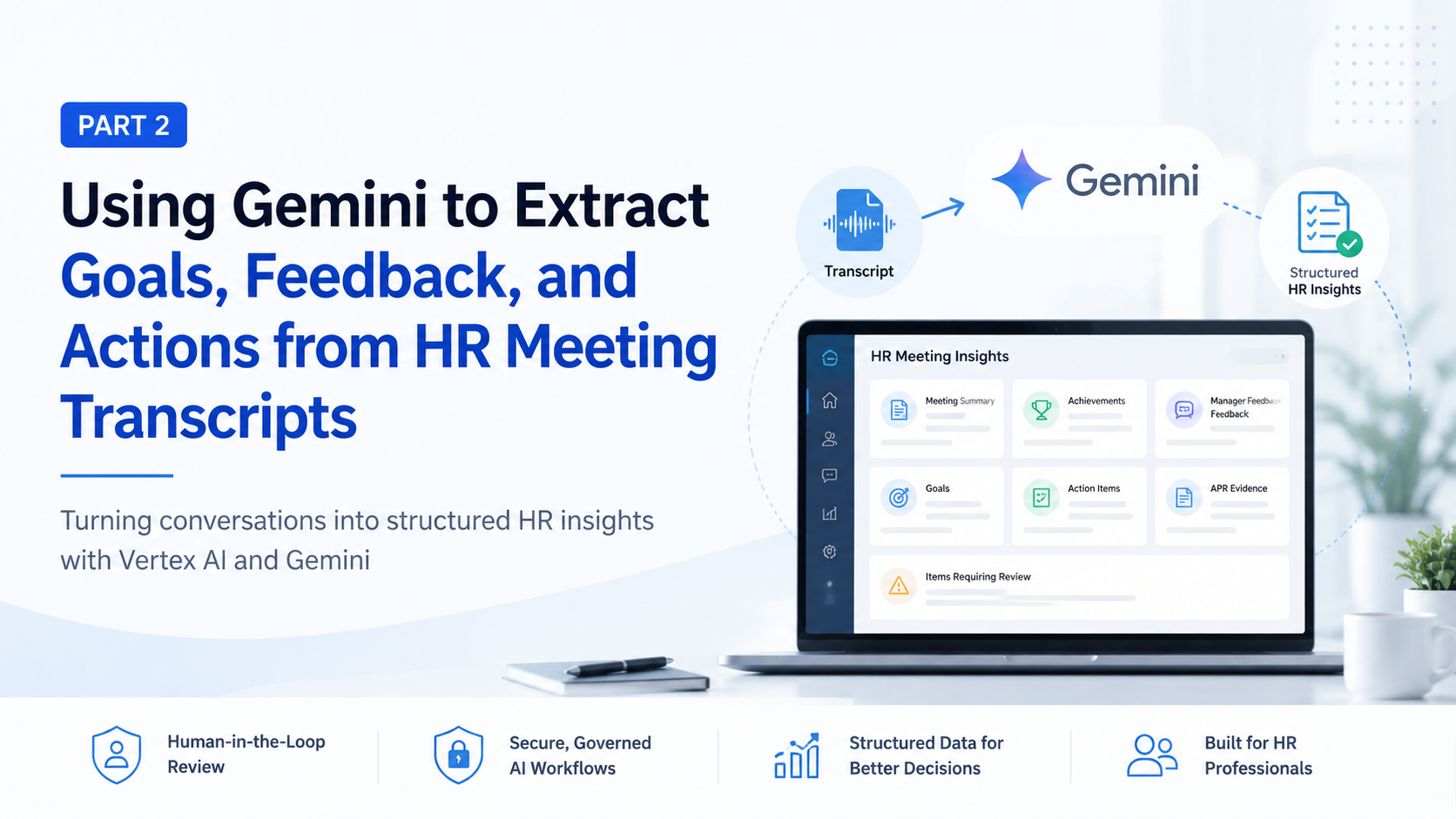
Part 2 extends the audio transcription workflow by adding a controlled analysis layer. The application submits an approved transcript to Gemini, validates the structured response, presents each extracted item for human review, and stores approved and rejected information separately.

Recap of Part 1: From Audio to a Reviewed Transcript

Part 1 established the ingestion and transcription workflow.

Read Part #1

At this stage, the application can:

  • Accept an uploaded HR meeting recording.
  • Store the recording in Cloud Storage.
  • Submit the audio for transcription.
  • Associate the transcript with the correct employee and meeting.
  • Present the transcript for human review.
  • Preserve the reviewed transcript as the approved source for further analysis.

Cloud Speech-to-Text supports converting audio into text, including asynchronous processing for longer audio files. Google Cloud also supports event-driven architectures in which Cloud services publish events or messages that can be consumed by a Cloud Run service.

The important architectural decision is that transcription does not immediately trigger permanent HR updates.

Before AI analysis begins, the transcript should reach an approved state. This provides an opportunity to correct:

  • Speaker attribution errors
  • Misheard technical terms
  • Employee or project names
  • Dates and numerical values
  • Acronyms
  • Punctuation that changes meaning
  • Sensitive conversation that should not enter the analysis workflow

Human review remains part of the system because transcription accuracy and business meaning are different concerns.

A technically accurate sentence can still be ambiguous in context. Conversely, a transcription error involving a date, target, project name, or negative expression could materially change the generated HR insight.

The reviewed transcript therefore becomes the source document for Part 2.
Why a Transcript Alone Is Not Enough

A full transcript is useful for auditability, but inefficient for decision-making.

A 45-minute meeting may produce thousands of words. Within that conversation, the information that matters for follow-up may be distributed across introductions, project updates, informal discussion, technical explanations, and future planning.

Even a complete transcript may be:

  • Too long for a manager to review quickly
  • Difficult to compare with previous meetings
  • Inconsistent in terminology
  • Mixed with informal or irrelevant conversation
  • Unclear about who made each statement
  • Missing a clean separation between observations and commitments
  • Ambiguous about whether a date is proposed or agreed
  • Difficult to map into an appraisal or development template

Consider the following exchange:

Manager: The API migration went well, particularly the work you did on backward compatibility. We still need to improve the deployment documentation before the next release. Could you own that by the end of September?

Employee: Yes. I will update the runbook and ask the platform team to review it.

A human can identify several distinct items:

  • Achievement: successful API migration contribution
  • Specific evidence: backward-compatibility work
  • Development area: deployment documentation
  • Action item: update the runbook
  • Action owner: employee
  • Target date: end of September
  • Dependency: platform-team review

A transcript stores those details as a conversation. A structured analysis converts them into objects that the application can display, validate, compare, search, and eventually export.

The output should not replace the transcript. It should provide a controlled interpretation layer above it.

Defining the Structured HR Output

Before calling Gemini, the development team should define exactly what the application is permitted to extract.

A practical first version may include:

  • Meeting summary
  • Employee achievements
  • Current responsibilities
  • Challenges or blockers
  • Skills discussed
  • Manager feedback
  • Employee feedback
  • Short-term goals
  • Long-term goals
  • Agreed action items
  • Action owners
  • Target dates
  • Follow-up questions
  • Potential annual performance review evidence
  • Statements requiring human verification

The distinction between these categories is important.

An achievement is not the same as positive feedback. A challenge is not automatically a performance deficiency. A manager suggestion is not necessarily an agreed goal. A possible deadline is not the same as a confirmed target date.

A reliable extraction schema should make those distinctions explicit.

Recommended Evidence Model

For higher-risk fields, storing only the extracted statement is insufficient. Each item should include provenance and review metadata.

For example:

{
  "description": "Completed backward-compatible API migration",
  "speaker": "manager",
  "evidence_text": "The API migration went well, particularly the work you did on backward compatibility.",
  "transcript_segment_id": "segment-184",
  "confidence": "high",
  "review_status": "pending"
}

This structure helps a reviewer answer three questions:

  • What did the model extract?
  • Why did it extract it?
  • Where can the reviewer verify it?

The model’s confidence label should not be treated as a mathematical guarantee. It is better understood as a routing signal for the user interface. Low-confidence or ambiguous items should receive more prominent review treatment.

Adding Vertex AI with Gemini

Once the transcript is approved, the application can send it to Gemini through Vertex AI.

Gemini’s role is to:

  • Read the reviewed transcript
  • Distinguish employee statements from manager statements
  • Extract information into predefined categories
  • Identify goals and commitments
  • Detect action owners and target dates
  • Produce a neutral meeting summary
  • Include supporting transcript references
  • Flag incomplete, uncertain, or conflicting statements
  • Return a structured response for application-level validation

Vertex AI supports controlled JSON generation using a predefined response schema. The application can specify a JSON response type and schema so that generated output follows the expected structure more reliably than free-form prompting alone.

This is preferable to asking the model to “summarize the meeting” and then attempting to parse arbitrary prose.

Structured Output Versus Function Calling

Structured output and function calling solve related but different problems.

Structured output is suitable when the application wants Gemini to return a document-shaped response, such as a meeting-analysis object.

Function calling is useful when the model may propose a controlled interaction with an application function or external service. Gemini returns structured information describing the function and its parameters; the application—not the model—executes the function. Google describes function calling as a bridge between the model and external tools, databases, services, or APIs.

For example, the application might expose functions such as:

  • create_draft_action_item()
  • request_manager_confirmation()
  • map_skill_to_taxonomy()
  • prepare_sheet_export()

Gemini could recommend a function call, but the application would still enforce:

  • Authorization
  • Input validation
  • Business rules
  • Approval status
  • Audit logging
  • Idempotency
  • Data-loss prevention controls

The model should never receive unrestricted authority to modify HR records.

For the initial extraction workflow, schema-controlled JSON is usually the cleaner design. Function calling can be introduced later for narrow, well-governed downstream actions.

Designing the Extraction Schema

A high-level response may look like this:

{
  "meeting_summary": "",
  "achievements": [],
  "current_responsibilities": [],
  "challenges": [],
  "skills_discussed": [],
  "manager_feedback": [],
  "employee_feedback": [],
  "short_term_goals": [],
  "long_term_goals": [],
  "action_items": [],
  "follow_up_questions": [],
  "apr_evidence": [],
  "items_requiring_review": []
}

That is a useful starting point, but a production schema should add field-level detail.

Example Goal Object

{
  "goal_type": "short_term",
  "description": "Complete deployment runbook updates",
  "stated_by": "employee",
  "status": "agreed",
  "target_date": "2026-09-30",
  "date_precision": "month_end_interpretation",
  "evidence_segment_ids": ["segment-184", "segment-185"],
  "requires_review": true
}

The date_precision field is valuable because “by the end of September” is less precise than “September 30, 2026.”

The application may normalize the phrase into a date for sorting, while still marking the normalization for confirmation.

Example Action-Item Object

{
  "description": "Update the deployment runbook",
  "owner": {
    "type": "employee",
    "name": null
  },
  "target_date": "2026-09-30",
  "dependencies": [
    "Platform team review"
  ],
  "agreement_status": "confirmed",
  "evidence_segment_ids": ["segment-184", "segment-185"],
  "review_status": "pending"
}

Example Review-Required Object

{
  "category": "ambiguous_ownership",
  "description": "It is unclear whether the employee or platform lead will schedule the review.",
  "related_segment_ids": ["segment-186"],
  "recommended_question": "Who will schedule the platform-team review?"
}

This is more useful than forcing the model to choose an owner when the transcript does not support one.

Keep Extraction Separate from HR Policy

The schema should describe meeting information without embedding a specific organization’s appraisal policy.

For example, the application may identify “potential APR evidence,” but it should not conclude:

  • The employee exceeded expectations
  • The evidence qualifies for a particular rating
  • The employee should be promoted
  • A development issue requires formal corrective action

Those decisions depend on company policy, role expectations, review periods, corroborating evidence, and authorized human judgment.

Prompt and Instruction Design

Schema design controls the response shape. Prompt design controls the model’s task boundaries.

The system instruction should be explicit.

A suitable instruction set might include:

  • Analyze only the approved transcript supplied by the application.
  • Use only information directly stated in the transcript.
  • Do not infer protected, sensitive, medical, psychological, or demographic attributes.
  • Do not diagnose health, personality, or behavioral conditions.
  • Do not assign performance ratings.
  • Do not recommend promotion, compensation changes, disciplinary action, or termination.
  • Distinguish confirmed commitments from suggestions and possibilities.
  • Identify the speaker associated with each material statement.
  • Use neutral, professional language.
  • Include transcript evidence references where practical.
  • Flag conflicting, incomplete, or uncertain information for human review.
  • Return only fields defined by the response schema.

Preventing Unsupported Inference

Suppose a transcript says:

“I have been struggling to keep up with the release schedule because two team members moved to another project.”

The model may safely extract:

  • Challenge: reduced team capacity
  • Blocker: two team members reassigned
  • Employee feedback: difficulty meeting the release schedule

It should not infer:

  • Poor time management
  • Low motivation
  • Stress disorder
  • Inability to perform the role
  • Negative performance rating

The difference is foundational. One set of statements is supported by the source. The other introduces interpretation that could cause unfair or harmful outcomes.

Maintain Speaker Separation

The prompt should require every feedback item to identify its source.

For example:

{
  "manager_feedback": [
    {
      "type": "positive",
      "description": "Handled backward compatibility effectively",
      "speaker": "manager"
    }
  ],
  "employee_feedback": [
    {
      "type": "process",
      "description": "Requested earlier architecture review for future migrations",
      "speaker": "employee"
    }
  ]
}

Without speaker separation, the system may incorrectly present an employee’s self-assessment as manager-validated feedback.

Require Evidence, Not Invented Explanation

For each material extraction, require at least one of the following:

  • Transcript segment identifier
  • Timestamp
  • Short supporting excerpt
  • Speaker identifier
  • evidence_not_available status

This does not eliminate hallucinations, but it makes unsupported output easier to detect.

Validating Gemini’s Response

Structured output reduces parsing risk, but it does not remove the need for application validation.

The worker should perform several validation layers.

Structural Validation

Check that:

  • The response is valid JSON.
  • Required fields are present.
  • Arrays contain the correct object types.
  • Enumerated values are allowed.
  • Dates follow the expected format.
  • Unknown fields are removed or rejected.
  • String and array sizes remain within defined limits.

Semantic Validation

Check for:

  • Action items without descriptions
  • Target dates without evidence
  • Unknown speaker identifiers
  • Goals incorrectly marked as agreed
  • Duplicate achievements
  • Overly broad summaries
  • Empty responses for substantive transcripts
  • APR evidence without supporting segments
  • Statements containing prohibited rating language

Evidence Validation

For every transcript reference:

  • Confirm that the segment exists.
  • Confirm that the cited speaker matches.
  • Confirm that the evidence text appears in or closely corresponds to the segment.
  • Flag items with missing support.
  • Route unsupported claims to items_requiring_review.

This can be implemented using deterministic checks and, where necessary, a second constrained model pass. The second pass should not simply ask Gemini whether its first answer was correct. It should compare individual claims against retrieved source segments.

Failure and Retry Strategy

Retry only failures that are likely temporary, such as:

  • Service unavailability
  • Network errors
  • Rate limiting
  • Truncated responses
  • Temporary internal model errors

Use bounded retries with exponential backoff.

Do not repeatedly retry a structurally invalid response using the identical request without changing the recovery strategy. The worker may instead:

  • Reduce transcript chunk size
  • Reissue the request with stricter output instructions
  • Analyze sections independently
  • Route the job to manual review

Every successful result should still be marked:

AI-generated draft — human approval required

Building the Human-Review Screen

The review interface is where the system becomes operationally useful.

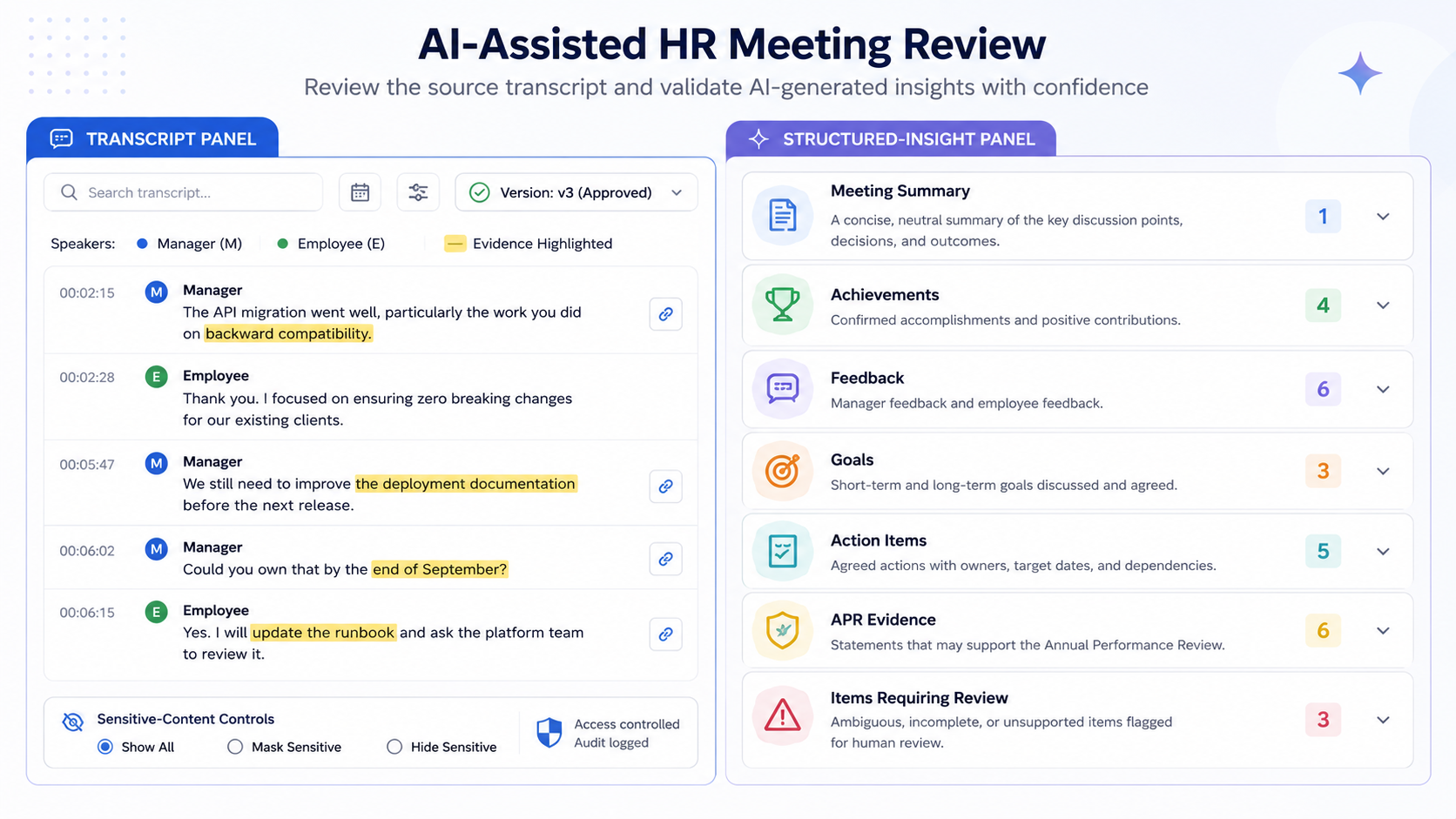
A manager or authorized HR reviewer should be able to:

  • Read the source transcript
  • Navigate to cited transcript segments
  • Review the generated summary
  • Approve or reject individual achievements
  • Edit goals and action items
  • Correct action owners and target dates
  • Remove irrelevant or sensitive information
  • Confirm or reject APR-related evidence
  • Add reviewer comments
  • Record approval history
  • See which fields were AI-generated
  • Compare the original and edited values

A useful layout is a split view:

Building the Human-Review Screen

Item-Level Decisions

Each extracted item should have an independent status:

  • Pending
  • Approved
  • Edited and approved
  • Rejected
  • Needs clarification

This is better than a single “approve analysis” button.

A summary may be accurate while one action owner is wrong. Likewise, three achievements may be valid while a fourth is merely a suggestion made by the employee.

Preserve the Review History

For every material change, record:

  • Original model output
  • Edited value
  • Reviewer identity
  • Timestamp
  • Decision
  • Optional reason
  • Source transcript version

Approved and rejected information should be stored separately or distinguished by immutable review events. Rejected content should not disappear without trace, particularly when the system is being evaluated for recurring model errors.

Preventing Inappropriate Automation

The strongest control is a clearly defined boundary around what the application will not do.

The system should not:

  • Automatically issue performance ratings
  • Recommend promotion or termination
  • Recommend disciplinary action
  • Treat sentiment as employee performance
  • Infer protected or sensitive personal attributes
  • Diagnose health or behavioral conditions
  • Present model-generated interpretation as fact
  • Update official HR records without approval
  • Export unreviewed content into appraisal documents
  • Hide AI involvement from the reviewer
  • Reuse employee data for unrelated model training without authorization

NIST’s AI Risk Management Framework and Generative AI Profile emphasize governance, risk identification, measurement, management, human oversight, and documentation as core elements of trustworthy AI use. These principles are particularly relevant when generated output may influence decisions about people.

The application should therefore be positioned as a decision-support and documentation tool—not an automated employment-decision system.

Preparing the Data for Google Sheets

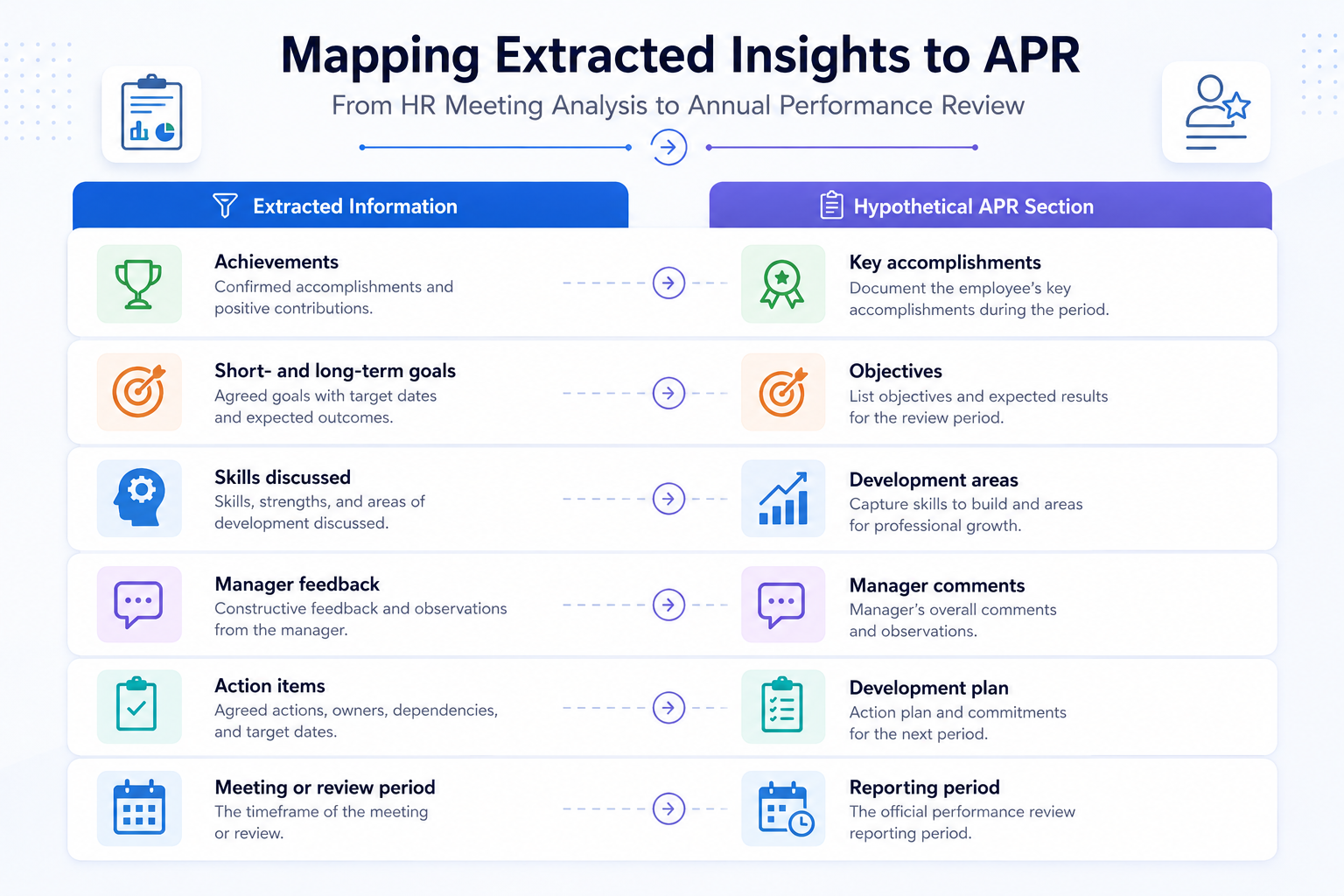
A future phase may map approved insights into a hypothetical annual performance review spreadsheet.

At a high level, the mapping could be:

Preventing Inappropriate Automation

The detailed Sheets API implementation should remain outside the main technical focus of this article.

The Google Sheets API provides programmatic access for reading and modifying spreadsheet values and ranges. It can read and write individual cells, ranges, sets of ranges, and larger sheet structures.

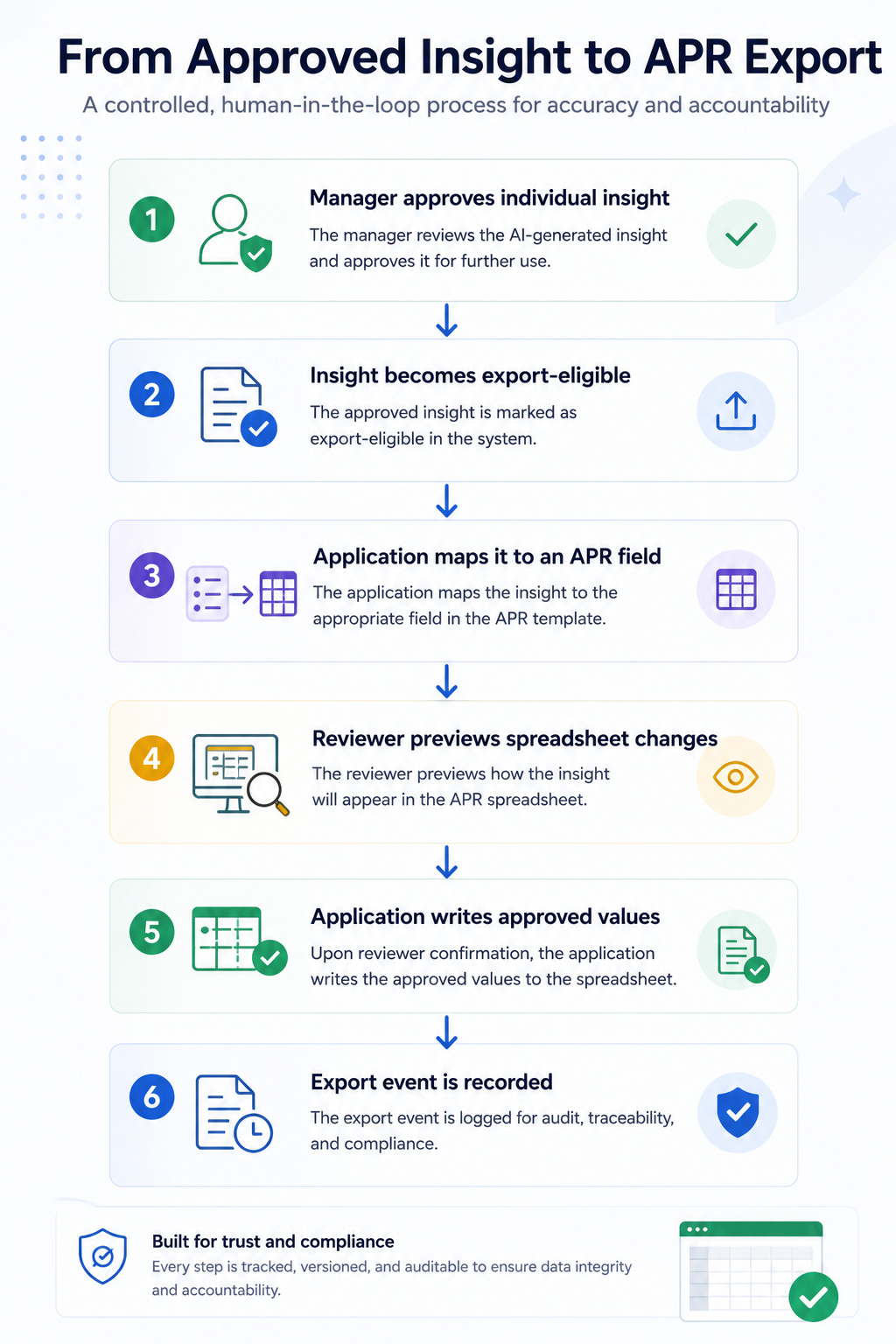
The important design rule is that only approved data should enter the export process.

A safe future workflow would be:

A Safe future workflow

The application should also preserve the relationship between the spreadsheet value and its internal source evidence. Otherwise, a clean spreadsheet may become detached from the transcript and approval record that justified it.

What the Application Can Do at the End of Part 2

At the end of this implementation phase, the application can:

  • Process an approved HR meeting transcript
  • Send the transcript to Gemini through Vertex AI
  • Generate schema-controlled HR meeting insights
  • Separate manager and employee statements
  • Identify achievements, feedback, goals, blockers, and actions
  • Detect potential APR evidence
  • Reference supporting transcript segments
  • Flag unsupported or uncertain conclusions
  • Validate the model response
  • Present AI-generated content for human review
  • Store approved, edited, rejected, and unresolved items separately
  • Preserve an audit history
  • Prepare reviewed data for future Google Sheets integration

This creates a meaningful transition from transcription software to a governed HR meeting-assistance platform.

The value does not come from generating a polished summary alone. It comes from making meeting information easier to review, trace, standardize, and act upon without removing accountability from managers and HR professionals.

Conclusion

A transcript gives an organization a record of a conversation. A structured, reviewed analysis gives managers a practical way to act on that conversation.

By adding Vertex AI with Gemini, the application can identify achievements, feedback, blockers, goals, responsibilities, target dates, action owners, and potential appraisal evidence. Schema-controlled output makes those insights easier to validate and integrate than free-form summaries.

However, the model must remain inside a controlled architecture.

It should extract rather than judge, cite rather than invent, flag uncertainty rather than conceal it, and produce drafts rather than official employment decisions. Human reviewers must be able to inspect the transcript, correct the interpretation, reject inappropriate content, and approve each material item before it enters an HR system or appraisal document.

For CTOs and technical leaders, this is the central design principle: the AI layer may accelerate understanding, but governance must remain deterministic, visible, and human-owned.

FAMRO helps organizations design and implement secure AI applications, Google Cloud workflows, Cloud Run services, Vertex AI integrations, structured data pipelines, and human-in-the-loop review systems tailored to real business operations.

To help organizations get started, we offer a free initial consultation focused on your AI-assisted HR meeting and transcript-analysis architecture—no obligation, no generic pitch.

If your organization is exploring Gemini, Vertex AI, or intelligent HR workflow automation and wants confidence—not guesswork—now is the time to act.

🌐 Learn more: Visit Our Homepage

💬 WhatsApp: +971-505-208-240

Frequently Asked Questions

Can Gemini Automatically Complete an Employee Appraisal?

Technically, a model can generate appraisal-style text, but the application should not treat it as an official appraisal. Gemini should extract potential evidence and draft structured information for authorized human review.

Why Analyze Only an Approved Transcript?

An approved transcript reduces the chance that transcription errors become structured HR records. It also establishes a clear source version for audit and review.

Should the Application Store the Model’s Confidence Score?

It can store a confidence category for review routing, but that score should not be treated as proof of accuracy. Source evidence and human verification remain more important.

Can the Application Detect Employee Sentiment?

Sentiment analysis is technically possible, but it should not be used as a proxy for employee performance, engagement, attitude, or future potential. Tone is highly contextual and vulnerable to misinterpretation.

Should Every Extracted Item Include Transcript Evidence?

Material items such as achievements, feedback, goals, action items, and APR evidence should include a source reference wherever practical. Unsupported items should be routed for review rather than presented as facts.

Can Gemini Call the Google Sheets API Directly?

Gemini can produce structured function-call requests, but the application should execute the API call after validating permissions, approval state, arguments, and business rules. The model should not hold unrestricted write authority.

How Should the Application Handle Sensitive Information?

Sensitive information should be minimized, access-controlled, logged, and removed when it is irrelevant to the approved HR purpose. Reviewers should be able to delete inappropriate model output before it reaches any downstream record.

References