Building an Agentic HR Meeting Assistant on Google Cloud

Learn how to build the first milestone of an agentic HR meeting assistant using Cloud Run, Cloud Storage, Speech-to-Text V2, Firestore, IAM, and human review.

Transcribing HR One-to-One Meetings with Google Cloud Speech-to-Text

One-to-one meetings are among the most valuable management tools available to an organization. They create space for employees and managers to discuss progress, goals, workload, development opportunities, concerns, and support requirements.

The problem is not usually holding the meeting. The problem is preserving what was discussed accurately and consistently.

Managers may take brief notes while trying to remain engaged in the conversation. Employees may remember key points differently. Action items may be recorded in emails, chat messages, spreadsheets, HR platforms, or personal documents. By the time annual performance review season arrives, important context can be scattered across twelve months of disconnected records.

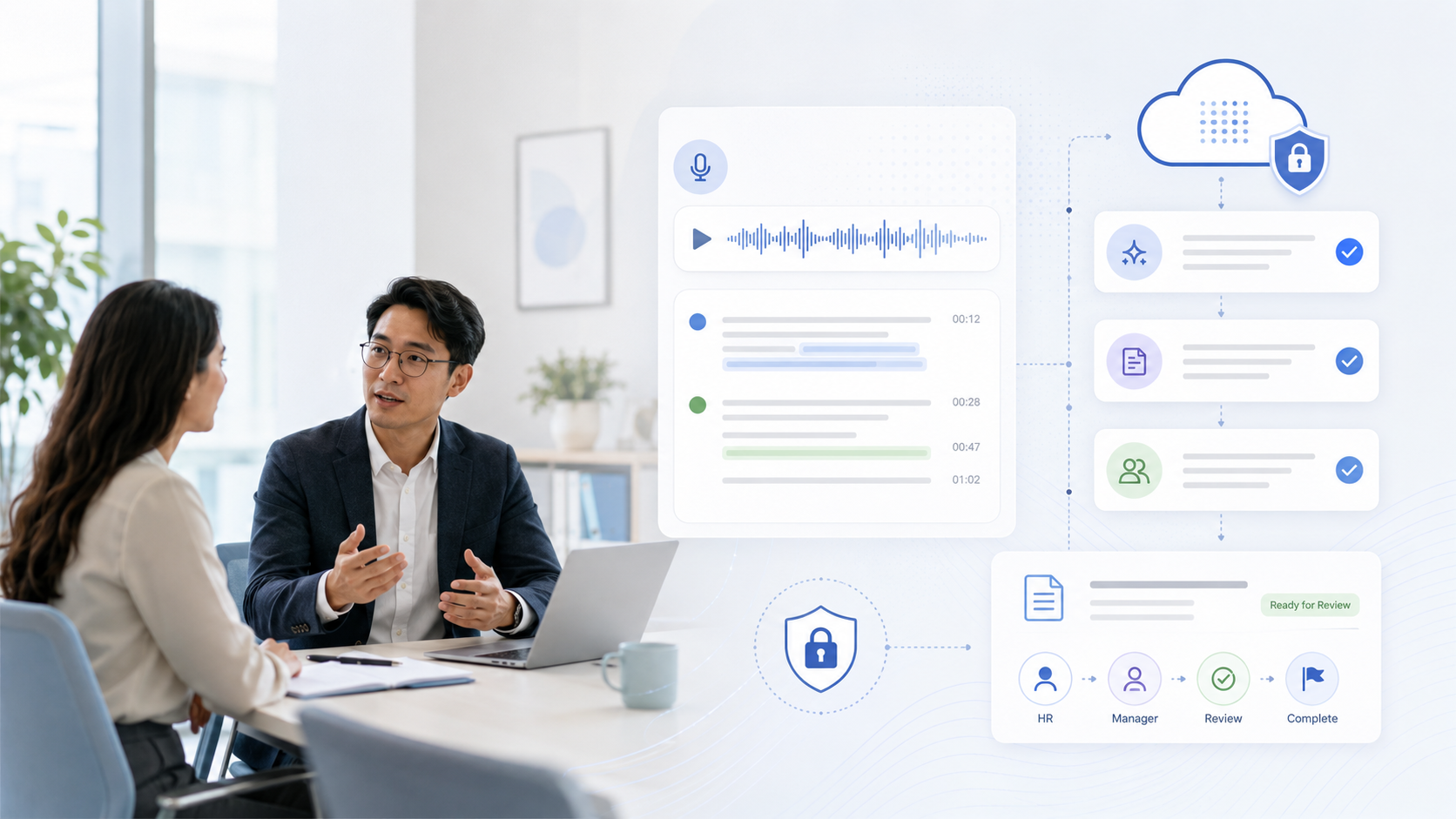
An HR meeting assistant can improve this process by creating a controlled workflow that starts with a meeting recording, produces a transcript, and allows an authorized person to review and approve the information.

This first article in a three-part series focuses on the foundation: securely uploading and transcribing recorded HR one-to-one meetings using Google Cloud.

This milestone does not attempt to evaluate an employee, generate a performance rating, or make an employment decision. It creates a reliable source document that later workflow stages can use—with appropriate review, governance, and safeguards.

Why One-to-One Meeting Notes Are Difficult to Maintain

A good one-to-one is a conversation, not a form-filling exercise.

Managers need to listen carefully, ask follow-up questions, observe concerns, provide coaching, and agree on next steps. Taking detailed notes at the same time can undermine the quality of the interaction.

As a result, note-taking practices vary considerably.

One manager may write a detailed summary immediately after every meeting. Another may record only action items. A third may keep informal notes in a private document. Even within the same department, the format and quality of records can depend on the manager’s workload, habits, and understanding of HR requirements.

This inconsistency becomes more significant when organizations need to answer questions such as:

  • What objectives were discussed during the year?
  • When was a development concern first raised?
  • What support did the manager agree to provide?
  • Which actions were assigned to the employee?
  • Was progress reviewed at subsequent meetings?
  • What evidence supports the annual progress report?
  • Has the employee had an opportunity to clarify or challenge inaccurate information?

Without a reliable record, managers may overemphasize recent events and overlook work completed earlier in the review period.

Problems with Manual Note-Taking

Manual notes are not inherently inappropriate. In many situations, they remain useful and necessary. However, using them as the only source for a year-long performance workflow introduces several risks.

Missed details

A manager cannot capture every relevant statement while remaining fully engaged. Important details about blockers, dependencies, commitments, or employee concerns may be omitted.

This does not necessarily reflect poor management. It is a limitation of asking one person to participate in and document the same conversation simultaneously.

Inconsistent formats

Some records contain dates, objectives, decisions, and owners. Others are unstructured paragraphs. Some managers separate facts from opinions; others combine both.

Inconsistent records are difficult to compare, search, audit, and convert into annual progress reporting.

Delayed documentation

Managers may intend to complete their notes after the meeting but become occupied with operational work. A summary written several days later may be incomplete or influenced by subsequent events.

Fragmented follow-ups

An action item may be recorded in the meeting notes, assigned in a project-management system, and discussed later in chat. Without a consistent meeting record, it becomes difficult to determine what was agreed and whether the action was completed.

Recency and interpretation bias

Annual reviews can unintentionally focus on the final weeks or months of the review period. Reliable chronological records help managers consider the employee’s progress across the full year rather than relying mainly on memory.

Transcription does not eliminate bias or interpretation. It provides a more complete starting point from which an authorized reviewer can prepare an accurate, proportionate summary.

How Transcription Automation Creates a Reliable Starting Point

A meeting transcript is not the same as an approved HR record.

Speech recognition can misidentify words, names, technical terminology, or speakers. Conversations can also contain informal remarks, incomplete thoughts, personal information, or discussion that is not relevant to performance management.

The value of transcription automation is therefore not that it produces an unquestionable record. Its value is that it reduces the amount of conversation lost before the review process begins.

A suitable workflow preserves two distinct artifacts:

  1. The original machine-generated transcript, which remains unchanged..
  2. The reviewed transcript, which contains authorized corrections and is clearly linked to the reviewer and review time.

This separation creates traceability. It allows the organization to see what the speech recognition system produced and what a human reviewer changed.

Scope of This Three-Part Series

The complete solution will be developed across three architectural milestones.

Part 1: Meeting transcription: The application will accept an approved recording, store it securely, initiate asynchronous transcription, save the output, and display it for human review.

Part 2: Part 2: Structured HR information extraction: The reviewed transcript will be processed to identify candidate objectives, achievements, concerns, commitments, development requirements, follow-up actions, and supporting evidence.

These outputs will remain proposed information until reviewed and approved by an authorized person.

Part 3: Annual progress reporting: Approved information from multiple one-to-one meetings will be consolidated into an annual progress report. The system will support evidence tracing, manager review, employee input, and controlled report generation.

The "agentic" capability becomes more visible in Parts 2 and 3, where specialized components can classify information, retrieve earlier commitments, identify unresolved actions, and prepare draft summaries. Human accountability must remain central throughout the workflow.

Understanding the Initial Use Case

The hypothetical workflow for the first milestone is intentionally straightforward:

  1. A manager conducts a one-to-one meeting with an employee.
  2. The meeting is recorded after appropriate consent has been obtained.
  3. An authorized user creates a meeting record in the application.
  4. The audio recording is uploaded.
  5. The application stores the file in Cloud Storage.
  6. A transcription worker sends the recording to Speech-to-Text V2.
  7. The transcript and processing metadata are saved.
  8. HR or the manager reviews the transcription.
  9. The reviewed version becomes available to later processing stages.

Google Cloud Speech-to-Text provides speech recognition capabilities for application integration. For long recordings, its batch recognition process is asynchronous: the application starts an operation and checks or receives the result later instead of keeping the original upload request open. Google specifically describes batch recognition as suitable for long audio stored in Cloud Storage.

This distinction is important for one-to-one meetings, which may last 30, 45, or 60 minutes. The frontend should not wait for the entire transcription to complete.

Privacy and Governance Must Be Designed First

An HR meeting assistant processes sensitive workplace information. Privacy, employment practices, security, and record governance cannot be added after the technical prototype is complete.

The exact legal requirements depend on the organization’s jurisdiction, employment arrangements, internal policies, and the nature of the information being discussed. Legal and HR specialists should therefore approve the operating model before production use.

Several design principles should apply regardless of geography.

Obtain consent before recording

The application should not treat consent as an informal assumption.

Before an upload is accepted, the meeting record should contain a confirmation that the participants received the required notice and that recording was permitted under organizational policy and applicable law.

Depending on the organization, the consent record might include:

  • Consent status
  • Date and time of confirmation
  • Consent method
  • Policy version
  • Identity of the person recording the confirmation
  • Any withdrawal or restriction

The recording interface should clearly indicate when recording is active.

Restrict Access to Authorized Users

Meeting audio and transcripts should not be broadly available to the organization.

Access may be limited to:

  • The employee’s assigned manager
  • Authorized HR personnel
  • A specifically approved reviewer
  • Compliance or legal personnel when required
  • The employee, according to organizational policy and applicable rights

Cloud Run supports IAM-based access controls at the service level, while Cloud Run service identities allow deployed services to access other Google Cloud APIs using an attached identity. Google recommends dedicated service accounts and minimal permissions when securing communication between services. (Google Cloud Documentation)

Authorization must also be enforced in application logic. A user who can invoke the API should not automatically gain access to every employee’s meeting record.

Define Retention Periods

Audio and text do not necessarily need the same retention period.

For example, an organization may decide that raw audio is deleted after transcription review, while an approved meeting summary is retained for the relevant employment-record period. Another organization may need to preserve the original recording for a defined period because of regulatory or dispute-management requirements.

The policy should explicitly define:

  • Audio retention
  • Original transcript retention
  • Reviewed transcript retention
  • Approved performance-information retention
  • Legal hold exceptions
  • Deletion ownership
  • Backup and replica handling

The application should store retention metadata so that deletion can eventually be automated and audited.

Do Not Automate Employment Decisions

A transcript may support a manager’s understanding of a meeting. It should not automatically determine promotion, compensation, disciplinary action, termination, performance ratings, or access to opportunities.

NIST’s AI Risk Management Framework is intended to help organizations manage risks to individuals and organizations throughout the AI lifecycle. Its guidance emphasizes the importance of human insight, oversight, accountability, transparency, privacy, and context-sensitive risk management. (NIST)

For this use case, that means the system can assist with documentation while the accountable manager and HR function retain responsibility for interpreting evidence and making decisions.

Require Human Review

No machine-generated transcript should enter an employee’s approved performance record without review.

The reviewer should be able to:

  • Correct recognition errors
  • Flag uncertain passages
  • Remove content that is irrelevant under policy
  • Confirm speaker attribution
  • Add limited contextual notes
  • Approve or reject the transcript
  • Record the reason for material changes

Separate Raw Transcripts from Approved Information

Raw conversation should not be treated as equivalent to verified performance evidence.

The data model should distinguish among:

  • Recorded audio
  • Machine-generated transcript
  • Human-reviewed transcript
  • Extracted candidate HR information
  • Approved performance information
  • Final annual progress report

This separation reduces the risk that an inaccurate phrase or irrelevant remark is silently propagated into a consequential report.

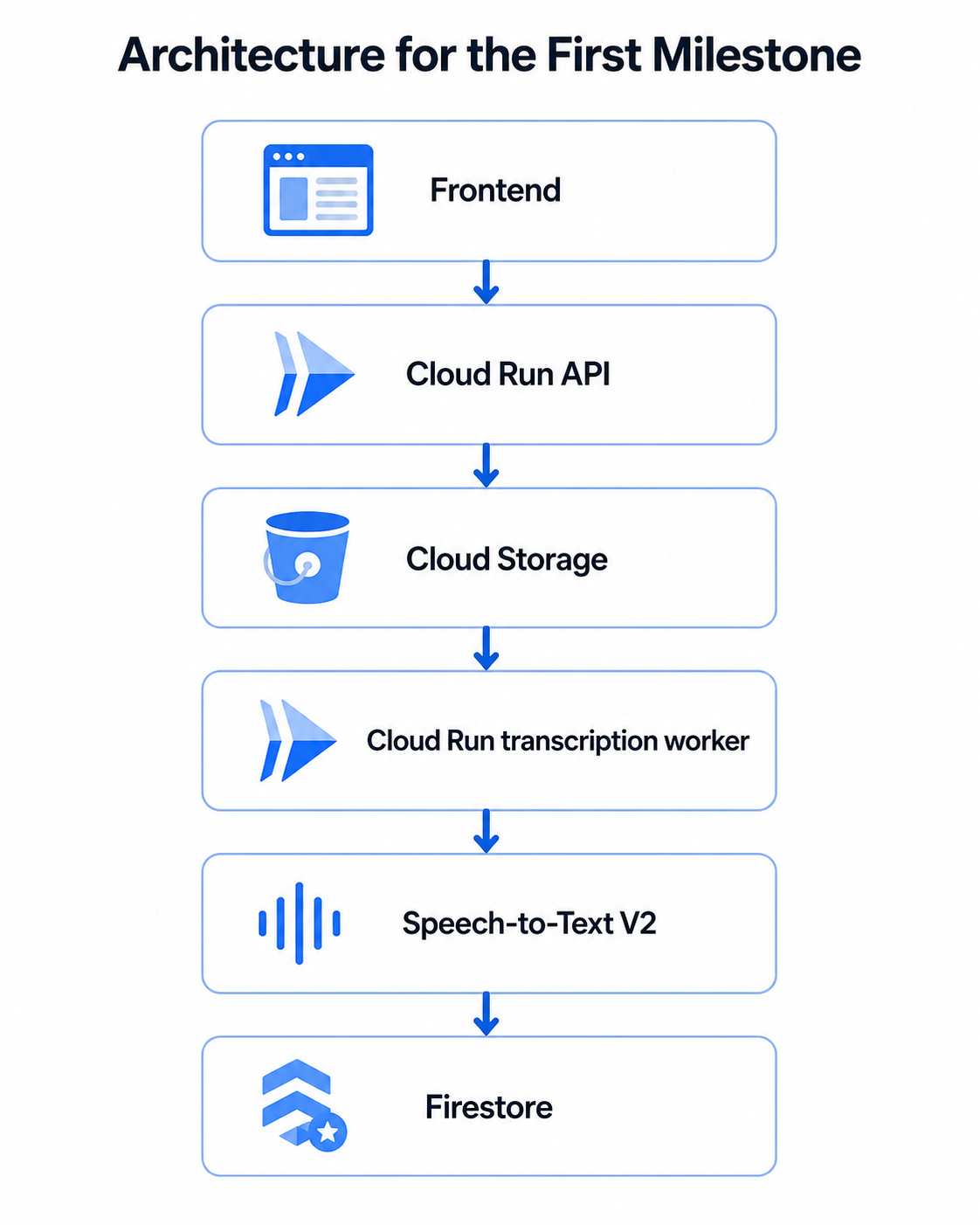
Architecture for the First Milestone

The initial architecture can remain relatively small:

Architecture for the First Milestone

In a production implementation, an event or task mechanism may be placed between upload and transcription so the worker can retry independently. However, the core responsibility of each component remains the same.

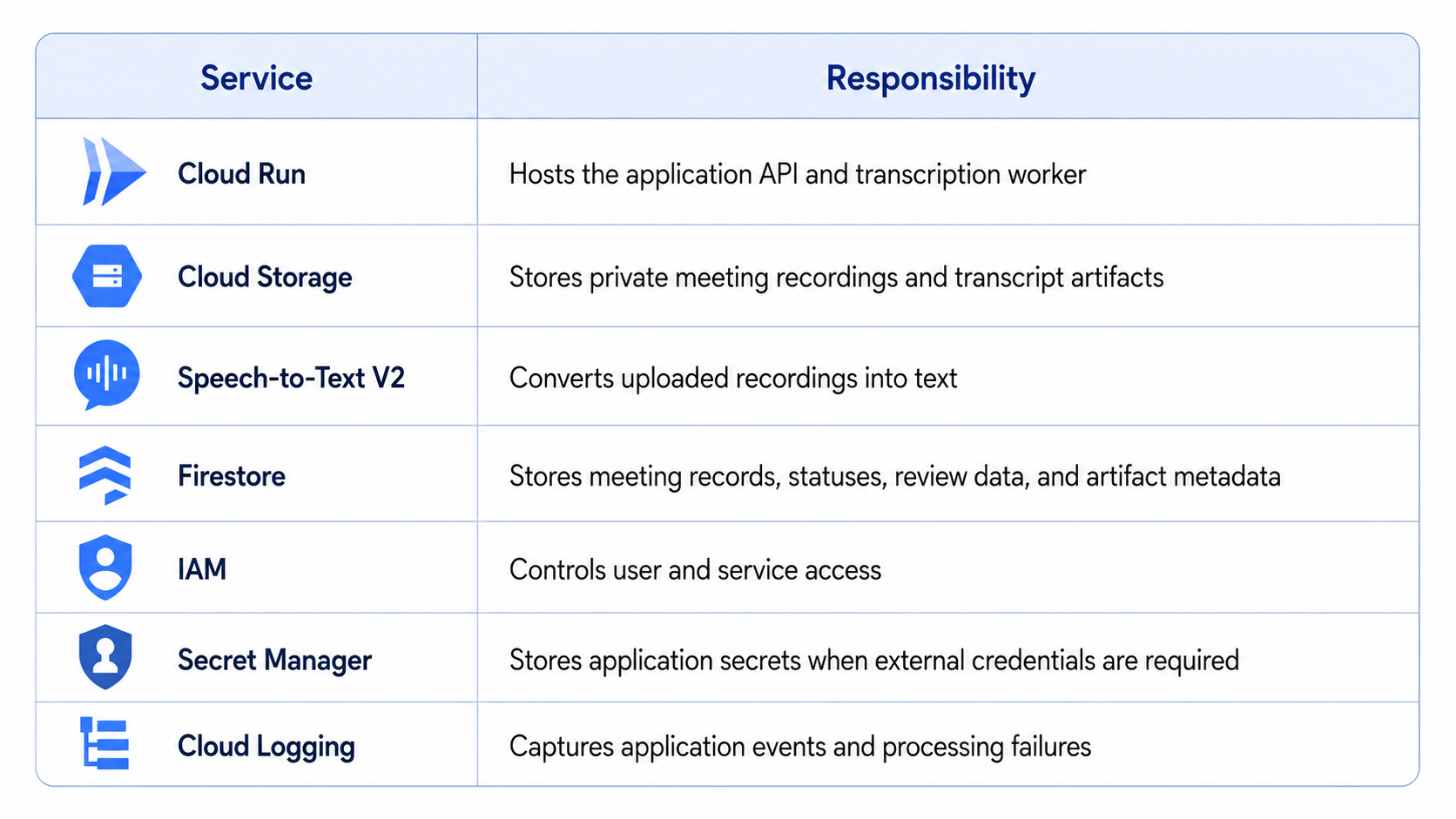
Google Cloud Services Used

Google Cloud Services Used

Cloud Run

The frontend calls a Cloud Run API to create the meeting record and initiate the upload workflow.

A separate Cloud Run service or worker can handle transcription. Separating the public-facing API from the processing component reduces coupling and allows each service to have its own permissions and scaling configuration.

The API service may require permission to write meeting metadata and create uploads. The transcription service may require permission to read audio, call Speech-to-Text, write transcript output, and update processing status.

It should not automatically receive permission to administer buckets, change IAM policies, or access unrelated HR data.

Cloud Storage

Cloud Storage holds the recording because batch transcription works well with audio files already stored in a bucket.

The bucket must not be public. Google Cloud’s public access prevention control protects buckets and objects from accidental exposure through public IAM principals or ACLs. Uniform bucket-level access is also generally preferable to managing independent object ACLs. (Google Cloud Documentation)

A practical object structure might be:

hr-meetings/
  organization-id/
    employee-id/
      meeting-id/
        source/
          meeting-audio.wav
        transcript/
          original.json
          reviewed.json

The object path improves organization, but it must not be treated as the authorization mechanism. Access should still be controlled through IAM and application-level checks.

IAM and Service Identities

Each Cloud Run component should use a dedicated service identity.

For example:

  • hr-api-service can create meeting records and generate controlled upload access.
  • transcription-worker can read only the relevant audio bucket, call Speech-to-Text, and update transcription fields.
  • review-service can read transcripts and save authorized corrections.
  • End users receive role-based access through the organization’s identity layer.

Attaching identities to workloads is preferable to embedding downloadable service-account keys in application configuration. (Google Cloud Documentation)

Speech-to-Text V2

Speech-to-Text V2 performs the transcription.

Google documents multiple transcription models and recommends selecting the method and model according to audio length, language, and use case. Batch recognition is intended for longer files and returns a long-running operation that can be monitored until processing completes. (Google Cloud Documentation)

Model choice should be tested rather than assumed. A configuration that performs well for a clear English-language recording may not be suitable for multilingual meetings, strong accents, overlapping speech, or specialized technical vocabulary.

Firestore

Firestore stores the meeting’s operational state and metadata.

Firestore is a document-oriented database in which documents are organized into collections. This structure suits meeting records because each meeting can be represented as a document with nested status, review, and artifact metadata. (Google Cloud Documentation)

Large audio files should remain in Cloud Storage rather than being written into Firestore. Depending on size and search requirements, full transcripts may also be stored in Cloud Storage while Firestore retains the latest reviewed text or a reference to the transcript artifact.

Secret Manager

Google Cloud client libraries can generally use service identities, so API keys should not be created unnecessarily.

Where the application requires external credentials, signing secrets, or integration tokens, Secret Manager provides managed storage for sensitive values. Google recommends least-privilege access to individual secrets and prefers workload identities over exported service-account credentials. (Google Cloud Documentation)

Cloud Logging

Cloud Logging captures API errors, worker failures, operation identifiers, processing duration, and retry information. It supports storage, search, analysis, monitoring, and alerting for Google Cloud and application logs. (Google Cloud Documentation)

Logs must not become an uncontrolled copy of sensitive HR data. Do not log full transcripts, authentication tokens, signed URLs, or confidential employee details. Google’s client-library guidance specifically warns that logs may contain sensitive information and that access should be restricted. (Google Cloud Documentation)

Designing the Meeting Data Model

A Firestore collection named meetings could contain one document per meeting.

A representative record might include:

meetingId
organizationId
employeeId
managerId
meetingDate
reviewPeriod
audio:
  bucket
  objectName
  contentType
  sizeBytes
  checksum
transcription:
  status
  operationName
  model
  languageCodes
  startedAt
  completedAt
  failureCode
  failureMessage
transcript:
  originalLocation
  reviewedLocation
  originalText
  reviewedText
review:
  status
  reviewedBy
  reviewedAt
  changeReason
consent:
  confirmed
  confirmedAt
  method
  policyVersion
retention:
  audioDeleteAfter
  transcriptDeleteAfter
createdAt
createdBy
updatedAt
updatedBy

The transcription.status field should use a controlled state model rather than arbitrary strings.

For example:

AWAITING_UPLOAD
AWAITING_TRANSCRIPTION
TRANSCRIPTION_IN_PROGRESS
TRANSCRIPTION_COMPLETED
TRANSCRIPTION_FAILED
REVIEW_IN_PROGRESS
REVIEWED
REJECTED

State transitions should be validated. A reviewed record should not silently return to an unreviewed state when a background worker retries.

It is also useful to store a checksum for the uploaded file. This helps the application detect accidental replacement, duplicate uploads, or inconsistencies between the meeting record and the object that was transcribed.

Building the Upload Workflow

A secure upload process should follow a defined sequence.

1. Create the Meeting Record

The API first verifies that the user is permitted to create a meeting for the selected employee.

It then validates required business information:

  • Employee identity
  • Manager relationship
  • Meeting date
  • Review period
  • Consent confirmation
  • Expected file type

The system creates the meeting document with an AWAITING_UPLOAD status.

2. Validate the File

Validation should occur on both the client and server side.

Check:

  • Allowed extension
  • Reported MIME type
  • Actual content characteristics where possible
  • Maximum file size
  • Minimum file size
  • Recording duration
  • Required audio properties
  • Malware or content-scanning requirements

A filename ending in .wav is not proof that the uploaded content is a valid WAV recording.

3. Upload to Cloud Storage

The application can either proxy the upload through Cloud Run or issue a short-lived, tightly scoped upload URL.

Direct-to-bucket uploads reduce load on the API, but the object name must be generated by the server. The client should not be allowed to choose an arbitrary path.

4. Associate the Recording with the Employee

After upload, the application verifies that the object exists and records its bucket, path, size, content type, and checksum.

The employee association must come from the authorized meeting record—not from untrusted object metadata supplied by the browser.

5. Mark the Meeting as Awaiting Transcription

Once validation succeeds, the application changes the status to AWAITING_TRANSCRIPTION and submits the processing task.

Use an idempotency mechanism so that retries do not create multiple uncontrolled transcription operations for the same recording.

6. Keep Audio Private

Do not make the bucket or object publicly accessible.

Temporary access should be granted only when required, for the shortest practical period, and to a specific object. Signed URLs provide time-limited access, but possession of the URL grants access during its validity, so URLs must be protected and must not appear in logs. (Google Cloud Documentation)

Connecting Speech-to-Text V2

The transcription worker performs the following steps.

Create the Client

Use the official Google Cloud client library for the selected implementation language. On Cloud Run, Application Default Credentials use the service identity attached to the deployed service.

No static API key should be embedded in the container image.

Select the Recognizer Configuration

Configure:

  • Project and location
  • Model
  • Language code or codes
  • Audio decoding settings
  • Punctuation requirements
  • Speaker-related capabilities where supported and appropriate
  • Output destination
  • Recognition features required by the application

Model selection should be tested using representative HR recordings rather than a single demonstration file.

Pass the Cloud Storage Location

The worker references the private Cloud Storage URI for the uploaded audio. Its service account must have permission to read the object.

Start Batch Recognition

The worker submits a BatchRecognize request and stores the returned operation identifier.

Because the operation is asynchronous, the worker can update the meeting status to TRANSCRIPTION_IN_PROGRESS and release its current request instead of keeping an HTTP connection open for the duration of the transcription. (Google Cloud Documentation)

Handle Completion and Failure

The processing workflow must handle:

  • Successful completion
  • Invalid audio
  • Unsupported encoding
  • Permission failure
  • Service quota issues
  • Timeout or interrupted processing
  • Empty recognition results
  • Partially usable output
  • Duplicate callbacks or retries

On success, the system stores the transcript artifact and changes the meeting status to TRANSCRIPTION_COMPLETED.

On failure, it records a structured error code and a safe operational message. Sensitive transcript fragments should not be copied into error logs.

Store the Transcript

The original transcript should be immutable from the application’s perspective.

A reviewer should never edit the only copy. Instead, the system creates a reviewed version derived from the original and records who made each material change.

Displaying and Reviewing the Transcript

The user interface should make the processing state visible.

Before completion, it might display:

  • Awaiting transcription
  • Transcription in progress
  • Processing started at a specific time
  • Retry scheduled
  • Transcription failed
  • Action required

After completion, the review screen should show the transcript in a readable format with clear editing controls.

Useful capabilities include:

  • Basic text correction
  • Speaker-label correction
  • Search within the transcript
  • Playback from a selected point
  • Flags for uncertain passages
  • Reviewer comments
  • Approval or rejection
  • Version history
  • Original-versus-reviewed comparison

The interface should not imply that every recognized word is accurate. Confidence or uncertainty indicators can help the reviewer focus attention, but they should not replace listening to the relevant audio when accuracy matters.

Material edits should be auditable. Store the reviewer identity, timestamp, previous value, updated value, and reason where appropriate.

Testing the First Milestone

A successful demonstration with one clean recording is not sufficient.

The test plan should reflect real workplace conditions.

Clear Single-Speaker Audio

Begin with a controlled recording to verify the upload, operation, storage, and display workflow.

Manager and Employee Conversations

Test turn-taking, interruptions, different speaking volumes, and overlapping speech.

Different Meeting Lengths

Include short check-ins and meetings close to the expected maximum duration. Measure total processing time and confirm that the frontend remains responsive.

Background Noise

Test office noise, keyboard sounds, air conditioning, remote-call artifacts, and inconsistent microphone quality.

Names and Technical Vocabulary

Use representative employee names, project names, product terminology, abbreviations, and role-specific language. Determine whether vocabulary adaptation or reviewer guidance is needed.

Unsupported Audio Formats

Confirm that invalid files are rejected with a useful message before an unnecessary transcription request is created.

Failed or Interrupted Jobs

Simulate permission errors, deleted objects, unavailable dependencies, worker restarts, and operation failures. Verify that retries are controlled and observable.

Incorrect Employee Associations

Attempt to upload a file for an employee the current manager is not authorized to access. Test manipulated meeting identifiers and object paths.

This is both a functional and security test.

Duplicate Submissions

Submit the same request repeatedly and confirm that the application does not create multiple records or conflicting transcript versions.

Privacy and Audit Tests

Verify that:

  • Audio objects are not public
  • Unauthorized managers cannot access another team’s meetings
  • Transcript text does not appear in application logs
  • Review changes are attributable
  • Retention fields are populated
  • Deleted or expired links no longer work
  • Service accounts have only required permissions

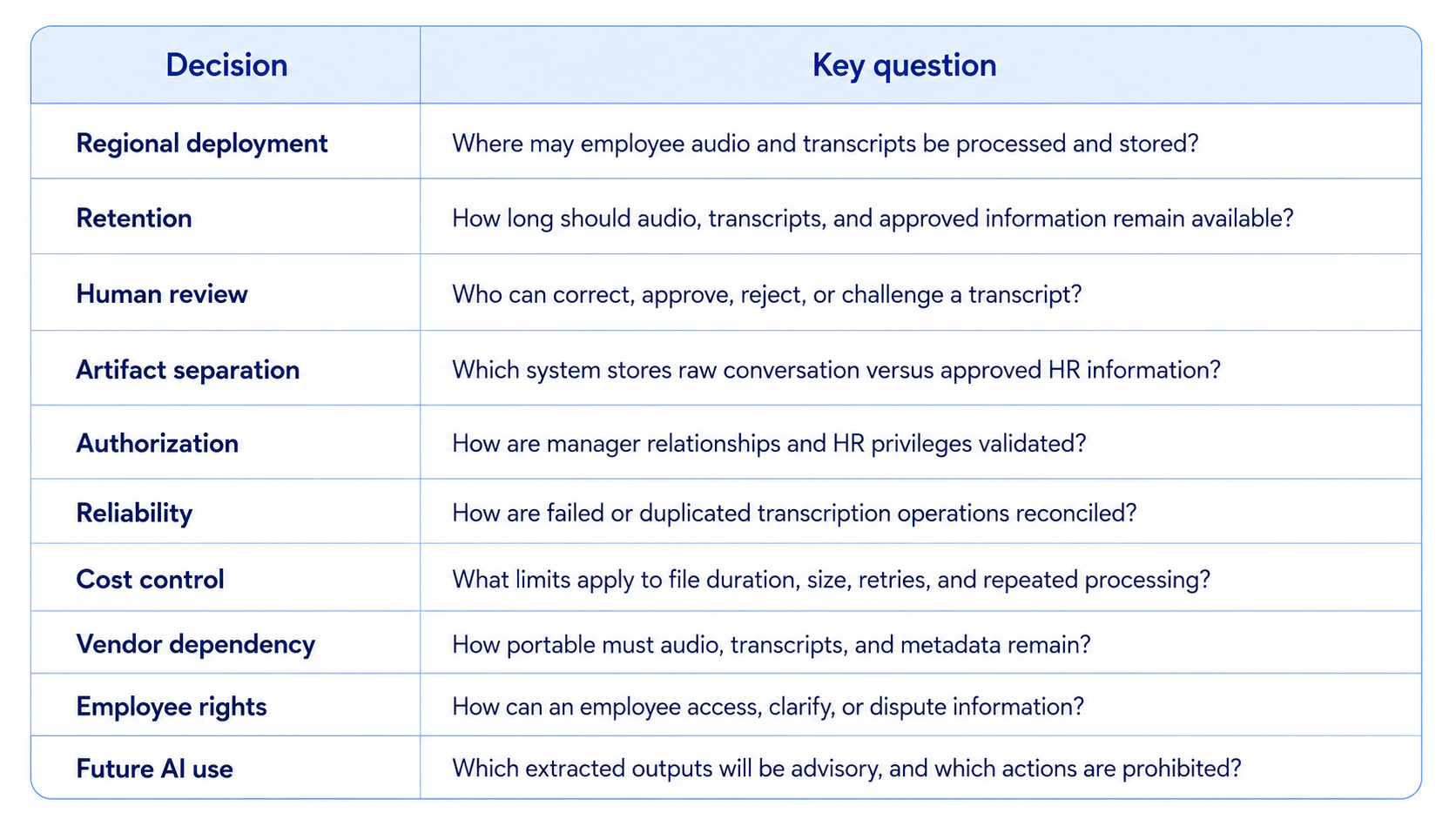
Architectural Decisions for CTOs and Senior Architects

The first milestone raises several decisions that should be made before expanding the platform.

Architectural Decisions for CTOs and Senior Architects

The first milestone raises several decisions that should be made before expanding the platform.

Architectural Decisions for CTOs and Senior Architects

The important architectural principle is that the transcript is evidence to be reviewed—not a decision to be accepted.

Key Takeaways

The first milestone raises several decisions that should be made before expanding the platform.

  • One-to-one meeting records are difficult to maintain because managers must participate in and document the conversation simultaneously.
  • Automated transcription provides a more complete starting point, but it does not produce an automatically approved HR record.
  • Cloud Storage can hold private recordings, while Speech-to-Text V2 processes long audio asynchronously.
  • Cloud Run supports separation between the application API and background transcription logic.
  • Firestore can maintain meeting status, artifact references, reviewer information, and audit metadata.
  • IAM permissions should be assigned to dedicated service identities according to least privilege.
  • Original and reviewed transcripts must be stored separately.
  • Consent, retention, authorization, and human review are core architecture requirements.
  • No transcript or later AI-generated output should independently determine an employment outcome.

Conclusion

At the end of Part 1, the application can:

  • Accept a recorded HR one-to-one meeting
  • Confirm that required consent information has been captured
  • Store the recording in a private Cloud Storage location
  • Transcribe the audio asynchronously with Speech-to-Text V2
  • Track processing state and failures
  • Save the original transcript
  • Display the result for authorized human review
  • Preserve a separate reviewed version with audit information

This is deliberately a controlled first milestone.

Before an organization asks an AI agent to identify achievements, performance concerns, goals, or annual-review evidence, it needs a trustworthy source workflow. That workflow must protect employee information, preserve provenance, limit access, and ensure that people—not automated components—remain accountable for consequential decisions.

FAMRO helps organizations design and implement secure Google Cloud applications, AI-assisted enterprise workflows, Cloud Run services, data architectures, and governed automation solutions. We can help your team move from an initial transcription prototype to a production-ready HR meeting assistant with appropriate security boundaries, human-review controls, observability, and integration architecture.

To help organizations get started, we offer a free initial consultation focused on your agentic HR meeting assistant and Google Cloud architecture—no obligation, no generic pitch.

If your organization wants to convert one-to-one conversations into reliable, reviewable annual progress information with confidence—not guesswork—now is the time to establish the right foundation.

🌐 Learn more: Visit Our Homepage

💬 WhatsApp: +971-505-208-240

Design a Secure Agentic HR Assistant on Google Cloud

FAMRO helps organizations design secure AI-assisted HR workflows using Google Cloud, including Cloud Run services, transcription pipelines, access controls, human-review processes, audit trails, and production-ready integration architecture

Frequently Asked Questions

Why use asynchronous transcription?

One-to-one recordings may last much longer than a normal web request. Asynchronous batch recognition allows the application to submit the audio, return control to the user, and update the meeting record when processing finishes.

Should the full transcript be stored in Firestore?

It can be, depending on size, query requirements, and policy. A common design stores larger transcript artifacts in Cloud Storage and keeps searchable metadata, status, and selected reviewed content in Firestore.

Can the original audio be deleted after transcription?

Technically, yes. Whether it should be deleted depends on the organization’s retention policy, legal obligations, review workflow, and dispute-resolution requirements. The deletion rule should be approved before production use.

Is employee consent alone sufficient?

Not necessarily. Recording requirements vary by jurisdiction and organizational context. Consent should be part of a broader policy covering notice, purpose, access, retention, employee rights, and acceptable use.

Can Speech-to-Text identify the manager and employee automatically?

Speech-recognition systems may distinguish speakers under supported configurations, but speaker labels are not the same as verified identity. An authorized reviewer should confirm attribution before information is approved.

Should transcript corrections overwrite the original?

No. Preserve the original machine-generated transcript and create a reviewed version with reviewer identity, timestamps, and change history.

Does this architecture make the system agentic?

Part 1 establishes the secure data and workflow foundation. More agentic capabilities appear when later components extract candidate information, retrieve historical commitments, identify unresolved actions, and prepare annual-report drafts. Those capabilities should remain bounded by human approval.

References