FAMRO logo
  • Home
  • Overview
  • Challenge
  • Solution
  • Outcomes
Contact Us
FAMRO logo
Home Overview Challenge Solution Outcomes
Privacy Mission Contact
Scroll
00
Case Study
CLD
Case Study
Cloud Migration
Healthcare

Cloud Migration & Modernization

Digitizing a paper-based healthcare network and moving operations to a centralized, cloud-backed platform.

This case study is based on a healthcare institution modernization program covering clinic digitization, offline-capable workflows, centralized reporting, and cloud infrastructure rollout across 35 sites.

Read Case Study Discuss Your Migration

Overview

Replacing fragmented paper processes with a connected digital operating model for a multi-clinic healthcare network.

The organization served low-income communities through a distributed clinic network, but paper-based records, disconnected administration, and weak digital infrastructure were creating operational drag, reporting gaps, and unnecessary cost.

Sector: Healthcare
Footprint: 35 Clinics
Engagement: Digitization + Cloud Migration
Stack: Flask / React / AWS / Postgres

Case Summary

The client is a non-profit healthcare organization operating more than 35 clinics in underserved neighborhoods. It supports roughly 100,000 to 150,000 patients annually and needed to move away from manual, paper-heavy operations.

The engagement focused on digitizing clinic workflows, creating a centralized cloud-based information hub, and giving each clinic the ability to continue operating even during connectivity issues.

The target outcome was not only a software rollout, but a modernization of patient flow, inventory control, reporting, administration, and third-party interoperability.

Operational Context

Before modernization, the organization depended on handwritten records, physical archives, and disconnected facility processes. That made it harder to manage inventory, analyze clinical trends, coordinate staff, and share information across sites.

The clinics also lacked dependable digital infrastructure for lab integrations, standardized reporting, and efficient queue management, creating friction for staff, volunteers, and patients alike.

The modernization strategy therefore needed to combine software, infrastructure, local clinic usability, and practical fallbacks for unreliable internet conditions.

What Needed To Change

  • Replace slow paper workflows with structured digital records and standardized data capture.
  • Improve clinical reporting so disease patterns and operational metrics could be surfaced quickly.
  • Reduce medicine wastage, theft, and poor inventory visibility across distributed sites.
  • Strengthen facility administration, staff management, and utility tracking.
  • Enable third-party integrations with labs and attendance systems through formal interfaces.
  • Reduce queue disputes and improve patient flow for volunteer-led doctors working under time pressure.

Engagement Profile

Primary objective: Digitize clinic operations and centralize information in the cloud.

Modernization scope: Mobile clinic workflows, head-office web platform, infrastructure, integrations, and analytics readiness.

Delivery constraint: Clinics needed local resilience even if internet connectivity became unstable or unavailable.

Challenge

The migration had to solve operational problems, not just replace paper with screens.

Transformation Drivers

Area Existing Constraint Operational Impact Required Improvement
Clinical records Handwritten and inconsistent record capture. Poor data quality, weak research capability, and no dependable analytics baseline. Standardize digital data entry and centralize records.
Inventory No real-time stock visibility across sites. Medicine expiry, wastage, and theft risk. Introduce trackable inventory workflows with barcode support.
Reporting Reports were difficult to generate quickly from paper archives. Slow disease-response reporting and limited management visibility. Enable centralized reporting and BI-ready data structures.
Facility administration Operational data was fragmented across people and locations. Harder staff, rent, utility, and volunteer coordination. Provide a shared digital system for office and clinic administration.
Third-party interoperability No digital platform for external labs or biometric systems. Manual handoffs and preventable admin overhead. Expose integration points through formal APIs and standards.
Patient flow No queue management system at clinics. Volunteer doctor time was lost resolving patient disputes. Introduce structured queue management at the point of care.
Archives and security Patient data was stored physically. Higher storage cost and exposure to loss, damage, or mishandling. Shift records to protected digital systems with better retention control.

Why This Was A Modernization Problem

Scale without coordination. Running 35 clinics on paper created friction across every shared function, from stock control to executive reporting.

Data without structure. Even when information existed, inconsistent paper capture meant it could not reliably support clinical insight, research, or ecosystem integrations.

Infrastructure without resilience. A digital solution had to work in real clinic conditions, including unstable connectivity, not just in ideal office-network scenarios.

Growth without repeatability. The organization needed a repeatable operating model that could be piloted, trained, and rolled out network-wide.

Solution

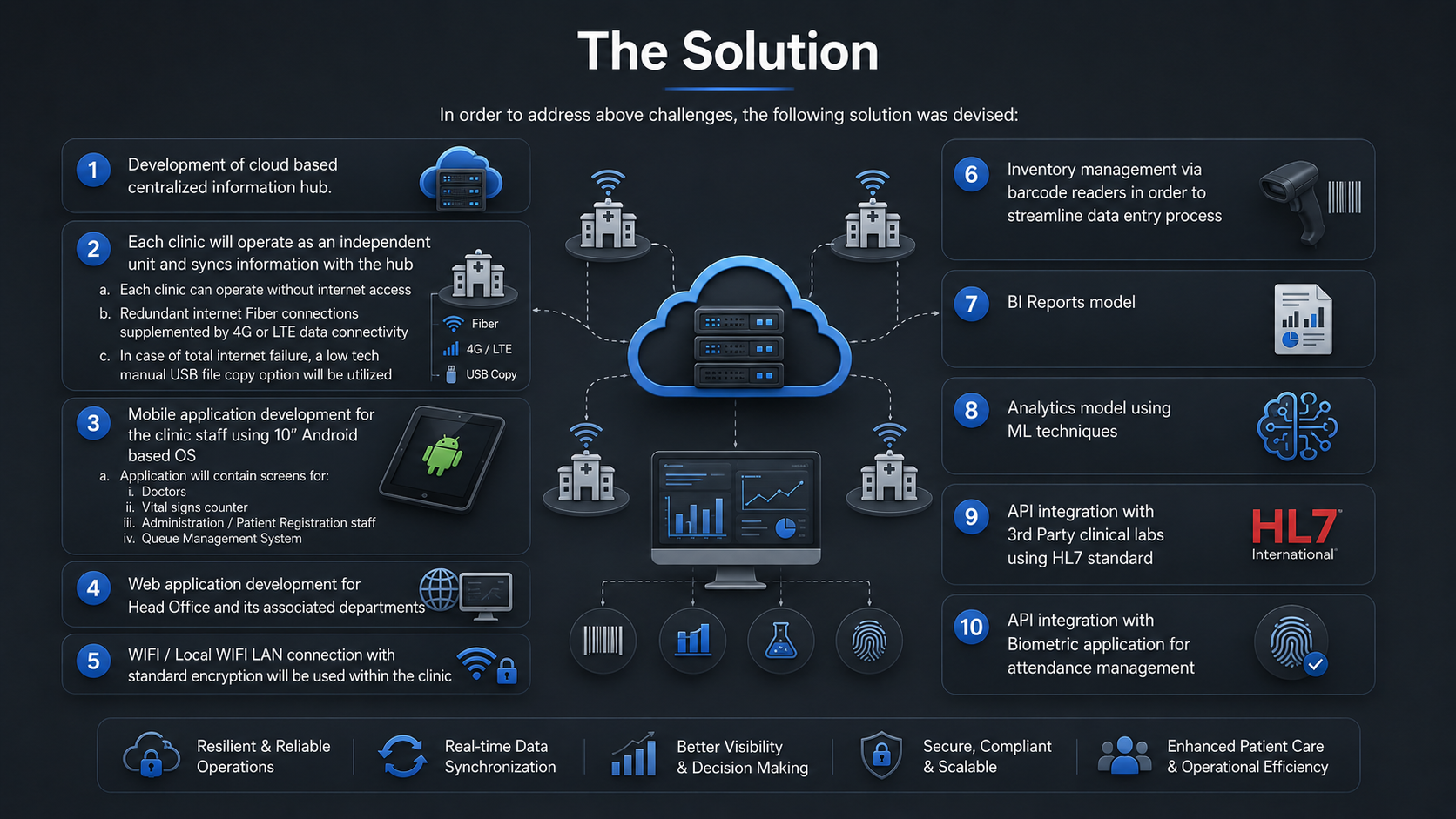
The solution combined centralized cloud architecture with clinic-level resilience and role-specific digital workflows.

Centralized Cloud Hub

  • Built a cloud-based central information hub to consolidate data from the full clinic network.
  • Designed each clinic to operate as its own unit while synchronizing records back to the central platform.
  • Created the foundation for head-office visibility, reporting, and cross-location oversight.
Healthcare cloud migration solution

Offline-Capable Clinic Operations

  • Allowed clinics to continue operating without continuous internet access.
  • Planned redundant fiber connectivity supplemented by 4G or LTE links.
  • Included a low-tech USB transfer fallback for total connectivity failure scenarios.

Digital Workflows At The Point Of Care

  • Developed Android-based tablet workflows for doctors, vital-signs staff, administration teams, and patient registration.
  • Added a queue management system to reduce clinic-floor disputes and improve volunteer doctor utilization.
  • Standardized how patient and operational data enters the system at the clinic level.

Operational Extensions

  • Introduced barcode-enabled inventory management to improve stock handling and reduce manual entry friction.
  • Prepared BI reporting and analytics workflows, including future ML-driven analysis.
  • Integrated external labs using HL7 and connected biometric attendance workflows through APIs.

Architecture

A practical cloud stack supported clinic synchronization, integrations, and centralized administration.

System Model

The platform followed a hub-and-spoke operating model. Clinics captured and used data locally, synchronized back to a central cloud environment, and exposed information to head-office users and integrated partners.

This balanced three needs at once: clinic usability, central oversight, and resilience during internet interruptions.

Application Technologies

Component Technology / Framework
REST API Python Flask
Database Postgres
Web backend Python Flask
Cache Redis
Frontend React
Mobile application React Native
Data exchange protocol HL7

Infrastructure Stack

Component Technology / Framework
Server / VM Amazon EC2
Load balancer AWS ALB
DDoS protection Cloudflare
CDN CloudFront
Storage S3
Email SES
Monitoring and alerts Zabbix, Pingdom, CloudWatch, Nagios
Repository / CI-CD GitLab and Jenkins

Rollout Approach

The rollout started with a pilot clinic, paired with staff training, before wider deployment across the network. That sequencing helped reduce adoption risk and created a path to standardize usage before expanding further.

The result was a modernization plan designed around real operating constraints instead of assuming uniform connectivity, staffing patterns, or process maturity across all clinics.

Outcomes

The first six months showed measurable gains in adoption, throughput, inventory control, and clinic organization.

According to the source case study, the deployment improved both operational discipline and service delivery during the pilot period and early rollout.

Recorded Results

  • Staff adapted to the paperless system despite initial resistance to change.
  • Average patient handling increased by 13 percent across the clinics.
  • Medicine wastage and theft decreased by 18 percent.
  • Laboratory results became available immediately once released by partner labs.
  • Additional laboratories were onboarded after HL7-based integration was introduced.
  • Overcrowding and disorganization in clinics fell by 30 percent.

Business Impact

Better care operations. Clinics could process more patients with less friction and less time lost to manual coordination.

Stronger control. Centralized data, inventory visibility, and structured reporting improved oversight for leadership and administrators.

Lower waste. The combination of digital inventory workflows and cleaner operations reduced preventable loss.

Integration readiness. Formal APIs and HL7 support made the healthcare network easier to connect with external partners.

Scalable foundation. The organization moved from fragile paper dependencies toward a repeatable digital operating model that could expand more confidently.

Planning A Migration?

If your organization is still carrying manual workflows, disconnected systems, or legacy infrastructure, modernization should solve operations end to end.

Reach out if you want FAMRO to help plan cloud migration, digitization, workflow redesign, integrations, and production-ready rollout strategy.

Book a Free Review Contact Us
FAMRO-LLC — 2026
Mission Statement & Values Privacy Contact Us

Book a free review

Tell us what you are evaluating. We will review your current setup and help identify technical risks, cloud issues, automation gaps, and practical next steps.