Your Cloud Bill Is Lying to You: The Real Cost of “Pay As You Go” in 2026

Cloud cost optimization requires more than negotiating discounts. This guide explains why pay-as-you-go cloud bills can grow faster than business usage and how idle resources, oversized compute, storage sprawl, data transfer, and lift-and-shift migrations create avoidable costs. Learn how rightsizing, FinOps practices, lifecycle automation, cost ownership, and cloud cost audits can improve AWS and Google Cloud economics.

“Pay as you go” is one of cloud computing’s most attractive promises. Instead of buying servers years in advance, organizations can provision infrastructure when they need it and pay according to consumption.

The problem is that pay as you go does not mean pay only for what creates business value.

A virtual machine can be running while doing almost nothing. Storage can remain billable years after the project that created it disappeared. Development environments can run overnight. Traffic can cross regions or availability zones without anyone connecting the architecture decision to the networking charge. And a workload moved directly from an on-premises environment can carry years of overprovisioning into a consumption-based pricing model.

That distinction matters more in 2026. Flexera’s 2026 State of the Cloud Report found that 85% of respondents identified managing cloud costs as a top challenge, while estimated wasted IaaS and PaaS cloud spend increased to 29%.

For enterprises and scaleups, the lesson is straightforward: cloud cost is not automatically optimized by cloud adoption.

Why Cloud Bills Grow Faster Than Usage

A company may increase transactions by 10% and still see its cloud bill rise 25%. That does not necessarily mean the provider increased prices or the application suddenly became dramatically more expensive.

Often, infrastructure and business activity have simply stopped moving together.

Idle and “Zombie” Resources

Cloud environments accumulate infrastructure surprisingly quickly.

A developer creates a VM for testing. A team launches a temporary database during a migration. A project creates load balancers, snapshots and persistent disks. Six months later, the project has changed—but some of those resources remain.

AWS explicitly recommends tracking project and resource lifecycles so organizations can identify resources that no longer have a useful purpose or owner. Its cost-management tooling similarly identifies idle resources, over-provisioned infrastructure and rightsizing opportunities.

Individually, these resources may look insignificant. Across dozens of teams and hundreds of cloud accounts or projects, they become material.

Oversized Compute

The cloud also exposes a habit inherited from traditional infrastructure: provisioning for the worst case.

If an application occasionally needs 16 vCPUs but normally needs four, running a 16-vCPU instance continuously means paying for headroom most of the month.

Google Cloud’s architecture guidance recommends matching resources to actual workload requirements and using autoscaling for dynamic demand rather than maintaining unnecessary fixed capacity.

Forgotten Storage

Storage is another quiet accumulator.

Snapshots, backups, logs, old database exports, unattached disks and duplicated datasets can survive long after their operational value disappears. Lifecycle policies and automated movement into lower-cost storage tiers help prevent data retention from becoming permanent by default.

Data Transfer and Egress

Networking costs are particularly easy to underestimate because architecture diagrams show connections—not invoices.

Traffic between regions, availability zones, services, the public internet and external platforms can have different cost implications. AWS specifically recommends modeling data-transfer cost by source, destination and volume because these charges are frequently neglected during architecture design.

Example: The $38,000 Application That “Should” Cost $25,000

Consider an illustrative SaaS platform whose engineering team expects infrastructure to cost approximately $25,000 per month.

A cost audit finds:

  • $3,200 in development and staging compute running continuously
  • $2,500 in oversized production instances
  • $1,800 in old snapshots and unattached storage
  • $3,500 in unexpected cross-zone, cross-region and internet data transfer
  • $2,000 in miscellaneous resources without clear ownership

The application has not suddenly become 50% busier. The infrastructure around it has become 50% more expensive.

That is the visibility problem hidden inside “pay as you go.”

The “Lift and Shift” Cost Trap

Lift and shift—moving workloads to cloud infrastructure with minimal application changes—can be the right migration strategy when speed, risk reduction or data-center exit deadlines matter.

It becomes expensive when teams assume migration itself equals optimization.

An on-premises application might run on eight VMs sized for peak demand because additional physical capacity takes weeks to procure. Moving those eight machines directly into equivalent cloud instances preserves the old capacity model while changing the billing model.

You now pay continuously for capacity that cloud architecture could potentially provision dynamically.

Cloud migration therefore needs to reconsider four questions:

Capacity: What does the workload actually consume rather than what hardware was historically allocated?

Architecture: Can components scale independently? Can managed or elastic services replace fixed infrastructure?

Lifecycle: When should development, test, temporary and migration resources automatically stop or disappear?

Ownership: Which product, team or cost center is responsible for each resource?

The FinOps Framework treats this allocation problem as fundamental: accounts, projects, tags, labels and organizational metadata should connect technology costs to responsible teams and business units.

Example: Migrating 20 Servers

Imagine an enterprise running 20 on-premises virtual machines.

The migration team maps every VM to a similarly sized cloud instance. Technically, the project succeeds: applications work and the data center can be retired.

But utilization analysis later shows that 12 machines rarely exceed 25% CPU, four are non-production systems that could shut down outside working hours, and several services exchange large volumes of data across architectural boundaries.

The problem is not cloud pricing. The migration reproduced an infrastructure design built for a different economic model.

A better migration would first establish a utilization baseline, identify steady-state versus variable demand, model data movement, classify storage and determine which workloads genuinely require fixed capacity.

A Practical Cloud Cost-Audit Framework

A useful cloud cost audit does not begin by asking, “How do we reduce the bill?”

It asks: What are we paying for, why does it exist, and who owns the decision?

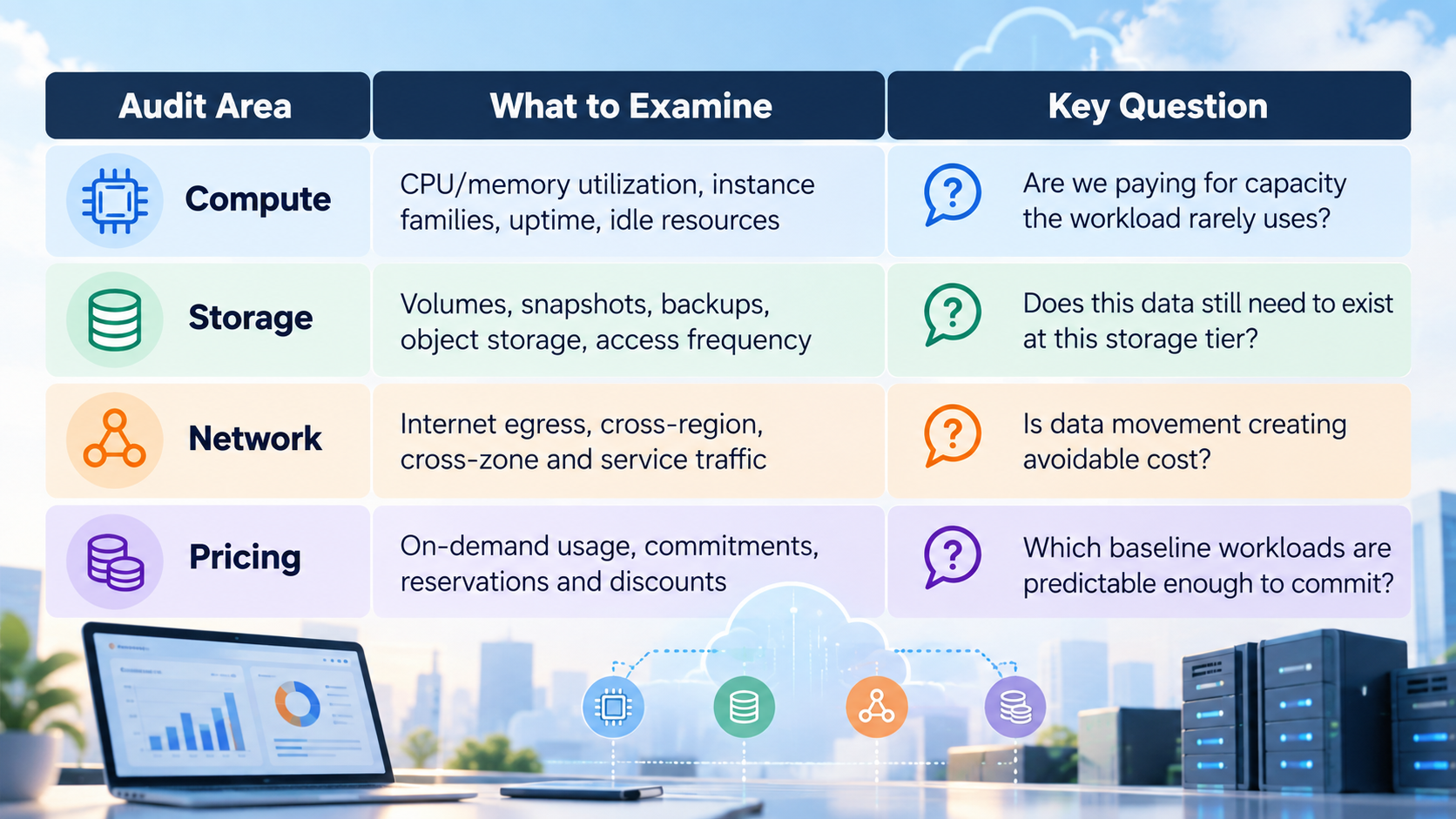
For most enterprises and scaleups, four areas reveal the majority of actionable issues.

A Practical Cloud Cost-Audit Framework

Start with at least 30 days of billing and utilization data, and use longer periods for seasonal businesses.

Then map resources to applications, environments and owners. “Unknown” should itself become an audit category. If nobody can explain why a resource exists, that is an operational control problem even before it becomes a cost problem.

Finally, separate variable workloads from predictable baseline consumption. AWS provides Savings Plans and reservation recommendations alongside rightsizing and idle-resource detection. Google Cloud similarly positions committed use discounts for predictable workloads, typically through one- or three-year commitments.

The sequence matters: do not commit to inefficient infrastructure simply because a discount makes it cheaper. Remove waste and rightsize first; then evaluate commitments against the remaining steady-state demand.

Quick Wins vs. Structural Cost Fixes

Not every cloud cost problem requires an architecture project.

Some improvements can begin immediately. Others require changes to how applications and engineering teams operate.

Quick Wins

Start by:

  1. Terminating confirmed unused resources.
  2. Rightsizing consistently underutilized compute.
  3. Scheduling non-production environments to stop outside required hours.
  4. Deleting obsolete snapshots, disks and backups according to retention requirements.
  5. Moving infrequently accessed data into appropriate lower-cost storage tiers.
  6. Reviewing stable baseline usage for suitable commitment-based pricing.

AWS’s own cost-optimization guidance includes stopping unused instances, rightsizing based on utilization, using autoscaling, reviewing commitments for predictable workloads and applying storage lifecycle policies.

Structural Fixes

The larger savings often require engineering work.

Autoscaling: Design capacity to follow real demand instead of remaining permanently provisioned for peaks.

Storage lifecycle engineering: Make retention, archival and deletion policies part of the platform rather than periodic cleanup exercises.

Workload redesign: Reduce unnecessary cross-region traffic, separate independently scalable components and evaluate managed or serverless services where their economics fit the workload.

Cost ownership: Require resources to identify application, environment, cost center and owner at provisioning time.

Unit economics: Move beyond “our cloud bill is $200,000” toward measures such as cost per customer, transaction, API request or workload. The FinOps Foundation describes unit economics as a way to connect technology spending directly with business value.

How to Make the Change Stick

A practical operating model is:

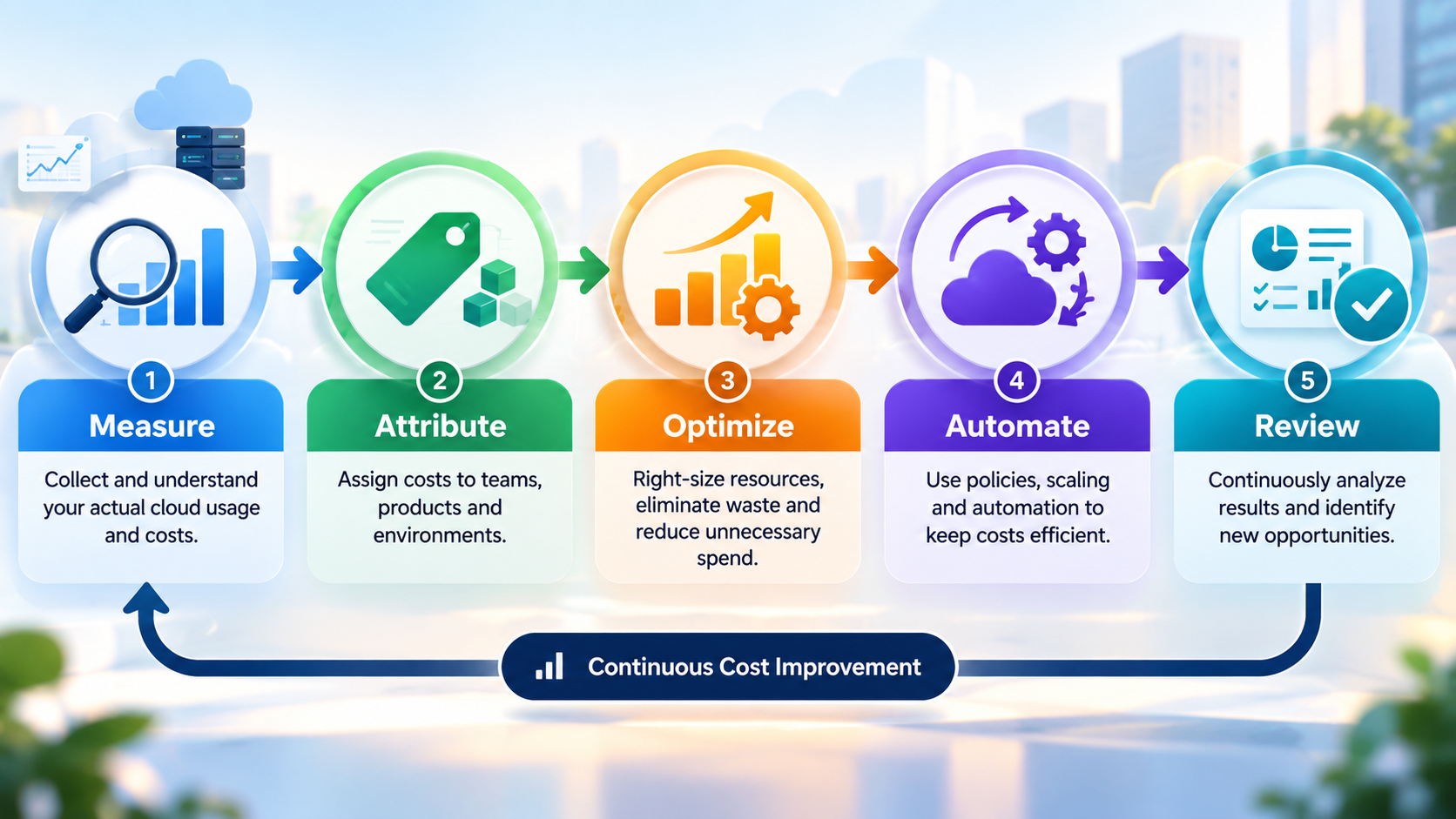
Measure → Attribute → Optimize → Automate → Review.

practical operating model

Measure actual consumption. Attribute it to an owner. Optimize obvious inefficiencies. Automate lifecycle and scaling decisions wherever practical. Then review the environment continuously.

This turns cloud optimization from an annual finance exercise into an engineering discipline.

Key Takeaways for CTOs and Technology Strategy Leaders

Cloud economics improve when infrastructure consumption is measurable, attributable, elastic, and aligned with business demand.

  • Audit before optimizing: Establish billing and utilization baselines before making migration or commitment decisions.
  • Remove waste before buying discounts: Eliminate idle resources and rightsize workloads before evaluating Savings Plans, reservations, or committed-use pricing.
  • Design for elasticity: Autoscaling and workload-aware architecture can prevent permanent overprovisioning for occasional peaks.
  • Make ownership mandatory: Connect resources to applications, environments, cost centers, and accountable teams.
  • Track unit economics: Measure cost per customer, transaction, API request, or workload—not just the total monthly cloud bill.
  • Automate lifecycle controls: Scheduling, retention policies, storage tiering, and automated cleanup reduce recurring infrastructure waste.

Conclusion

The biggest cloud-cost mistake is not choosing the wrong instance family.

It is migrating without understanding what the existing workload actually needs.

Before moving infrastructure, organizations should know which systems consume capacity, which resources are underutilized, how data moves, what must be retained, which workloads are predictable, and who owns the resulting spend.

That is why FAMRO approaches cloud migration as more than infrastructure relocation. Its Cloud Migration & Modernization work covers migration planning, architecture review, infrastructure setup, observability, security, production readiness and cost optimization across platforms including AWS and Google Cloud.

For migration engagements, the cost conversation should start before workloads move: establish the current baseline, audit resource requirements, identify obvious waste and design the target environment around realistic consumption rather than historical allocation.

Combined with FAMRO’s AWS/GCP-certified engineering model, flat organizational structure and no-consultant-markup approach, that gives enterprises and scaleups a practical path to cloud adoption focused on engineering outcomes rather than simply reproducing infrastructure on somebody else’s servers.

Cloud can absolutely create a more flexible and financially efficient operating model. But “pay as you go” only works in your favor when you know exactly what you are paying for.

To help organizations get started, FAMRO offers a free initial consultation focused on your cloud cost baseline, migration architecture and optimization opportunities—no obligation, no generic pitch.

If your organization is planning an AWS or GCP migration and wants cost clarity before workloads start moving, now is the time to audit first and migrate second.

🌐 Learn more: Visit Our Homepage

💬 WhatsApp: +971-505-208-240

Frequently Asked Questions

Why can pay-as-you-go cloud become expensive?

Pay-as-you-go charges for resources consumed, not the business value they create. Idle compute, oversized instances, forgotten storage, unnecessary data transfer, and always-on non-production environments can therefore increase costs without increasing useful workload.

What is cloud cost optimization?

Cloud cost optimization is the ongoing process of matching infrastructure consumption and pricing to actual workload requirements while maintaining the required performance, reliability, security, and business outcomes.

What should a cloud cost audit examine?

A cloud cost audit should examine billing and utilization data, idle resources, compute sizing, storage, data transfer, workload patterns, pricing commitments, resource ownership, and the relationship between infrastructure costs and business activity.

Why can lift-and-shift migrations increase cloud costs?

Lift-and-shift migrations can preserve an on-premises capacity model in a consumption-based environment. Moving oversized or permanently provisioned servers directly to cloud infrastructure can carry existing inefficiencies into the new billing model.

Should companies buy cloud commitments before rightsizing?

Organizations should generally identify waste and rightsize infrastructure before evaluating commitment-based pricing. Otherwise, a discount can lock in spending on capacity the workload does not actually require.

How does FinOps help control cloud spending?

FinOps helps connect technology consumption with financial accountability by allocating cloud costs to responsible teams, applications, products, or business units and supporting decisions based on measurable business value.

Which cloud cost metrics should CTOs track?

Alongside total cloud spend, technology leaders should track utilization, idle capacity, cost allocation, commitment coverage, data-transfer costs, and unit economics such as cost per customer, transaction, API request, or workload.

References