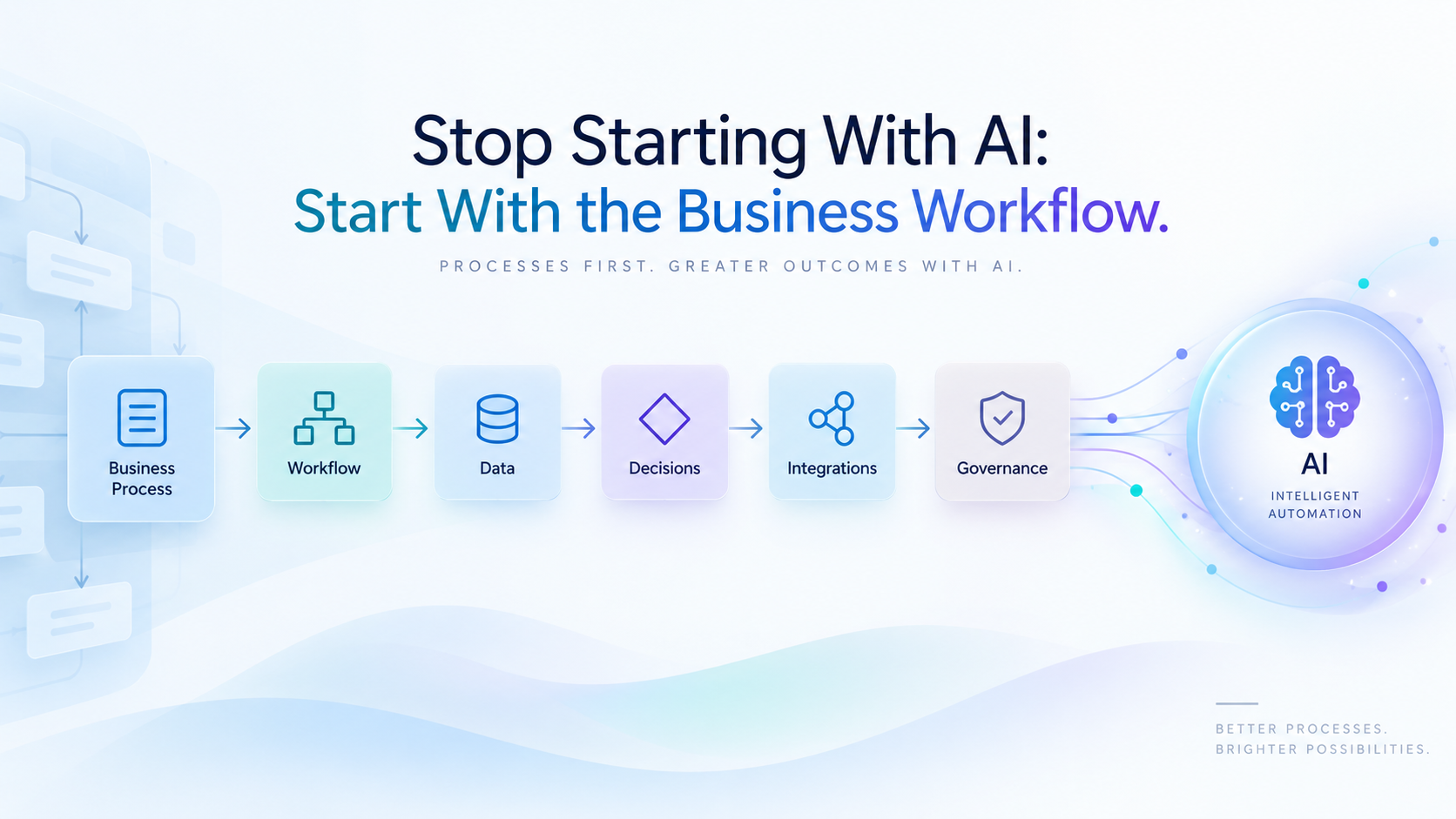
Stop Starting With AI: Start With the Business Workflow

A practical guide for CTOs, founders, and technology leaders on designing enterprise AI from the workflow first. Learn how to identify where AI adds value, where traditional automation is better, and how to build safer, more scalable AI systems around real operational needs.

Enterprise AI programs often begin with the wrong question.

Which LLM should we use? Should we build agents? Which orchestration framework is best? Do we need retrieval-augmented generation? Should we standardize on one AI platform?

These are legitimate technical questions—but they are usually not the first questions a CTO, CIO, or Chief AI Officer should answer.

The starting point should be the business workflow.

Before selecting an AI model or agent framework, organizations need to understand how work actually moves: who initiates it, which systems are involved, where information comes from, which decisions are made, where exceptions occur, who approves what, and what happens when something goes wrong.

Only then can leadership determine where AI belongs.

McKinsey’s 2025 global AI survey reinforces this point. Among the organizational practices it evaluated, workflow redesign had the strongest relationship with reported EBIT impact from generative AI. Yet only 21% of respondents using generative AI said their organizations had fundamentally redesigned at least some workflows.

The lesson is straightforward:

Define the Workflow Before Selecting the Technology

An enterprise workflow is more than a sequence of tasks.

It represents how people, business rules, applications, data, approvals, and operational exceptions combine to produce an outcome.

Consider a customer onboarding process. A high-level description might simply say:

Receive application → review information → approve customer → create account.

The real operating workflow could involve CRM data, identity verification, document collection, sanctions screening, credit checks, contractual approvals, ERP provisioning, exception queues, compliance reviews, and customer notifications.

If the technology team begins by asking an LLM to “automate customer onboarding,” it is already working with an incomplete representation of the problem.

Before discussing AI architecture, teams should determine:

  • What triggers the workflow?
  • Which teams participate?
  • Which applications are systems of record?
  • What data is required at each stage?
  • Which decisions are deterministic and which require judgment?
  • Where do handoffs and delays occur?
  • What exceptions require escalation?
  • Which actions have regulatory, financial, or customer consequences?
  • What evidence must be retained?

This process exposes the real automation opportunity.

Sometimes AI is the answer. Sometimes the bigger problem is fragmented data, manual integration, unclear decision rights, or an approval process that should have been redesigned years ago.

AI should not be used to automate unnecessary complexity.

Follow the Sequence: Workflow → Data → Decisions → Integrations → Controls → AI

A practical enterprise AI architecture should follow a deliberate sequence:

Workflow → Data → Decisions → Integrations → Controls → AI

Each layer provides requirements for the next.
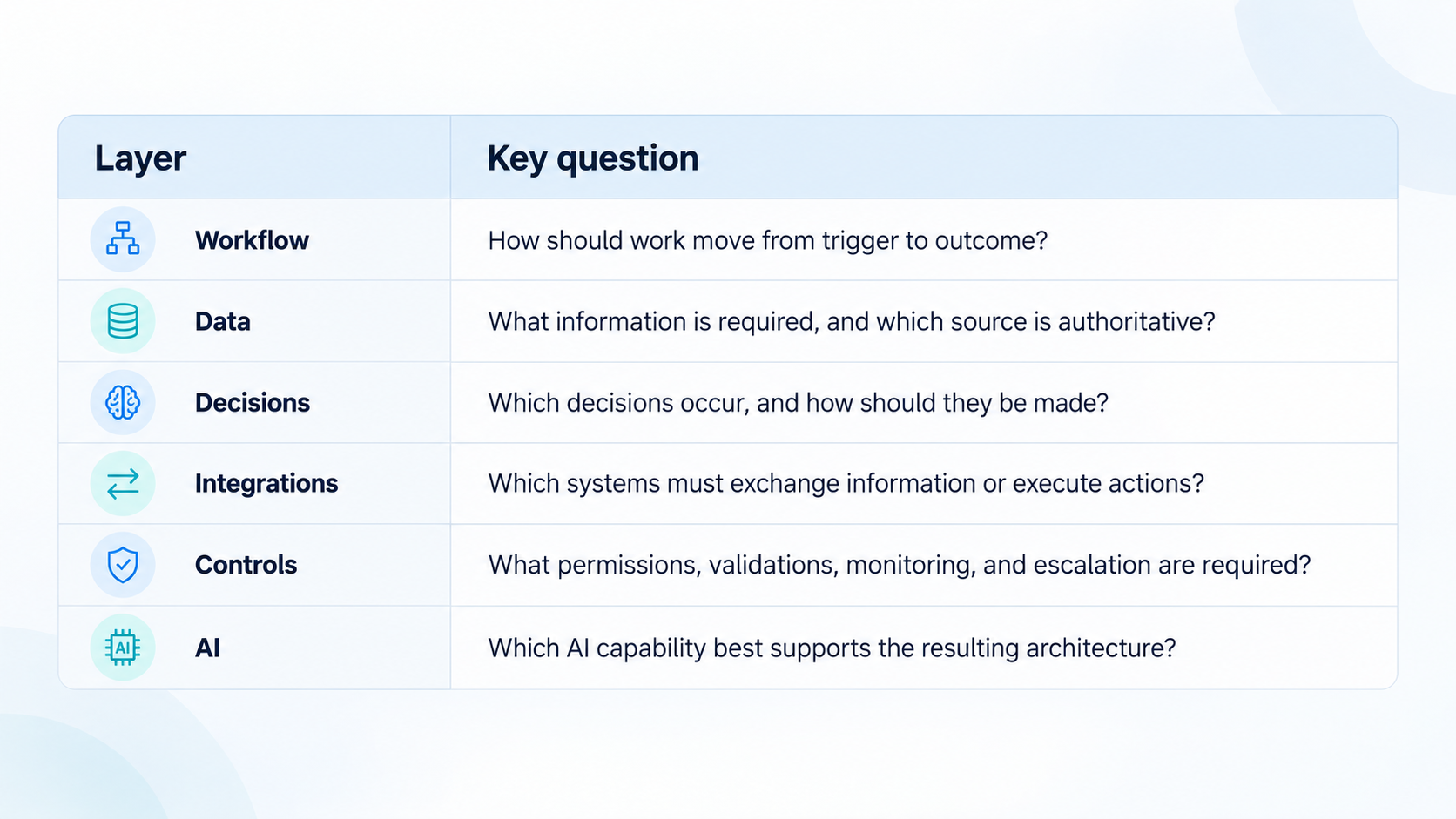
Follow the Sequence: Workflow → Data → Decisions → Integrations → Controls → AI

1. Workflow

Start with the operating process.

Map the happy path, but also document exceptions. In enterprise environments, exceptions often reveal more architectural requirements than standard transactions do.

A purchasing workflow, for example, may behave very differently when a vendor is new, a contract exceeds a threshold, a purchase involves restricted data, or budget approval is unavailable.

2. Data

Once the workflow is clear, identify the information required to execute it.

Determine:

  • systems of record;
  • data ownership;
  • quality requirements;
  • retention obligations;
  • sensitivity classifications;
  • contextual information AI may require.

This prevents teams from discovering halfway through implementation that the AI system cannot access the information necessary to make a useful recommendation.

3. Decisions

Separate decisions from tasks.

Some decisions are deterministic:

If invoice amount exceeds $50,000, require director approval.

Others require interpretation:

Does this contract clause materially increase operational risk?

The first belongs primarily in business rules or workflow logic. The second may justify AI assistance—but potentially with human review.

This distinction prevents expensive models from being used for work that conventional software can perform more reliably.

4. Integrations

Next, determine which systems the workflow must read from or write to.

An enterprise AI assistant that produces an excellent recommendation but cannot interact safely with Salesforce, SAP, ServiceNow, Microsoft 365, a document repository, or internal APIs may remain an interesting demonstration rather than an operational capability.

Integration requirements frequently influence architecture more than model selection does.

5. Controls

Before giving AI authority, determine what it is allowed to do.

Define identity, permissions, validation, auditability, monitoring, human approval, rollback, and escalation requirements.

6. AI

Only now should the organization select the AI capability.

At this point, teams can evaluate LLMs, smaller specialized models, retrieval architectures, agent frameworks, orchestration platforms, or conventional automation against actual operating requirements.

The model becomes an architectural decision—not the architecture itself.

Design Data, Decisions, and Integrations Around the Workflow

A workflow-first approach changes how enterprise AI systems are designed.

Suppose an organization wants to use AI to improve IT incident management.

Starting with the model might produce an agent that summarizes tickets and suggests resolutions.

Starting with the workflow exposes a broader architecture.

The team may discover that the system needs to:

  1. ingest incidents from ServiceNow;
  2. retrieve asset and configuration data;
  3. examine monitoring events;
  4. search approved knowledge articles;
  5. identify similar historical incidents;
  6. determine severity;
  7. recommend remediation;
  8. request human authorization for high-impact actions;
  9. update the ticket;
  10. retain evidence of the recommendation and resulting action.

Now the technical requirements are much clearer.

AI is responsible for selected interpretation and reasoning tasks. APIs provide system access. Identity controls determine what can be changed. Business rules establish deterministic boundaries. Observability captures what happened.

This is fundamentally different from connecting a general-purpose LLM to several enterprise applications and asking it to “manage incidents.”

MIT Sloan highlighted this broader shift in 2026, noting that AI's greatest effect may come from changing how tasks are sequenced, grouped, and handed off between humans and machines, rather than simply accelerating isolated activities.

Establish Controls Before Expanding AI Responsibilities

stablish Controls Before Expanding AI Responsibilities

The more responsibility AI receives, the more important operating controls become.

A system that summarizes documents has a different risk profile from an agent that can approve refunds, modify customer records, provision infrastructure, send external communications, or initiate payments.

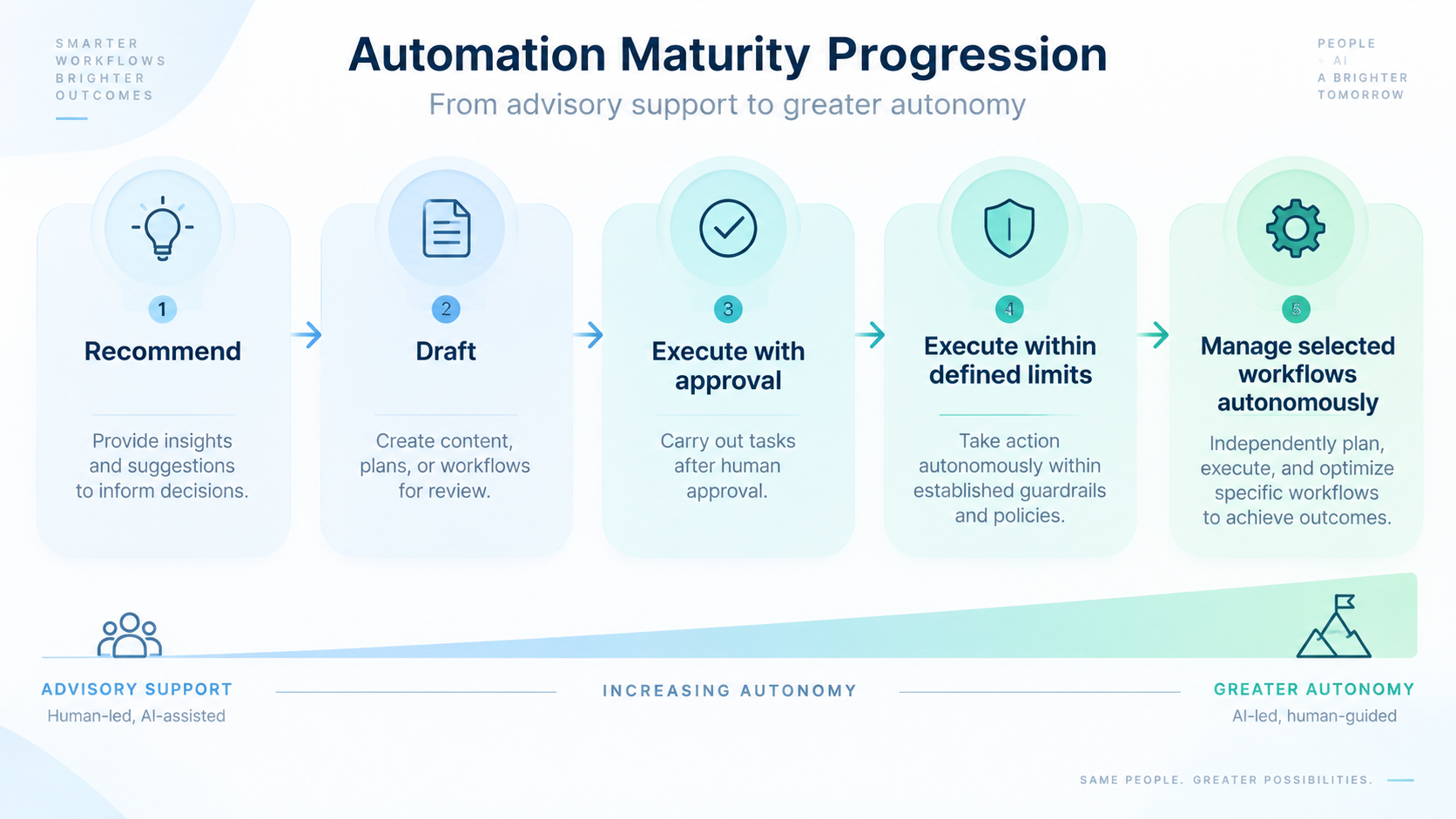
AI autonomy therefore should not be treated as an on/off decision.

Organizations can progressively expand responsibility:

Recommend → Draft → Execute with approval → Execute within defined limits → Manage selected workflows autonomously.

Recommend → Draft → Execute with approval → Execute within defined limits → Manage selected workflows autonomously

Each increase in responsibility should require corresponding controls.

Important controls include:

  • least-privilege access;
  • role- and attribute-based permissions;
  • input and output validation;
  • approved tool and API boundaries;
  • transaction limits;
  • human approval thresholds;
  • audit trails;
  • exception handling;
  • monitoring and alerting;
  • model and prompt versioning;
  • rollback mechanisms;
  • periodic performance and risk reviews.

NIST’s Generative AI Profile emphasizes governance, pre-deployment testing, oversight, tracking, documentation, and management controls as important components of generative AI risk management.

Security architecture must also account for AI-specific failure modes. OWASP identifies risks including prompt injection, sensitive information disclosure, improper output handling, and excessive agency—where AI systems receive more functionality, permissions, or autonomy than necessary.

For enterprise leaders, the principle is simple: increase autonomy only when controls mature alongside it.

Treat AI as a Component of the Operating Architecture

AI is not the entire system.

A production enterprise solution may include workflow orchestration, APIs, identity services, databases, event streams, search infrastructure, policy engines, observability platforms, approval mechanisms, conventional application code—and one or more AI models.

The appropriate model depends on that environment.

A lightweight classification model may outperform an expensive LLM for routing requests. Retrieval may be necessary where answers depend on proprietary documents. An agent may make sense when the workflow genuinely requires dynamic multi-step reasoning and tool use. Deterministic workflow automation may remain safer for high-volume, predictable transactions.

This is why beginning with a preferred AI platform can create architectural distortion.

Teams start modifying business requirements to fit what the tool does well.

The better approach is the reverse:

Define the operating architecture and make the AI earn its place within it.

As McKinsey summarized the broader transformation: “The value of AI comes from rewiring how companies run.”

Key Takeaways for CTOs and Technology Strategy Leaders

  • Start with the business outcome and workflow—not the LLM.
  • Map systems, handoffs, decisions, exceptions, and accountability before designing AI.
  • Follow the sequence Workflow → Data → Decisions → Integrations → Controls → AI.
  • Use deterministic software for deterministic decisions where appropriate.
  • Design enterprise integrations as first-class architecture components.
  • Establish permissions, validation, monitoring, escalation, and auditability before increasing AI autonomy.
  • Select models and agent frameworks based on operating requirements rather than market momentum.
  • Measure AI success through workflow outcomes such as cycle time, error reduction, operating cost, throughput, service quality, and risk—not model capability alone.

Conclusion

The organizations that generate lasting value from AI will not necessarily be those that adopt the newest models first. They will be those that understand where AI belongs in their operating model and build the architecture required to support it safely.

That means designing the workflow first, identifying the required data and decisions, connecting the right enterprise systems, establishing clear controls, and then selecting AI technologies that fit those requirements.

FAMRO helps organizations move from AI experimentation to practical implementation by designing business workflows, enterprise architectures, system integrations, automation layers, and governance controls around real operational requirements.

Whether you are evaluating an enterprise AI use case, designing an agentic workflow, modernizing legacy processes, or preparing AI capabilities for production, the goal should be the same: build an operating architecture in which AI can create measurable value without introducing uncontrolled complexity.

To help organizations get started, we offer a free initial consultation focused on your AI workflow and enterprise architecture—no obligation, no generic pitch.

If your organization is investing in enterprise AI and wants confidence—not guesswork—now is the time to design the workflow before choosing the technology.

🌐 Learn more: Visit Our Homepage

💬 WhatsApp: +971-505-208-240

Frequently Asked Questions

Why should enterprise AI projects start with the business workflow?

Starting with the workflow reveals the actual systems, data, decisions, approvals, exceptions, and controls involved. This helps teams determine where AI can create value instead of forcing a business process to fit a particular AI tool.

What is a workflow-first AI strategy?

A workflow-first AI strategy maps how work is performed before selecting models or agent frameworks. A practical sequence is workflow, data, decisions, integrations, controls, and then AI.

When should an enterprise use AI instead of traditional automation?

AI is most useful for tasks involving interpretation, reasoning, unstructured information, or dynamic decisions. Deterministic rules and predictable high-volume processes are often better handled with conventional software and workflow automation.

What controls are needed before increasing AI autonomy?

Organizations should define permissions, validation, human approval thresholds, audit trails, monitoring, escalation procedures, transaction limits, rollback mechanisms, and approved tool or API boundaries.

How do enterprise integrations affect AI architecture?

Integrations determine which systems an AI solution can safely read from or write to. APIs, identity services, systems of record, workflow platforms, and business applications often influence the architecture more than model selection.

How should organizations measure enterprise AI success?

Enterprise AI should be measured through workflow outcomes such as cycle time, operating cost, throughput, error reduction, service quality, compliance, and risk rather than model capability alone.

How can FAMRO help with enterprise AI workflow design?

FAMRO helps organizations assess business workflows, enterprise architecture, system integrations, automation layers, AI use cases, and governance controls before moving AI capabilities into production.

References