Document Processing
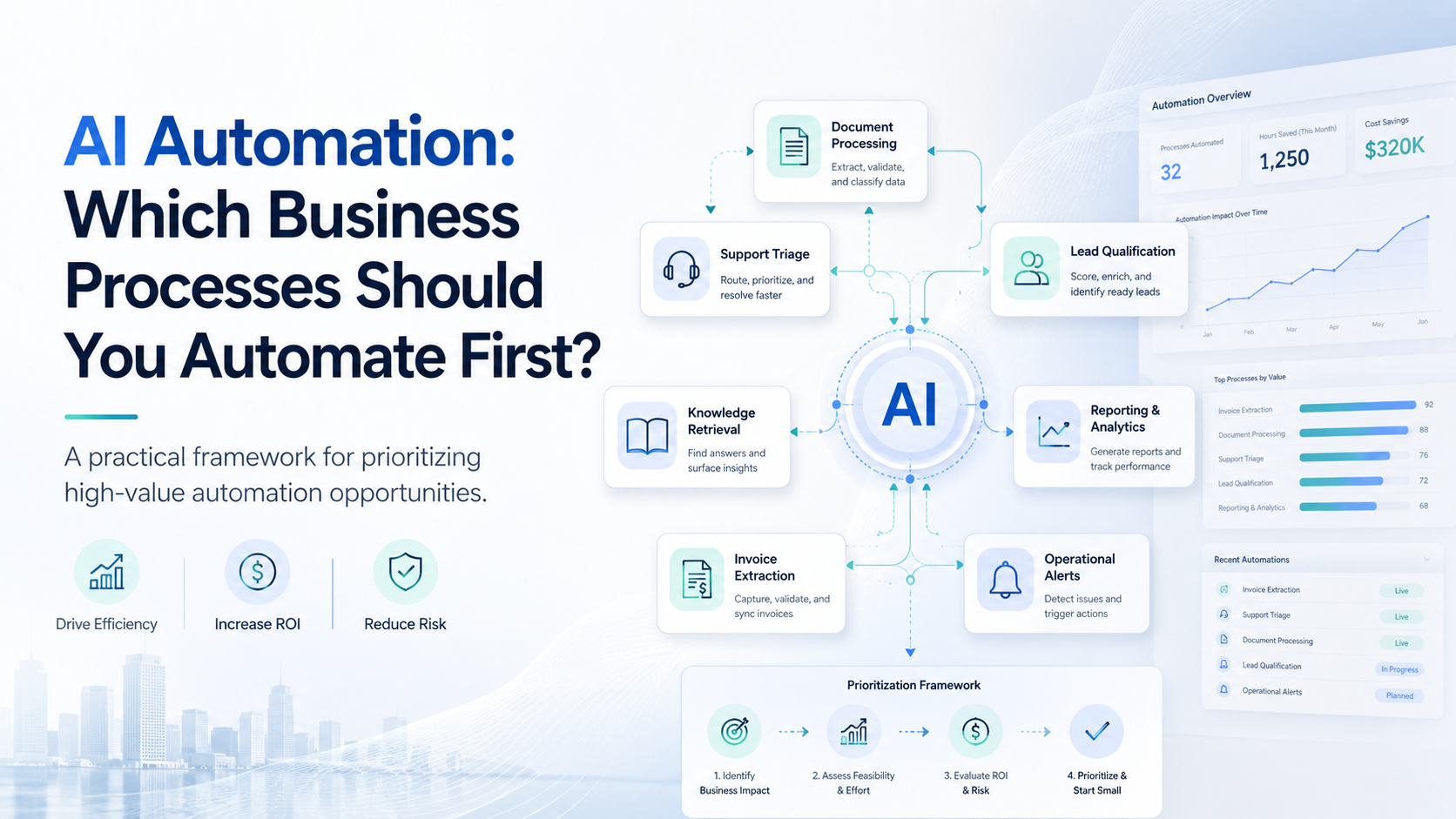
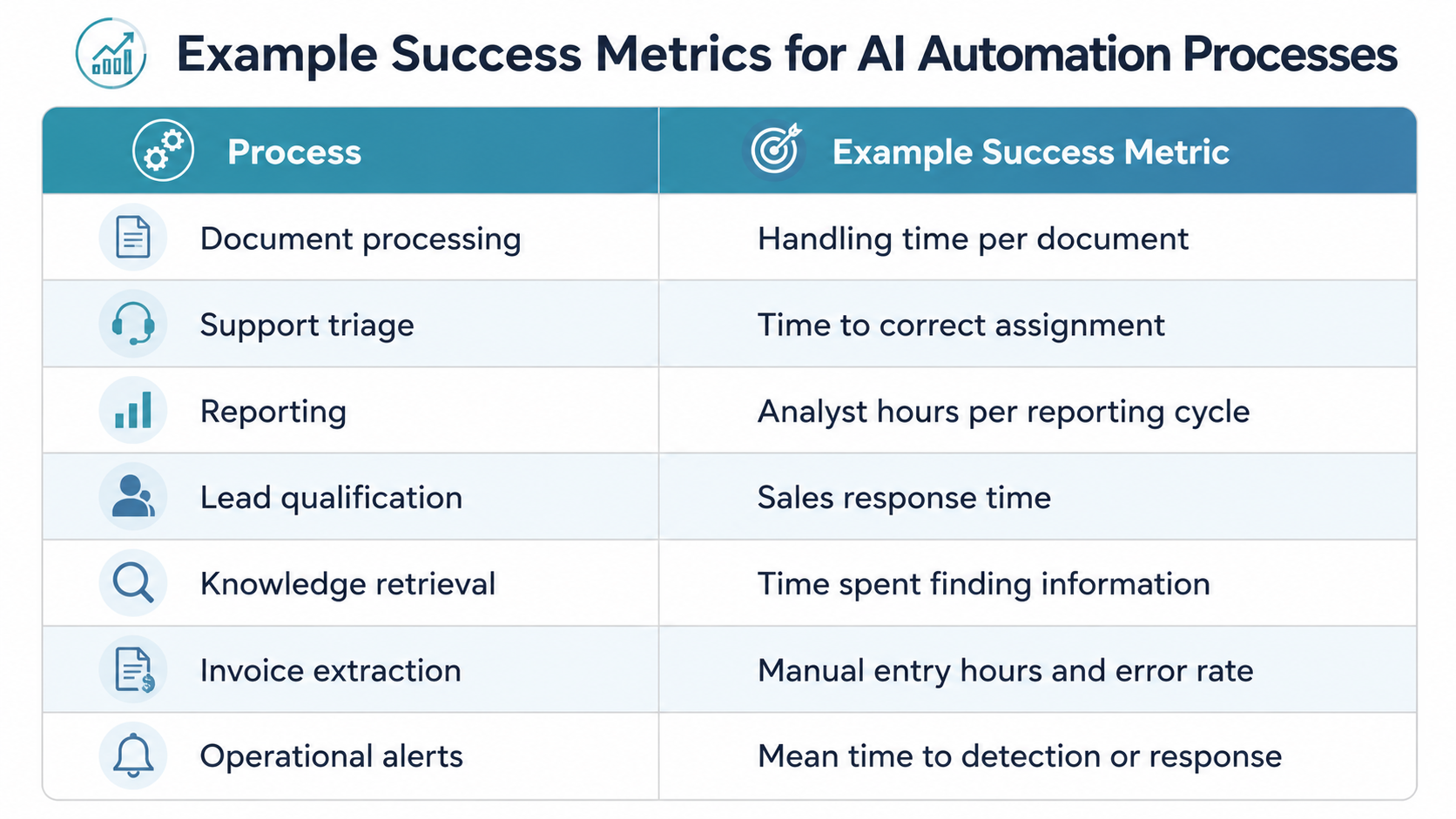
Document-heavy workflows are frequently strong candidates for early AI automation.
Organizations routinely receive contracts, applications, claims, invoices, onboarding forms, purchase documents, compliance evidence, and other files that employees must manually inspect.
AI-supported workflows can help:
- Identify document types
- Extract relevant information
- Summarize content
- Validate required fields
- Detect missing information
- Route documents to the correct team
- Escalate exceptions for human review
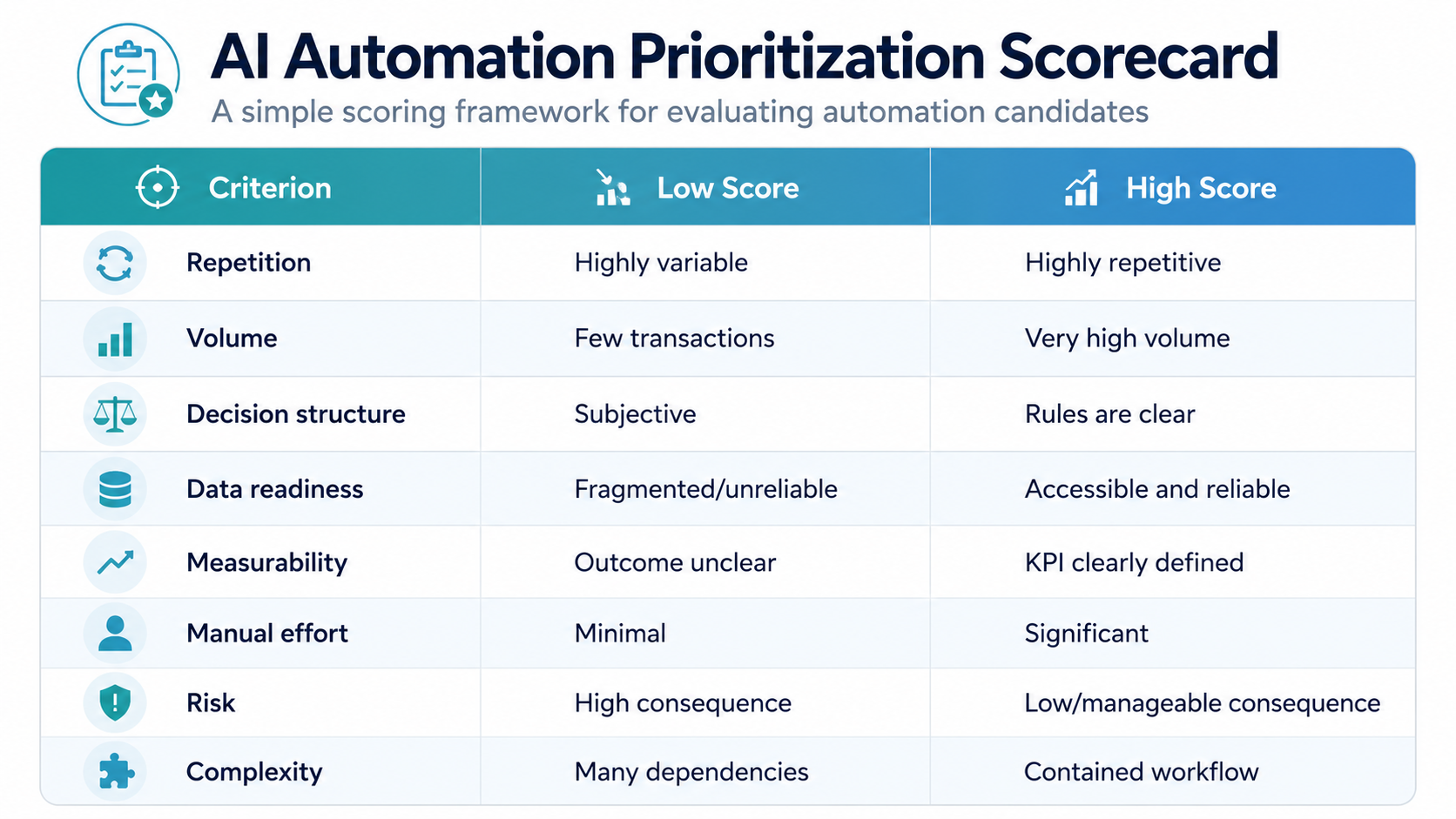
The strongest candidates are workflows where documents follow reasonably consistent structures and the expected output can be checked.
A procurement team, for example, might automatically classify supplier documents and verify whether mandatory information is present before sending incomplete submissions back for correction.
The objective is not necessarily to remove human review entirely. It is to stop skilled employees spending time on routine document administration.
Customer-Support Triage
Customer support environments often receive large numbers of requests through email, chat, portals, and messaging platforms.
Before an agent can solve a customer's issue, someone or something must determine:
- What is the customer asking?
- Which product or service is involved?
- How urgent is the request?
- Which team should handle it?
- Is immediate escalation required?
AI automation can perform much of this initial triage.
An incoming message such as "our production users cannot log in after this morning's deployment" could be identified as an access-related technical incident and routed with higher urgency than a routine account-information request.
This can reduce queue-management overhead and improve response times.
However, organizations should preserve escalation paths for ambiguous, emotionally sensitive, high-value, regulated, or high-risk cases. Automation should accelerate the support operation—not create barriers between customers and appropriate human assistance.
Internal Reporting
Many organizations still devote substantial employee time to producing recurring reports.
The work often includes:
- Extracting information from established systems
- Consolidating datasets
- Comparing actual performance with targets
- Identifying major changes
- Producing summaries
- Formatting recurring reports
- Distributing them to stakeholders
AI automation can reduce much of this repetitive preparation.
A weekly operational review, for instance, could automatically retrieve approved KPIs, identify significant movements, prepare a first-pass narrative, and generate a draft management report.
The limitation is straightforward: unreliable source data produces unreliable automated reporting.
Organizations should first establish trusted data sources, agreed metric definitions, and reporting rules. AI can then accelerate interpretation and presentation rather than compensating for weak data governance.
Lead Qualification
Sales teams frequently spend time reviewing incoming opportunities that are unlikely to progress.
AI automation can support early-stage qualification by collecting and organizing information such as:
- Company size
- Industry
- Geography
- Requested service
- Existing technology environment
- Budget information
- Engagement history
- Buying timeframe
- Defined qualification criteria
The system might then prioritize the opportunity or route it to the appropriate sales workflow.
For example, an enterprise cloud modernization inquiry could be routed to a strategic account team, while a small transactional request might enter a different engagement path.
This is particularly useful when sales teams receive substantial inbound volume.
AI should nevertheless support the organization's qualification process rather than quietly redefine it. Final commercial judgments—especially around strategic accounts, pricing, credit, contractual commitments, or sensitive opportunities—should remain aligned with established governance.
Knowledge Retrieval
Finding internal information remains an expensive hidden form of operational friction.
Employees may search through:
- SharePoint environments
- Internal wikis
- Policy repositories
- Technical documentation
- Standard operating procedures
- Project records
- Product documentation
- Service manuals
AI-powered knowledge retrieval can allow employees to ask questions in natural language and receive synthesized answers from approved internal sources.
Instead of searching several systems for the latest onboarding procedure, an employee could ask directly for the current process and receive an answer connected to the supporting documentation.
The value comes from shortening the distance between a question and trusted organizational knowledge.
Governance, however, is critical.
A useful enterprise knowledge solution must respect access permissions, distinguish current from obsolete content, identify sources, and prevent employees from receiving information they would not otherwise be authorized to access.
Invoice and Document Extraction
Invoice extraction is a particularly practical subset of document automation because the inputs and required outputs are often well understood.
Organizations can automatically extract fields such as:
- Supplier name
- Invoice number
- Purchase-order number
- Invoice date
- Currency
- Line items
- Tax
- Total amount
- Payment terms
Those fields can then feed accounts-payable, ERP, validation, or approval workflows.
The strongest business case typically exists when organizations process substantial document volumes and employees currently perform repetitive manual entry.
Accuracy also needs to be measured by field rather than by document alone. An automation may correctly capture supplier names while performing poorly on line-item descriptions or tax values.
High-impact financial fields should therefore have validation rules and appropriate exception handling.
Operational Alerts
Some valuable automation opportunities do not involve generating documents or making business decisions at all.
They involve continuously watching for conditions that require attention.
Examples include:
- Infrastructure capacity approaching a threshold
- Failed data integrations
- Unexpected transaction volumes
- Inventory reaching minimum levels
- SLA deadlines approaching
- Repeated application errors
- Unusual operational activity
The automation can monitor defined signals and notify the appropriate owner when intervention is required.
Good alert automation depends on four things:
Clear thresholds. Teams must know what conditions actually require attention.
Actionability. Every alert should lead to a meaningful next step.
Ownership. Someone must be responsible for responding.
Noise control. Excessive low-value alerts quickly cause alert fatigue.
The goal is not to tell teams everything that happened. It is to identify what requires human attention.